Copy link to clipboard
Copied
I'm using the pencil tool quite a lot in "Accurate"-mode, but it seems like this mode somehow got worse wi9th the last Updates? Did they change anything with the pencil tool?
Does anyone suffer the same results while drawing with some speed?
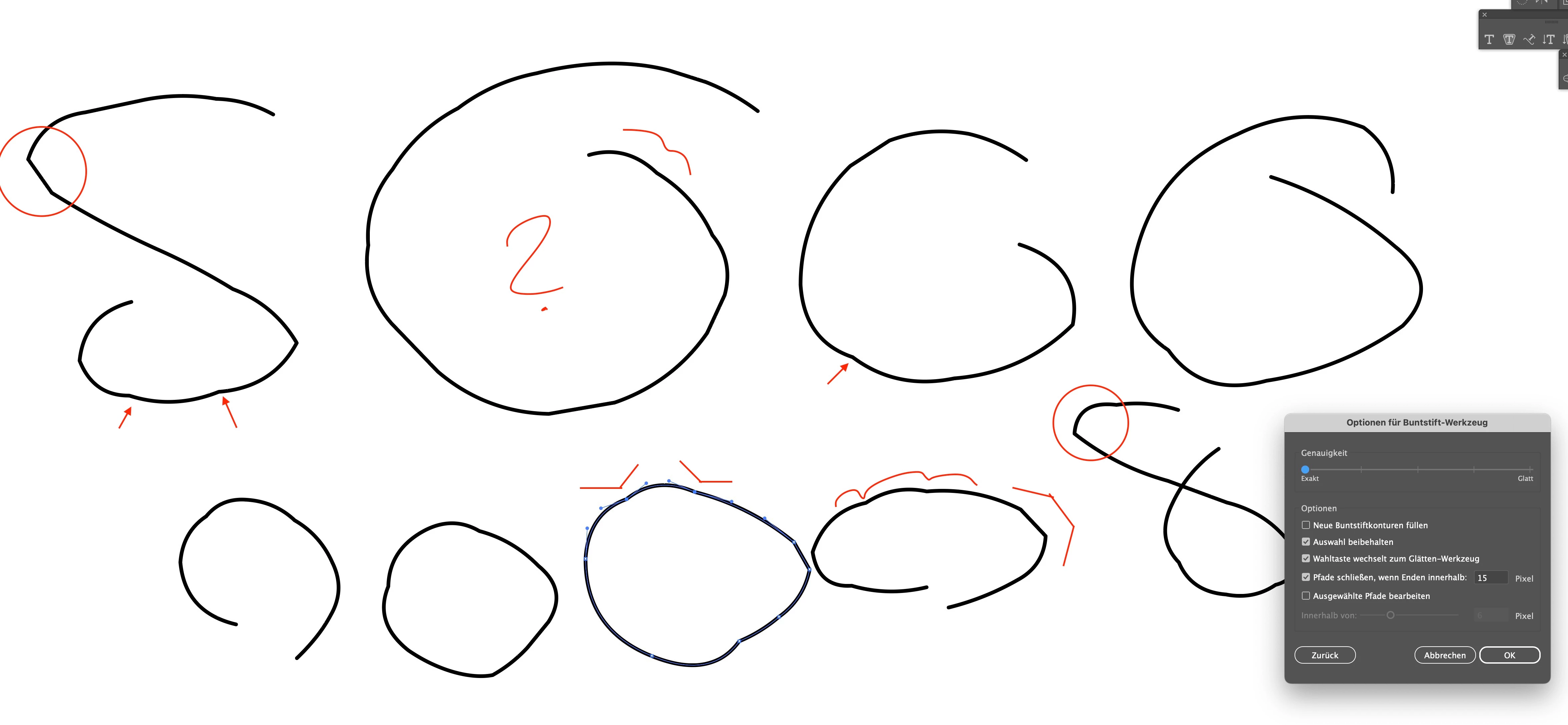
There are these wired bumps in a lot of sections, which are absolutely NOT accurate.
I know I can smooth the lines, but that smoothes everything. For some drawings I really like the accurate mode - but not this way ...
Copy link to clipboard
Copied
Hi @Someone75
Thank you for sharing your experience. I'm sorry to hear that you're having issues with the Pencil tool in "Accurate" mode after the recent updates. It must be frustrating to encounter those unexpected bumps, especially when you're aiming for precision in your drawings.
Would you mind sharing which version of Illustrator you are using? Also, a small video demonstrating your workflow. We're here to help, just need more info.
Regards,
Srishti
Copy link to clipboard
Copied
@Srishti Bali Tanks a lot for your quick answer!
I use Sonoma 14.5 with Illustrator 28.5
I does not matter if I use mouse or Wacom Tablet. Same results for different devices. This is really bad ...
Link to the video. I just draw circles with Mouse or Wacom Pen:
I just draw a circle. On an iMac Pro. That's it.
So any idea how to solve this issue?
Best
Copy link to clipboard
Copied
@Srishti Bali So thanks for no follow up ...
Copy link to clipboard
Copied
Thank you for your patience, and I sincerely apologize for the delay in following up. I completely understand how frustrating it can be.
We've recently released version 28.6, which includes multiple bug fixes. Could you please confirm if you're still encountering the same issue with this latest version? If the problem persists, I'd be more than happy to escalate this to our product team and I'll make sure to keep you updated with any solutions or workarounds as soon as we have them.
Once again, I appreciate your understanding and look forward to resolving this for you.
Regards,
Srishti
Copy link to clipboard
Copied
Copy link to clipboard
Copied
Macbook Pro M1 with Monterey and a mouse, no Wacom driver installed, Illustrator 28.6: https://youtube.com/shorts/IgdA3jLH7zY?feature=share
With the accurate setting you have to expect a lot of anchor points.
Copy link to clipboard
Copied
@Monika Gause That's a much to slow drawing style and not realistic compared to a pen drawing.
You would not draw that slow with real drawings. It's not about the count of anchor points! Look at my image where I marked the buggy sections quite clear.
Try to increase drawing speed on your laptop and you will get the same bumps and sharp, edgy lines. You can already see them in the line previews (even in your drawing speed!). They get smoothed in slow motion, but smoothing will fail if lines are drawn to fast.
https://www.youtube.com/watch?v=D_t6Lr5Y-6Q
Copy link to clipboard
Copied
That is how fast I draw with a mouse. Ich bin auf der Arbeit und nicht auf der Flucht.
But I see that it gets more jittery when I set the mouse speed higher in the system. I have not set it up that way, because I do not like that kind of nervous mouse movement (and that is not about Illustrator but about moving around in my system).
Copy link to clipboard
Copied
@Monika Gause The issue is realted to drawing actions performed with a pen. It does not deal with "escape", it deals with the "momentum" of real drawing! A mouse is no drawing tool by definition ... It's good for design, but not for drawing.
So this bug does not deal with nervousness either ...
Copy link to clipboard
Copied
Thank you for the information, but I will keep on drawing with my mouse if you don't mind, because it works fine for my drawings (and no, it's not just stick figures).
I am also using an iPad for a lot of things. Particularly because with the Apple Pencil you can draw the most beautiful curves. No Wacom could ever do that for me and I like the fact that without a Wacom I have fewer hassles.
Copy link to clipboard
Copied
@Monika Gauseyou can do whatever you want with your mouse, even drawing.
But bugs with a pen-tool cannot be checked with a mouse. That's it.
So please just refer to the mentioned bug in that post and it deals with the "exact mode".
Happy if you find any additional informations or help, but only related to that issue.
Copy link to clipboard
Copied
In your video you also used a mouse and the subject of this thread is about the pencil tool in general.
So the question is: is it the pencil tool that is causing this? Or is it the cooperation of pencil and Wacom? Or is it the tablet driver that already disturbs the strokes? Or is it just a certain setting in the system, Illustrator or the driver that does not work? Or is it a certain system that interferes?
Just picking out the pencil tool when you have so many variables seems kind of simplified.
Copy link to clipboard
Copied
@Monika GauseI did NOT use a mouse in my video
The pronlem is directly connected to the pencil tool.
So if you are not fimilar with Wacom & Photoshop on desktop, maybe you aill not comment anymore on this thread? Thanx
Copy link to clipboard
Copied
@Someone75 schrieb:
@Monika GauseI did NOT use a mouse in my video
Then maybe I misread that post: https://community.adobe.com/t5/illustrator-discussions/have-line-jitters-in-quot-accurate-quot-mode-...
Quote: Link to the video. I just draw circles with Mouse or Wacom Pen:
Copy link to clipboard
Copied
@Monika GauseSo could you stop our conversation here, now? You mess up this thread and do not contribute any help. Best
Get ready! An upgraded Adobe Community experience is coming in January.
Learn more