


Known Participant
November 3, 2017
解決済み

How become anchor point in the center of a stroke

  • November 3, 2017
  • 返信数 4.
  • 1912 ビュー

Good morning,

Probably another easy question, but for me as amateur i can't find the solution.

In below picture i will have point C exact in the middle of the stroke.

I have tried with allignment but it's still not.

Do you have any suggestion?
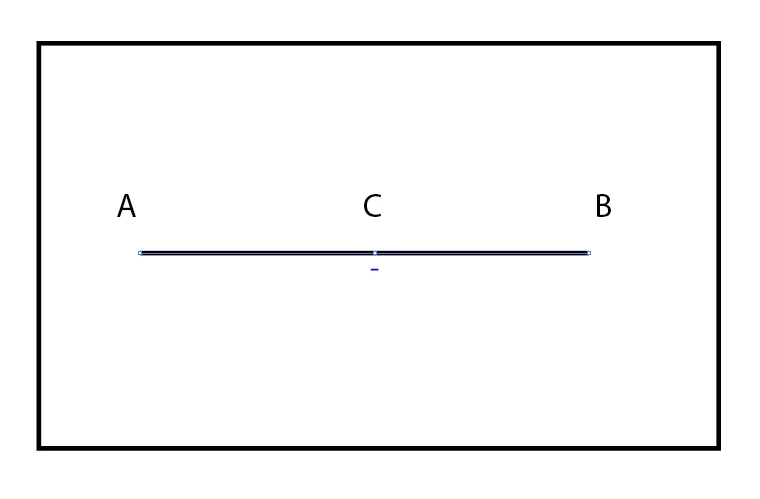
Thanks a lot,

Gr Alfons

    このトピックへの返信は締め切られました。
    解決に役立った回答 Jacob Bugge

    Alfons,

    If you wish to add a centre Anchor Point to get a two segment path, you can just Object>Path>Add Anchor Point.

    If you wish to have a single independent Anchor Point on top of the centre of the path, another way is to copy the path, click the left (or right) Reference Point in the Transform palette and divide the W value by 2, then deselect and select the left (or right) end Anchor Point with the Direct Selection Tool and press Delete; this will leave you with the centred Anchor Point selected.

    返信数 4

    jane-e
    Community Expert
    Community Expert
    November 3, 2017

    I prefer Jacob's method to create the anchor point, and I also use Doug's.

    However, if the anchor point is already there and you now want it to be centered, select all three anchor points with the Direct Selection tool and use Distribution (not Alignment) to equally space them. Whichever anchor point you select last is the "key" anchor point and will not move.

    Doug A Roberts
    Community Expert
    Community Expert
    November 3, 2017

    you sure about that one jane? as far as i know if all anchor points are selected illustrator treats that the same as if the object was selected, so you'd get no effect.

    jane-e
    Community Expert
    Community Expert
    November 4, 2017

    Doug, you are correct--I was on my iPad before and just tested it. At least one anchor point needs to be deselected for distribution to work. Too bad, though...

    Jacob Bugge
    Community Expert
    Jacob BuggeCommunity Expert解決!
    Community Expert
    November 3, 2017

    Alfons,

    If you wish to add a centre Anchor Point to get a two segment path, you can just Object>Path>Add Anchor Point.

    If you wish to have a single independent Anchor Point on top of the centre of the path, another way is to copy the path, click the left (or right) Reference Point in the Transform palette and divide the W value by 2, then deselect and select the left (or right) end Anchor Point with the Direct Selection Tool and press Delete; this will leave you with the centred Anchor Point selected.

    Doug A Roberts
    Community Expert
    Community Expert
    November 3, 2017

    use smart guides (view > smart guides)

    add anchor point where they say 'intersect'.

    Known Participant
    November 3, 2017

    Hello again,

    Doug A, i must say your tip was more usefull than i thought.

    Easy to center the Anchor point.

    Thanks.

    Gr Alfons

    Mylenium
    Legend
    November 3, 2017

    You have to convert the stroke to an outline.

    Mylenium

    Known Participant
    November 3, 2017

    Hello,

    @@@ Mylenium

    Thanks, This is no option, after creating outlines, i am not ready with the drawing.

    @@@Doug A

    This is a good one, when i haven't placed an anchor point yet to find the center.

    But for now the anchor point is already on the segment.

    @@@Jane

    The solution with distribution is rather not working.

    @@@Jacob

    This is for me the best solution. Creating a 2 path segment.

    Perfect for this.

    Thank you all for you input!

    Now i can go on.

    Enjoy your weekend!

    Jacob Bugge
    Community Expert
    Community Expert
    November 4, 2017

    For my part you are welcome, Alfons.