


Supernaut63
Inspiring
March 23, 2025
質問

How do I get rid of this annoying prompt...and what happened to the Pantone color books?

  • March 23, 2025
  • 返信数 3.
  • 2094 ビュー

I just upgraded to Mac OS Sequoia 15.3.2 today, and then I upgraded all of my Adobe programs. I was tinkering around with Illustrator and noticed this box kept popping up (highlighted in yellow below). I want to turn this function off. I don't even know what it is...It appears to be popping up in Photoshop as well. I find it annoying. How do I turn it off?
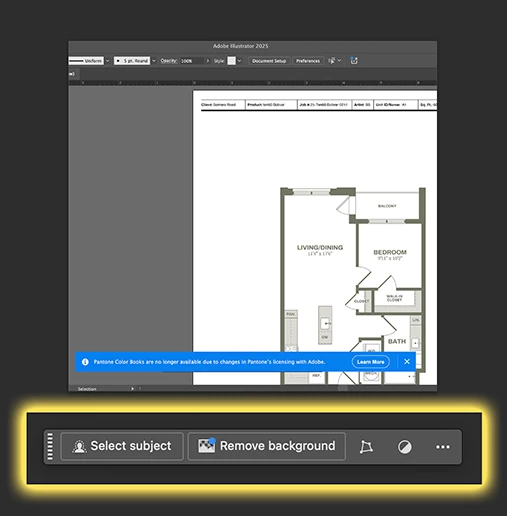


So, the other thing I noticed is that when I go to Window > Swatch Libraries > Color Books, the Pantone libraries are completely GONE. What happened to them, and how am I supposed to use Patnone colors in Illustrator now? I need this for work.


返信数 3

Ton Frederiks
Community Expert
Community Expert
March 24, 2025

To add to what Brad said : 

If you have a Photoshop license, you can install Photoshop 22.2.

In the Creative Cloud app select Apps > All Apps > Photoshop > click the 3 dots …  next to the Open button >  click Other Versions and select Photoshop (22.2) and Install

Then, open Photoshop 2023 Application folder > Presets > Color Books and you will find the PANTONE color books, so copy it to Illustrator's Color Books folder.

Make a copy in a safe place

Supernaut63
Supernaut63作成者
Inspiring
March 24, 2025

I'm good.

Thanks bud!

Brad @ Roaring Mouse
Community Expert
Community Expert
March 24, 2025

As for the Pantone swatches, Adobe can no longer bundle them for "reasons" I won't get into as that's been covered ad nauseam, but if you still have your older Illustrator install on your previous system (e.g. the most recent one where you had the Pantone libraries available), you can copy them over to the proper location in the new install. (Illustrator > Presets > Color Books). Caveat, some of these libraries are outdated and will not have the most recent color additions, but you will at least have the ones you were working with before.  If you've already trashed your old install, but might happen to have a time machine backup, you can search for them and restore them.

Supernaut63
Supernaut63作成者
Inspiring
March 24, 2025

That's exactly what I did. I had an older version of Illustrator (2021), in my Time Machine, and moved the libraries over to the new version (2025). And yes, I am aware there are alot of Pantone colors missing from those old libraries, as I've been asked to use certain (newer) Pantone that aren't available in Illustrator. My client always provides me with really nice branding guides for my jobs that have hexadecimal breakdowns, so I end up using them instead of a Pantone. But yeah, I think soon I'm going to have to break down and pay for the Pantone Conect plugin (everybody's so freakin' greedy nowadays...I'm really not surprised they've done this). Reminds me of Klaus Schwab: "You'll own nothing and be happy"? Yeah, right.

Community Expert
March 25, 2025

The situation with Pantone is just so stupid, IMHO. Rival applications, such as Affinity Designer and CorelDRAW, still have Pantone color libraries and they're updated when new versions of those applications are released (Corel is even hyping that as one of the few new features in its 2025 release). Unless I'm missing something it looks like Pantone singled out Adobe and has, for reasons I don't know, let Serif and Alludo continue to keep using the color libraries in their software.

Here's a funny thing: if you merely have the old Pantone color book files present in a current installation of Adobe Illustrator it will open art files that have newer Pantone colors properly without turning those colors black.

Ton Frederiks
Community Expert
Community Expert
March 23, 2025

You can click the 3 dots ans select Hide Bar (it is also in the Window menu as Contextual Task Bar).

The Pantone colors have been gone for years. Did you click the learn more button?

https://helpx.adobe.com/illustrator/kb/pantone-color-books-illustrator.html

Supernaut63
Supernaut63作成者
Inspiring
March 23, 2025

Thanks Ton.

In Illustrator, I went to Window and turned off Contextual Task Bar.

I'm not seeing that option in the Window menu in Photoshop though. Where is it in Photoshop, aside from clicking the 3 dots on the bar? I want it to stay off and never come back on when in Photoshop. Let me know. Thanks again.

Ton Frederiks
Community Expert
Community Expert
March 23, 2025

I see it in Photoshop at the bottom of the Window menu: Contextual Task Bar.