


質問
How to add Unicode arrow labels to a path while following the direction of the anchor point index
I am in need of a script that adds arrow labels to pathItems. I would like to use Unicode characters in order to not rely on any pre-existing symbols or external configuration. I have included a sample of the code that I normally use to add labels to the bottom center of a path. I could use some help in adding the proper logic to have the Unicode arrow character point in the proper direction according to the index of the path's anchor points.
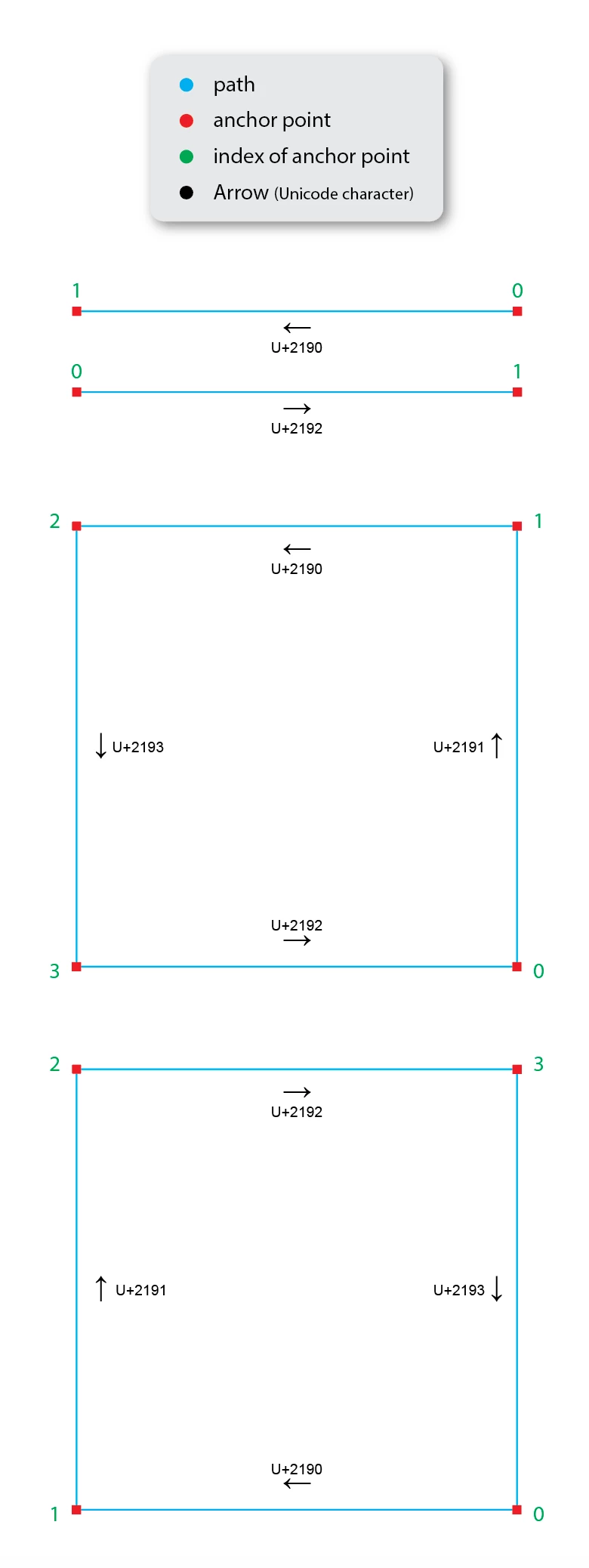
#target illustrator;

var idoc = app.activeDocument;

middleBottom();

//========== (Create Label and Place Horizontal Center and Bottom of Path) ==========
    function middleBottom() {
        var labelMargin = 5;
        var label = idoc.layers.getByName('Layer 1').textFrames.add();
        label.name = "Path Label";
        label.contents = "\u2190";
        label.opacity = 25.0;
        label.textRange.characterAttributes.textFont = textFonts.getByName('ArialMT');
        label.textRange.characterAttributes.size = 12;
        var refBnds = idoc.layers.getByName('Layer 1').pathItems[0].geometricBounds;
        var objBnds = idoc.layers.getByName('Layer 1').pathItems[0];
        var tg = idoc.layers.getByName('Layer 1').textFrames.getByName('Path Label');
        var ct = (refBnds[0] - (tg.width / 2)) + (objBnds.width / 2); // center
        var md = refBnds[1] - (tg.height - labelMargin); //bottom
        tg.position = [ct, md];
        idoc.selection = null;
    }
 AdChoices