


Known Participant
August 12, 2020
解決済み

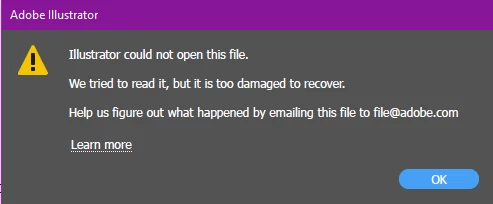
Illustrator could not open this file. We tried to read it but it's too damaged to recover

  • August 12, 2020
  • 返信数 1.
  • 11761 ビュー

I was working on a file today, and mid trying to save it, my laptop died. (so annoying)

When I got my laptop back up and running a few minutes later, I tried to open the document (didn't care if my most recent changes were gone) and I got this error.


I emailed that address like it said to but was wondering if anyone had a quicker fix.


NOTE: I do not have this in PDF form so there's no PDF to try to recover the info either.

I've been working on this file for the last 3 days without any problems. I also checked my recovery file and it's empty.


このトピックへの返信は締め切られました。
解決に役立った回答 Jacob Bugge

Brittney,


I have tried to alert an Adobe staff friend about this.


No backup?


It is always recommended to create backups with different names regularly, and to store backups in more than one place/way.

And also to save often.

You may use Autosaviour,
https://astutegraphics.com/plugins/autosaviour


If you have a CC subscription, saving files in your Creative Cloud Files folder will automatically create and keep versions up to 10 days,
https://helpx.adobe.com/illustrator/using/crash-file-data-recovery.html
https://helpx.adobe.com/creative-cloud/help/sync-files.html
https://helpx.adobe.com/creative-cloud/help/versioning-faq.html


And there is also the new concept of Cloud documents,
https://helpx.adobe.com/in/illustrator/using/cloud-documents.html


返信数 1

Jacob Bugge
Community Expert
Jacob BuggeCommunity Expert解決!
Community Expert
August 12, 2020

Brittney,


I have tried to alert an Adobe staff friend about this.


No backup?


It is always recommended to create backups with different names regularly, and to store backups in more than one place/way.

And also to save often.

You may use Autosaviour,
https://astutegraphics.com/plugins/autosaviour


If you have a CC subscription, saving files in your Creative Cloud Files folder will automatically create and keep versions up to 10 days,
https://helpx.adobe.com/illustrator/using/crash-file-data-recovery.html
https://helpx.adobe.com/creative-cloud/help/sync-files.html
https://helpx.adobe.com/creative-cloud/help/versioning-faq.html


And there is also the new concept of Cloud documents,
https://helpx.adobe.com/in/illustrator/using/cloud-documents.html


Known Participant
August 13, 2020

Ah yes. Thank you. For some reason, my recovery saving was inactive. Not sure why but I changed that.


I also don't seem to have the checkbox option to save to the cloud. Oh well!


I want to get my file recovered. I'll keep waiting for my response from Adobe. Thank you though. 

Participant
June 20, 2022

Hi @patriciam3146867,


Sorry to hear about that. Would it be possible for you to share the file with me? You can upload it to creative cloud/ Dropbox/ Google Drive and share the download link here or via DM. We'll try to recover it.
I must also inform you that file recovery can't be guaranteed with 100% success. We'll surely try our best.


Regards,

Anshul Saini 


Hello Anshul, I have a file with the same problem, any chance you could help?