


harshinim5407457
Participant
December 26, 2018
質問

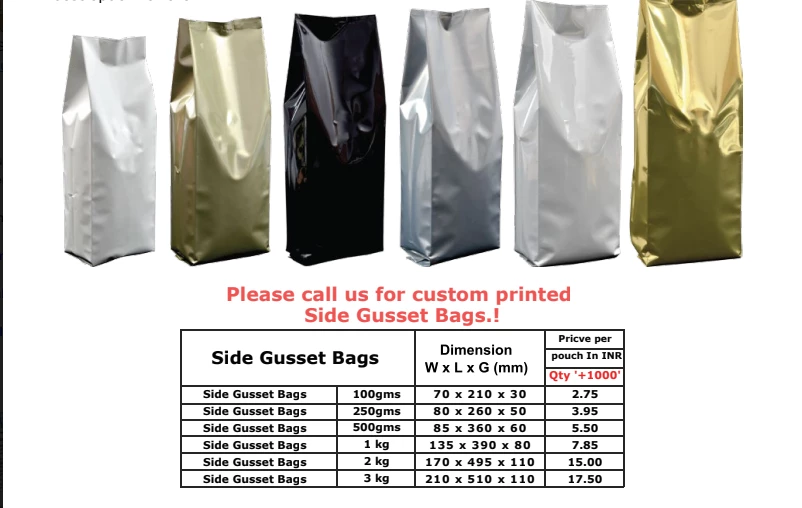
Packaging Measurements (W x L x G)

  • December 26, 2018
  • 返信数 2.
  • 1220 ビュー

Hello,

I have been trying to figure like how do I add these measurements in Adobe Illustrator or InDesign, I have the design ready, it's just that I have to add that design into this bag measurements. I'm totally confused on how to do it?. I don't get the desired look or measurement when I add these given values in Illustrator or InDesign.

P.S: 500g & 1kg Bags
このトピックへの返信は締め切られました。

返信数 2

Inspiring
December 26, 2018

In some cases, they may have a print production file template.  It would be a pre-production ( bag ) die cut layout.  Your artwork could then be applied to a "Layer" and ultimately converted to PDF per their specifications.  In other cases, the bag company would or will send the project out to a print vendor who would then apply your artwork to a production file for printing.  They then would or will send the bag back to the bag manufacturer for cutting, gluing, and final assembly.  I recommend contacting the bag manufacturer and asking them what their file specs are and how they want the artwork submitted.

Monika Gause
Community Expert
Community Expert
December 26, 2018

Please show the artwork where you want to add these measurements.

Neither Illustrator nor InDesign has labeling tools out of the box.