Inspiring
September 29, 2023
解決済み

[Q] How to find the with of a string that is smaller than the width of an Illustrator textFrame?

  • September 29, 2023
  • 返信数 1.
  • 1276 ビュー

I have a number of textFrames (area text), most of which contain a single line of text which is narrower than the width of the textFrame.


I'm trying to get the width of the string in points and I'm stumped... I tried:

textPath.width

textPath.pathPoints[1].anchor[0]


What is the right way of doing this?


Any help greatly appreciated.


// Tom


このトピックへの返信は締め切られました。
解決に役立った回答 CarlosCanto

Hi Carlos,


Thank you for clarifying, I got confused by the documentation which seems to suggest a return type:
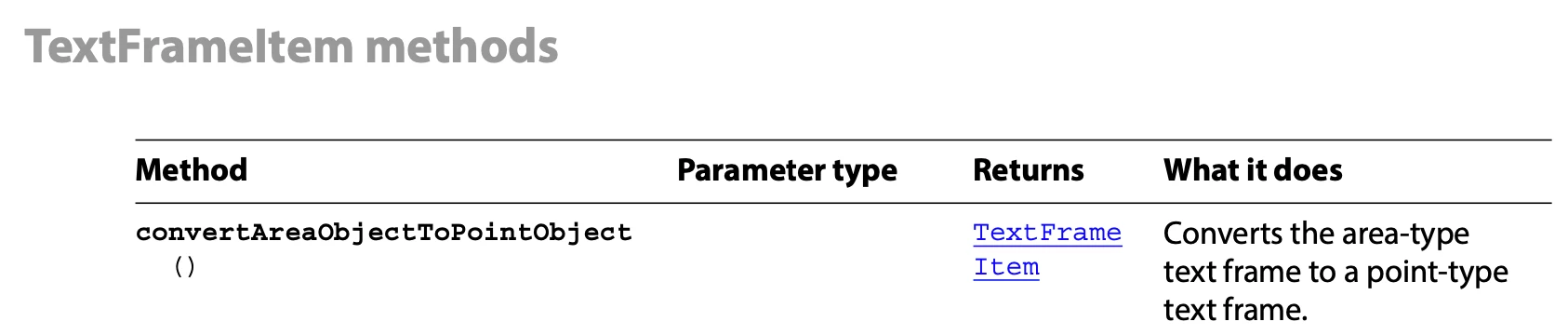
 

I can now convert area text to point text but I still have problems picking up the width (and height if that is possible) of the point text.


My artboard looks like this when the text is still area text:

My layer structure looks like this:
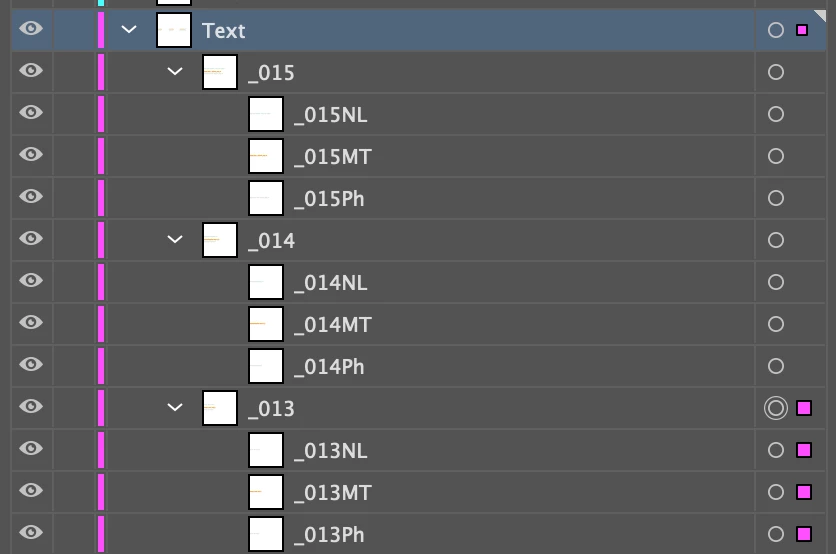
And my code like this. I get an error when I try to remove the duplicate which I converted to point text. And the rectangles don't pick up the new size but stick to the old size.


for (var i = 0; i < myDocument.layers["Text"].pageItems.length; i++)
{

var vParent = myDocument.layers["Text"].pageItems[i]; // get the elements of the group
var vNumbers = vParent.pageItems.length; // numbers of elements

for ( var j = vNumbers - 1; j >= 0 ; j-- ) {


var vChild = vParent.pageItems[j];
var vPointTextCopy = vChild.duplicate();
var gB = vPointTextCopy.geometricBounds; // left, top, right, bottom
var w = Math.abs(gB[2] - gB[0]);
var h = Math.abs(gB[3] - gB[1]);
var top = gB[1];
var left = gB[0];

app.redraw();

var rect = myDocument.layers["TestRectLayer"].pathItems.rectangle(top, left, w, h); // de oorsprong ligt linksonder
rect.name = "TestRect";
rect.stroked = true;
rect.filled = false;
rect.strokeWidth = 3;
rect.strokeColor = redColor;

vPointTextCopy.remove(); // throws an error
}
}


So I get:



And I'm stuck with the point text objects which I can't remove. It appears as if the pointers still point to the original objects.


Any help greatly appreciated.


// Tom


Hi Tom, I can replicate your issue, I checked my notes and in fact I had noticed the reference gets lost after converting to PointText but couldn't remember. Since the dup text frame gets selected after duplicating, we'll put this selection right back into our variable.


insert these two lines after duplicating your text frame

app.redraw();
vPointTextCopy = selection[0];


Let me know if that works, if not we'll look into other workarounds

返信数 1

CarlosCanto
Community Expert
Community Expert
September 29, 2023

you could make a copy of the Area text and convert it to point text. The bounding box will shrink to the size of the text,, then just get the point text width

tomd75724979作成者
Inspiring
September 30, 2023

Hi Carlos,


Many thanks. This sounds like a good plan but I have problems implementing it.


// convert to point text
var myPointText = myDocument.textFrames[i].duplicate();
myPointText.convertAreaObjectToPointObject();


Contrary to what the docs say, the call convertareaobjecttopointobject returns nil rather than a point text object. And it does not seem to convert the current area text object either.


Any ideas?


tomd75724979作成者
Inspiring
October 2, 2023

Hi Tom, I can replicate your issue, I checked my notes and in fact I had noticed the reference gets lost after converting to PointText but couldn't remember. Since the dup text frame gets selected after duplicating, we'll put this selection right back into our variable.


insert these two lines after duplicating your text frame

app.redraw();
vPointTextCopy = selection[0];


Let me know if that works, if not we'll look into other workarounds


Thank you so much, Carlos. This works! BTW, is this the most efficient way to set the dimensions of a rectangle from geometricbounds? I find the distinction between [x1, y1, x2, y2] and [top, left, bottom, right] quite confusing.


    for ( var j = vNumbers - 1; j >= 0 ; j-- ) {

        var vChild = vParent.pageItems[j];
        vPointTextCopy = vChild.duplicate();
        vPointTextCopy.convertAreaObjectToPointObject();
        app.redraw();
        vPointTextCopy = selection[0]; // this is a hack to recover the lost pointer

      
        var gB = vPointTextCopy.geometricBounds; // left, top, right, bottom
        var w = Math.abs(gB[2] - gB[0]);
        var h = Math.abs(gB[3] - gB[1]);
        var top = gB[1];
        var left = gB[0];


        var rect = myDocument.layers["TestRectLayer"].pathItems.rectangle(top, left, w, h); // de oorsprong ligt linksonder
        rect.name = "TestRect";
        rect.stroked = true;
        rect.filled = false;
        rect.strokeWidth = 3; 
        rect.strokeColor = redColor;
    }

