


Sarah-SDLStudio
Participant
June 29, 2020
解決済み

Arabic text is correct direction, but period goes to the right, not left at end of sentence.

  • June 29, 2020
  • 返信数 3.
  • 11954 ビュー

I am having a problem with the period in Arabic. When I copy and paste Arabic text into my multilingual document, it moves the period to the right(at the beginning of the sentence) instead of left(at the end of the sentence). The Arabic characters all read from right to left, just not the period. Does anyone have a fix for this?

このトピックへの返信は締め切られました。
解決に役立った回答 Zaid Al Hilali

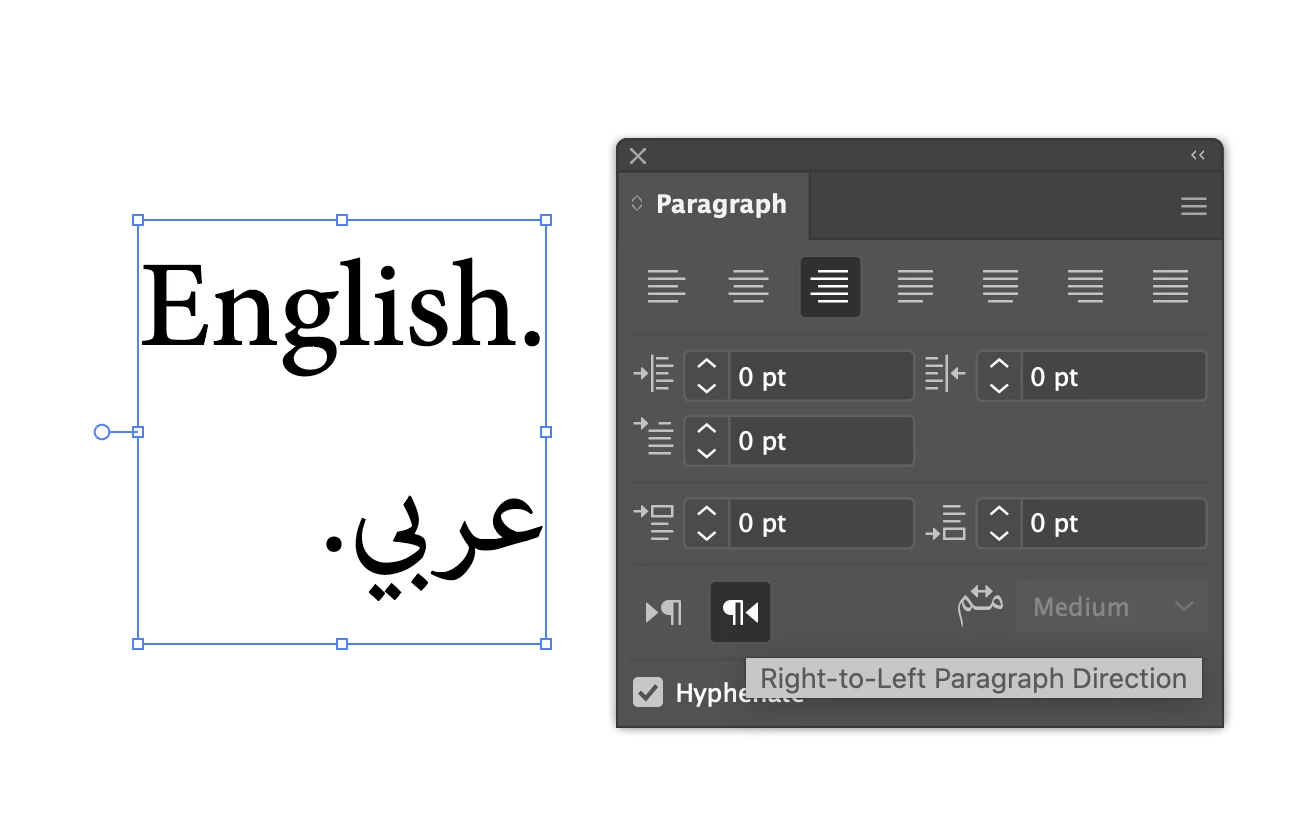
In order to fix this, you need to have Middle Eastern version of Illustrator. Open Paragraph panel, highlight your text, then click to select "Right-to-Left Paragraph direction"
返信数 3

Participant
August 8, 2022

In the Paragraph Options, try checking the "Roman Hanging Punctuation".

Ashutosh_Mishra
Inspiring
July 11, 2020

Hi there,


Thanks for reaching out. In addition to earlier response, you may also check out this help article about Arabic typing. Hope it helps.


Regards,

Ashutosh

Zaid Al Hilali
Community Expert
Community Expert
June 30, 2020

In order to fix this, you need to have Middle Eastern version of Illustrator. Open Paragraph panel, highlight your text, then click to select "Right-to-Left Paragraph direction"

Sarah-SDLStudio
Participant
June 30, 2020

Installing now. Thank you!