Participant
April 3, 2018
Answered

Shape expanded message

  • April 3, 2018
  • 2 replies
  • 2551 views

Hi! I created a square with the rectangle tool, and when I moved the anchor points to change its shape, the shape expanded message pop up. I would like to know what exactly does this mean and how will it affect the file. Thanks!

This topic has been closed for replies.
Correct answer Doug A Roberts

when you create a basic shape using the shape tools, illustrator treats it as a 'live' shape -- i.e. it keeps track of things like number of sides of a polygon, rotation angle, dimensions of the shape itself rather than its bounding box, etc. Full details here:

Draw, edit, and re-edit shapes easily |

this is evident in the Transform palette, where you can see extra options when you have a live shape selected:
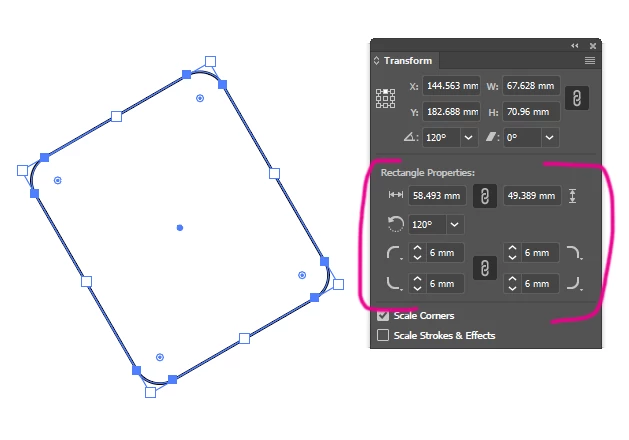
when you move an anchor point, illustrator loses this 'live' shape information and treats it like any other object. that's what the message is telling you.


2 replies

Ton Frederiks
Community Expert
Community Expert
April 3, 2018

Sometimes after the "Shape Expanded" message, you can make the object into another shape again.

After moving the upper right corner point of the rectangle, it will expand the shape.

When you select the object and choose: Object > Shape > Convert to Shape, it becomes a shape again.

A diferent one, a polygon instead of a rectangle.

Doug A Roberts
Community Expert
Doug A RobertsCommunity ExpertCorrect answer
Community Expert
April 3, 2018

when you create a basic shape using the shape tools, illustrator treats it as a 'live' shape -- i.e. it keeps track of things like number of sides of a polygon, rotation angle, dimensions of the shape itself rather than its bounding box, etc. Full details here:

Draw, edit, and re-edit shapes easily |

this is evident in the Transform palette, where you can see extra options when you have a live shape selected:

when you move an anchor point, illustrator loses this 'live' shape information and treats it like any other object. that's what the message is telling you.
