



jane-e
Braniac
February 10, 2017
Question

Print InDesign document to PostScript file

  • February 10, 2017
  • 8 replies
  • 7050 views

Can anyone think of any reason to ever print to PostScript® from InDesign and then convert to PDF using Adobe® Acrobat Distiller? Ever?
I am asking for serious answers, please.

I am asking because InDesign (2017 Release) Classroom in a Book mentions this as a viable option on page 263 in the lesson on Printing and Exporting.

    This topic has been closed for replies.

    8 replies

    New Participant
    April 29, 2020

    Short answer: Yes, even in the year 2020.
    There are options available through the print dialog (such as printing seperations) not availble through exporting to PDF. In my client's case, separations are not necessary for production but for proofing to the client. for those of us doing print design.production all the time, we know how to use the Output Preview in a combined PDF to see the separations. But to the client service reps, that is just one task that can be easily resolved by printing to a pre-seaparated PDF: One page for each color, and the rep can just simply page down, see each plate, and go on with life.
    This has not been made easier on Mac with the Adobe Printer option being removed (compared to 'the old days' and Windows, where it is simply installed as a printer.)
    Certainly, the export to PDF is a cleaner solution, a simpler solution, but being able to print ps to Distiller remains helpful and needed.

    BobLevine
    Braniac
    April 29, 2020

    No. Just no.

    There is zero reason for this in the year 2020 and any printer that tells you they need a distilled or pre-separated PDF is living in the 1980s.

    Dov Isaacs
    Braniac
    May 2, 2020

    On behalf of Adobe, absolutely agree!


    - Dov Isaacs, former Adobe Principal Scientist (April 30, 1990 - May 30, 2021)
    Inspiring
    February 12, 2017

    I still use it, rarely, for a workaround when I have problematic output for a PDF.

    Sometimes a graphic refuses to print. Or some odd, unexplainable artifact appears in the PDF. The worst situations for me seem to be print PDFs I create from InDesign documents with interactive elements. Maybe two or three times a year I run across some little problem that gets completely fixed when I first create a .ps file and then turn it into a PDF through Distiller.

    Braniac
    February 11, 2017

    Sometimes FrameMaker will flat out refuse to create a PDF using the preferred routes, and my only option is to print to a .ps file and distill manually. When I need to get a proof to a client, I'll do what it takes.

    I am asking because InDesign (2017 Release) Classroom in a Book mentions this as a viable option on page 263 in the lesson on Printing and Exporting.

    Dov Isaacs​ has weighed in against a number of workflows coming directly out of the Adobe Acrobat Classroom in a Book series. I think it would be very helpful to have someone at Adobe review the "official" materials, because most ACIs (and many other instructors) base their classes off of the exercises in these books. I don't know how the other books are reviewed, but when I worked on a FrameMaker CIB, I chose my own tech editor and Adobe Press provided the "regular" editor. I am unaware of anyone else—besides the three of us—who reviewed the content before it went into print.

    It's one thing to blow by the single sentence in the InDesign CIB, jane-e, but when it comes to the Acrobat DC CIB, we either have to opt to create our own materials or be constantly saying, "I know the book teaches this workflow, but Adobe doesn't recommend it".

    These books are expensive, and I purchase a copy for each of my Rocky Mountain Training students. It's a very frustrating situation.

    rob day
    Braniac
    February 11, 2017

    I think it would be very helpful to have someone at Adobe review the "official" materials

    The question wasn't what's a general best practice for PDF output, it was—Acrobat Distiller? Ever? Best practice guidelines are useful until they slip into dogma.

    Steve Werner
    Braniac
    February 11, 2017

    I agree, Rob. But when you're teaching you try to teach best practices. In a similar example, in my InDesign class for future designers, I teach the value of using a grid system when creating a layout. But, I also say that sometimes you have to "break the grid."

    But you have to learn the best practices first before you learn when it's necessary to break out of the box. And Classrooom books are beginners books.

    Braniac
    February 11, 2017

    jane-e  wrote

    Can anyone think of any reason to ever print to PostScript® from InDesign and then convert to PDF using Adobe® Acrobat Distiller? Ever?

    Yes.

    But not in my regular workflow.

    1. Working around with bugs in PDF Export:

    If something goes wrong with PDF Export I would test the PostScript => Distiller => PDF workflow to see if there is a bug with PDF Export or if it's something else.

    2. Very special workflow where I am using small EPS files with PostScript programming instructions.
    The technical term is pdfmark instructions for e.g. formfield creation with PDFs. Even JavaScript for the formfields is possible.

    PDF Export will not pass the instructions to the exported PDF. Distiller will transform them into valid PDF widgets etc.pp. if the code has no bugs ;-) .

    3. Minimizing PDF file size for web viewing.

    If you know what you are doing with Distiller settings this could give you a better quality/file size ratio than the options you have with Acrobat Pro DC. Depends of the job of course.

    Just a question:

    is InDesign (2017 Release) Classroom in a Book also telling where to get the ADPDF9.PPD printer description file, explains what a PPD file is, and how to install it? If not, this chapter about printing to PostScript is indeed misleading and perhaps should be taken out. Or at least marked as deprecated together with some explanations.

    Regards,
    Uwe

    jane-e
    jane-eAuthor
    Braniac
    February 11, 2017

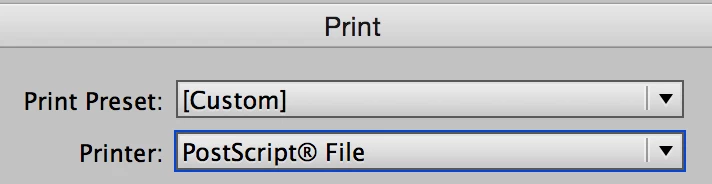
    Screenshot. The first 10 steps go through the Print Settings and creating a Preset. They say it as if it's a normal course of action.

    Steve Werner
    Braniac
    February 11, 2017

    And my point is: Classroom is a Book is a book to teach beginners good practices to use in InDesign. The book is sold in first world countries (primarily US and Europe, I'd guess) where the technology is available to follow best practices.

    At best, PostScript is a special case situation which would be used by people with a lot of graphic arts knowledge who generally understand the limitations of the process, or old operators who don't like to change their methods.

    It's not appropriate to teach it in Classroom in a Book.

    rob day
    Braniac
    February 10, 2017

    to ever print to PostScript® from InDesign

    Occasionally the question of how to deliver an imposed booklet to a copy service where there is no imposition capability comes up (there's no imposition option via Export). In that case there is the Print Booklet option which works fine with the Adobe PDF 9.0 PPD. You could easily have a document with no complex transparency or downstream color management needs, which would survive that workflow.

    jane-e
    jane-eAuthor
    Braniac
    February 11, 2017

    Thank George, Steve, and Rob, for the answers so far.

    I used to do the .ps to Distiller 25 years ago, but it is not something I would teach or encourage people to do now, especially new students.

    George, the old imagesetters don't take PDFs?

    Steve Werner
    Braniac
    February 11, 2017

    Actually, even old imagesetters can be output from PDF files. It's the old printers (meaning, the people doing the printing) who don't want to change old workflows.

    Geоrge
    Braniac
    February 10, 2017

    @Steve Werner

    Yes, you are right. "Classroom in a Book" is a lamer yellow-paper. Russian like to read full help in PDF

    Remember, never say you can't do something in InDesign, it's always just a question of finding the right workaround to get the job done. © David Blatner
    Steve Werner
    Braniac
    February 10, 2017

    In my opinion, only a very ancient workflow would use PostScript and Acrobat Distiller. It should never be recommended in a book.

    I wrote a post for InDesignSecrets.com in 2006 about why you should use File > Export > PDF [now PDF (Print)] which lists all the reasons we use that far superior workflow. It's even more true today.

    Creating PDF: Export or Use Distiller? - InDesignSecrets ...

    EDIT: Not too many Russian readers of Classroom in a Book, I'd bet.

    Geоrge
    Braniac
    February 10, 2017

    Serious answer - in Russia still many firms have old imagesetters, and they are in working state.

    Remember, never say you can't do something in InDesign, it's always just a question of finding the right workaround to get the job done. © David Blatner