


Participating Frequently
May 5, 2021

P: Desktop Memory leak on M1 Machines

  • May 5, 2021
  • 57 replies
  • 14713 views

Hi!


I am a software developer. Recently, my Lightroom CC (version 4.2 - 20210301-0713) is very slow . A close look at activity monitor reveals that the app consumes too many threads and memory (attached photos) which freezes the app.
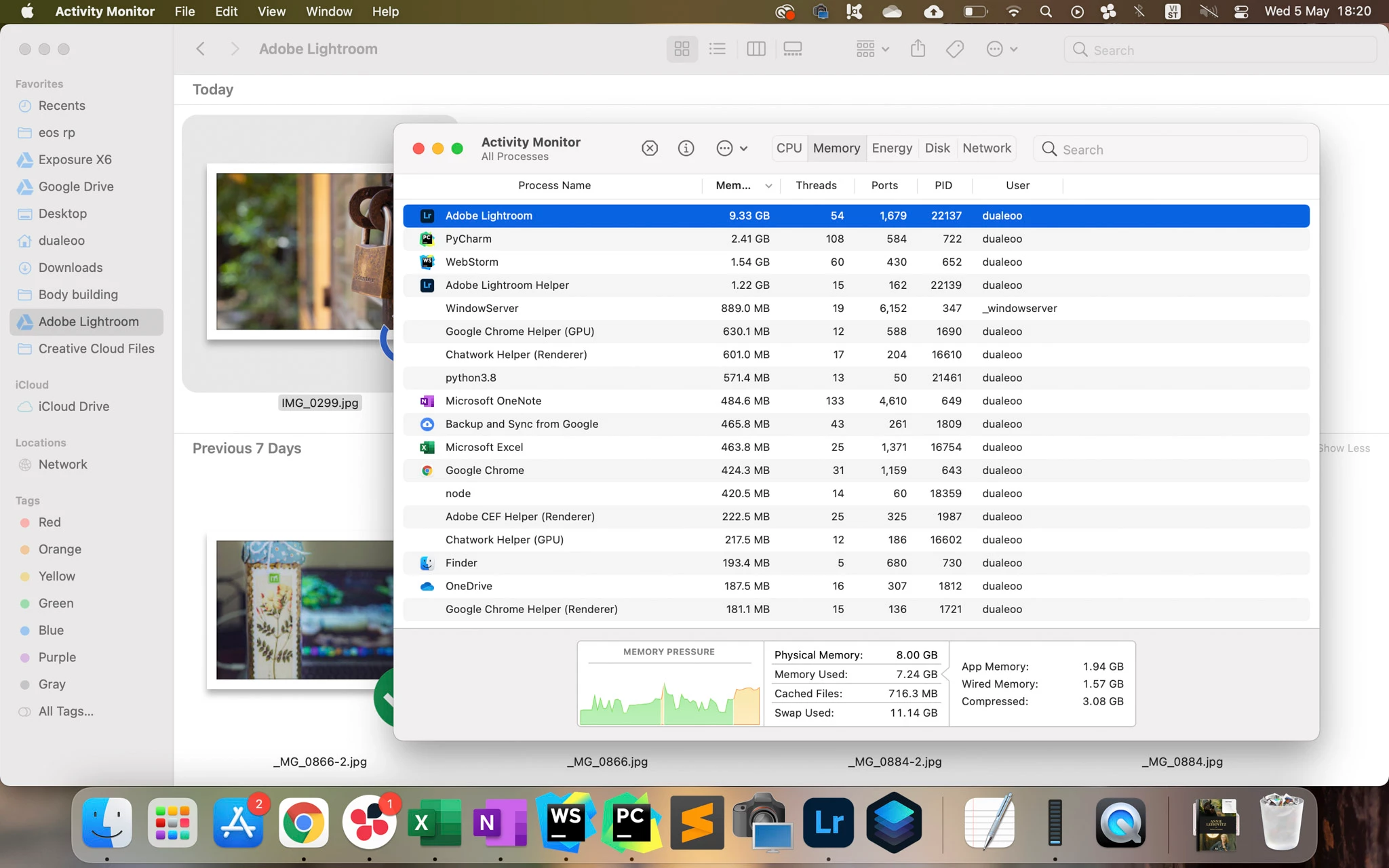


@Rikk Can you help me forward this to the development team?


Thank you so much!

57 replies

wok5
Known Participant
June 15, 2022
Ian Lyons
Community Expert
June 14, 2022

@wok5 


The crashes are not related to the subject of this thread. Therefore, I think your best bet is as Rikk suggested. Create a new thread and provide as much information about your setup as possible. This would include any other applications or services running at the same time as Lightroom. A screenshot of Activity Monitor  CPU and memory tabs would also be helpful.

wok5
Known Participant
June 14, 2022

Sorry, to fast: Happens with or without attached monitor...


W:


wok5
Known Participant
June 14, 2022

I can not access the Prefs. LR just stalls (Beachball of death).


W

Ian Lyons
Community Expert
June 14, 2022

@wok5 


Have you tried switching off the GPU? If no, then please do so and report whether it helps or not.


Are you using an external display? If yes, then please specify the resolution (e.g. 4K) and the scaling setting you've chosen in macOS 'System Preferences > Displays'

Rikk Flohr_Photography
Community Manager
Community Manager
June 14, 2022

@wok5 

This thread is not really about crashing but more about memory usage. I think you have a different issue than that being reported. I would recommend starting a new thread with very specific information about systems, workflow, crashes etc. 

I checked out your crash reports and I don't find 'hundreds' For 5.3, I find a total of 4 crashes but they represent three different crash states and in each case, it looks like you are the sole customer in that bucket. If you are experiencing this on more than one machine, I would look for a common software configuration that might be causing the crash. 

The other thing to be aware of is are all the crashes Adobe? Are some of the crashes represented with an OS dialog? 

In any case, I would recommend a new thread as your issue is likely different. 


Rikk Flohr: Adobe Photography Org
wok5
Known Participant
June 14, 2022

Hello, Rick!

If its 5.4 I downloaded minutes ago: No, its still crashing after 15 seconds of doing nothing:


It would be rally nice to use my paid software, I am waiting since month (and two different M1-Computers) to get this fixed!

Angry - very angry: Wolfgang

Rikk Flohr_Photography
Community Manager
Community Manager
June 14, 2022

Greetings,


Updates to the Adobe Photography Products were released on June 13. The update contains a fix for this issue.  Please download and the latest version of your application via the Adobe Creative Cloud Application or your respective device app store.

If you do not see the update (Mac and Win) you can refresh your Creative Cloud App with the keyboard shortcut [Ctrl/Cmd]+[Alt/Opt]+[ R ]. 


Note: App store availability can take several days for the update to appear and be available. 


Thank you for your patience.

Rikk Flohr: Adobe Photography Org
wok5
Known Participant
June 14, 2022

Small Update: Just installed 5.4, and THE PROBLEM IS STILL THERE. Adobe must have recieved hundreds of crash-reports from me alone, I mean: Ist the an Adobe Support existent?

REALLY ANGRY
Wolfgang ->(Just boubght Capture One)

New Participant
June 2, 2022

Hello!


I'm having severe performance problems with Lightroom (Cloud-based, Version 5.3) on my new Mac Studio M1 Max. I've just set up my computer and installed the necessary apps (Lightroom, PS, FCP, MS Office - nothing special...). Upon starting the Lightroom desktop app, I'm experiencing extreme lag. Each click takes up to 4-5 seconds to perform the task. It also seems to slow the whole system down - it takes several seconds to navigate through the menu bar, although Lightroom isn't doing anything (no exporting etc.).


I've tried to reinstall the desktop app, but it's still lagging - to an extent, where the program isn't usable any more. All other apps seem to work fine (Photoshop, FCP, even the web-app of Lightroom works smoothly - as i would expect from the desktop app). I have a Mac Studio with an M1 Max chip and 32GB of RAM - so the hardware shouldn't be the problem. Even when editing with the mobile app on my iPad Pro, there are no problems.


Is anyone else experiencing the same problems - or does anyone have a solution?

I'd be very grateful!

Thanks in advance!

Andy

New Participant
June 3, 2022

I've been doing some research, but haven't found a solution yet. Looking at the activity monitor, it seems the memory is ok but the cpu usage is way too high. As you can see on the attached screenshots, LR consumes between 400% (when it's just opened i the background) and 700% (when I'm trying to do some editing) of CPU. Is there any way to fix this?


I'm using a 4k LG Display with HDMI - I use scaling for more space. I found when I'm reducing the size of the window, it seems to use less CPU (around 150%) and therefore running a bit faster - but that can't be the solution, can it? I'd like to use my whole display for photo editing, not just a small corner...


Thanks in advance!

- Andy