


Participant
November 4, 2019
解決済み

I can no longer get colors from outside the photoshop screen on macOS Catalina

  • November 4, 2019
  • 返信数 2.
  • 1845 ビュー

macでphotoshopを使用している者です。

以前までphotoshopのスポイトでできていた「画面外の色を取得」ができずに困っております。

なぜか、macの壁紙の色は取得することができるのですが、その他の画面外の色はなにも取得することができません。


どうすれば、以前のように画面外から色を取得することができるようになるでしょうか?

もしご存知であれば教えていただけますと幸いです。(仕事でよく使用している機能なので少し困っております…)


このトピックへの返信は締め切られました。
解決に役立った回答 silk-m

Hi

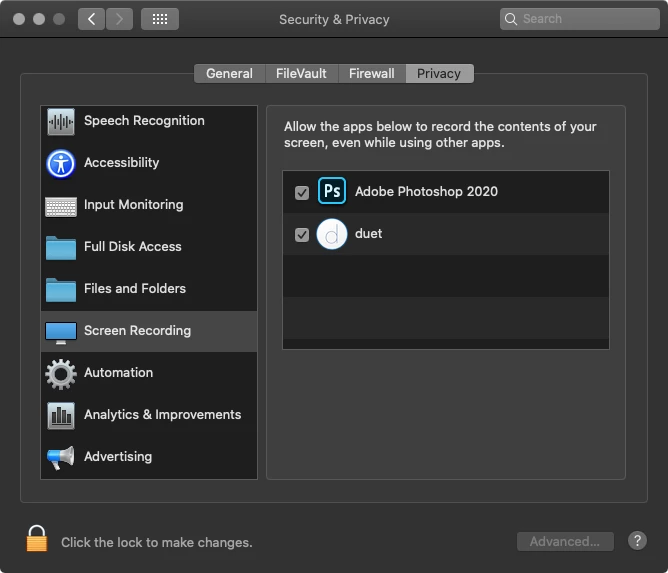
Catalina には Photoshop 2020 しかインストールしていませんが、Mac の「システム環境設定 / セキュリティとプライバシー / スクリーンレコーディング」で Photoshop を許可してください。

返信数 2

silk-m
Community Expert
silk-mCommunity Expert解決!
Community Expert
November 4, 2019

Hi

Catalina には Photoshop 2020 しかインストールしていませんが、Mac の「システム環境設定 / セキュリティとプライバシー / スクリーンレコーディング」で Photoshop を許可してください。

--Susumu Iwasaki
kaih15171030作成者
Participant
November 4, 2019
I was able to solve it thanks to you!!

 Thank you very much!!

nikunj.m
Legend
November 4, 2019

Hi there,


We are sorry about the issue you are facing with Photoshop while using the color picker outside the Photoshop interface.


Would you mind confirming the version of photoshop you are using by going to the Help menu > System info?


If you are on a subscription, please update Photoshop to the latest version and check if that helps. We have just released the Photoshop version 21.0 (2020).


For known compatibility issues for Photoshop on macOS Catalina and there work arounds, please check the link below.

https://helpx.adobe.com/photoshop/kb/photoshop-and-macos-catalina.html


Regards,

Nikunj