


解決済み
Photoshop CC 2017の自動選択ツールについて
2周間ほど前から自動選択ツールのアイコンが変わってしまって使い方が変わってしまいました。
従来は星のステッキのような形で、選択したい部分を自動で選んで簡単にぼかしなどが使えたのですが、変更後はキラキラしたメイク道具のようなアイコンになりました。
選択したい部分を選んでも従来のように簡単に選択ができず困っています。
変更前のアイコンに戻す方法はないでしょうか?

2周間ほど前から自動選択ツールのアイコンが変わってしまって使い方が変わってしまいました。
従来は星のステッキのような形で、選択したい部分を自動で選んで簡単にぼかしなどが使えたのですが、変更後はキラキラしたメイク道具のようなアイコンになりました。
選択したい部分を選んでも従来のように簡単に選択ができず困っています。
変更前のアイコンに戻す方法はないでしょうか?
The icon has not changed - it just shares a position on the toolbar with the quick selection tool. Click and hold on the quick selection tool and you should see the magic wand
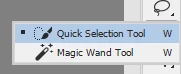
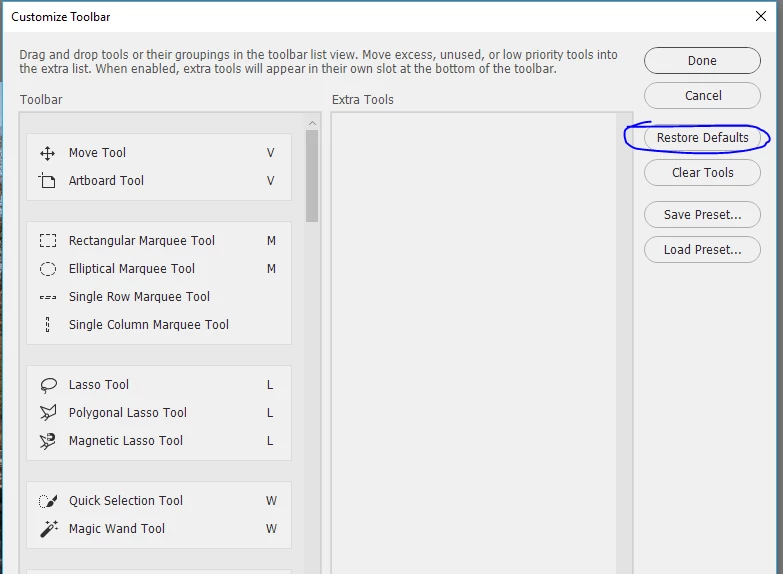
If you do not see that, click on the three dots (or go to the toolbar menu) and in the dialogue select restore defaults

Dave
Enter your E-mail address. We'll send you an e-mail with instructions to reset your password.
 AdChoices