Exit
  • Global community
    • Language:
      • Deutsch
      • English
      • Español
      • Français
      • Português
  • 日本語コミュニティ
  • 한국 커뮤니티
307

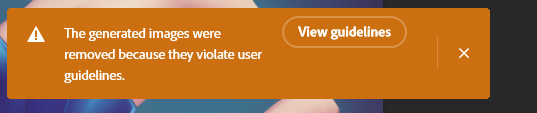
P: Generated images violate user guidelines

Community Beginner ,
May 23, 2023 May 23, 2023

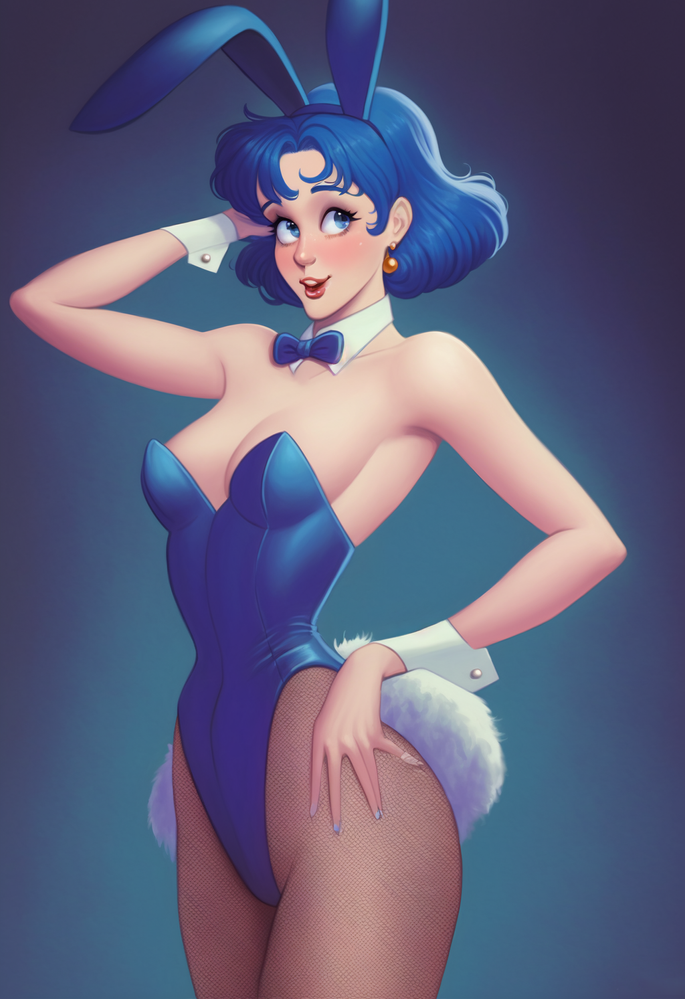
Bunny.png

image (1).png


So as you can see, it's a PG-13 relatively inoffensive image of a woman in a bunny outfit. The top worked fine, and I was able to complete the top ear, which is cool. When I tried to extend the bottom with generative fill, though, I got this warning. They're just a pair of legs wearing stockings, and I wanted to extend it.

It feels like a false flag - though I could be wrong? I find myself thinking it would do the same for women in swimsuits.

Figured I'd share here.

Bug Started Locked
TOPICS
Desktop-macOS , Desktop-Windows
329.0K
Translate
Report
Community guidelines
Be kind and respectful, give credit to the original source of content, and search for duplicates before posting. Learn more
community guidelines

correct answers 1 Correct answer

Adobe Employee , Nov 10, 2023 Nov 10, 2023

Dear Community,

On November 7th, 2023, the Firefly for Photoshop service was updated and improved for this issue. You should encounter fewer guideline errors when working on or near skin-tone areas that do not violate the community guidelines.

While the improvement is a big step in the right direction, we are continuing to explore new ways to minimize false-positives. Please continue to give us feedback on this new forum thread and also report false violation errors in the application.
Thank you

...
Translate
replies 1389 Replies 1389
1,375 Comments
Participant ,
Jun 22, 2023 Jun 22, 2023

Lets see PS do this 🙂


[image removed]

Translate
Report
Participant ,
Jun 23, 2023 Jun 23, 2023

No idea why it was removed it was a picture of someone wearing belly dancing clothes. No not offencive in any way. Unless the Moderator is some super religious OTT  prude  and doesn't like the sight of a belly button 

Translate
Report
Explorer ,
Jun 23, 2023 Jun 23, 2023

Maybe I am wrong, but it seems that perhaps the violations are more common with skin tones? I've not done any definitive testing, but in general it seems to me that:

- Working with colors like blue and green I am not getting any violations.

- Working with colors along the skin tone color range tend to give community violations even when working on non human objects like a wall or a sheet, especially when prompt is empty. 

Translate
Report
Community Beginner ,
Jun 23, 2023 Jun 23, 2023

Gostaria de saber como é possivel que o prompt de recheio generativo "parede branca" e "fundo branco" pode estar mal?????

Translate
Report
Participant ,
Jun 23, 2023 Jun 23, 2023

I just sent a photo I was working on at work. (DS_Award_for_Adobe.psd)

Not sure how you line up what I uploaded with my account here.

But... I saved 2 selections for you and can guide you on a third as it uses the crop to increase the size of the image and I didn't want to foul up the initial generative fill rejection by sending it in with the larger area. The only thing I can figure... and it's grasping at straws here, is there's a lot of pink in the photo, and perhaps photoshop thinks it's... em... pink parts? When you look at the image, it's several people on a stage getting an award. Nothing remotely naughty in the picture. Initially, I was trying to remove the text on the background to the right and the sleeve of someone just entering the frame. 


The recipe for the other direction that didn't work with this image is using the crop tool to extend the image downwards. This is for a video I am working on (1920x1080) and I scaled the image to 1500 pix high before proceeding. I used the crop and pulled it down to 1698 px. I made a selection including a small slice of the bottom of the image and hit generate, leaving the prompt box empty.

Translate
Report
New Here ,
Jun 23, 2023 Jun 23, 2023

Hey everyone! Excuse my english as it is not my first language! Wanted to bring attention to this issue i've been experiencing with generative fill. I'll attach a screenshot as an example, but it is not the first time that this happened the past 2 days.
Basically i would try to make a selection to remove an object, like a chain, or a stick from the ground, and no matter what object or surface it is, if the selection has that kind of (from what i observed, perhaps phallic?) shape, it will refuse to generate the fill and say the fill is against user guidelines, even though it's not even remotely NSFW or inappropriate in any way.

This is an amazing tool and it's already enabling me to accelerate the creation of assets to make animated "Collage style or papercut style" videos. Can't wait to see how it evolves!

Translate
Report
Explorer ,
Jun 24, 2023 Jun 24, 2023

@zevendesign  This has also been my thoughts while playing with it the past week; if I'm running into this so often when I am trying it on some really boring diner photos, what is this going to be like when I try it on a portrait session?  Will we not even be able to use it at all on boudoir-or-more photos, even if you're trying to do something innocuous like "remove wrinkles on backdrop" or "add chandelier" to an image - pretty basic tasks that can and are routinely done without AI, but AI will help with retouching by saving time and providing a great base to work with; just like someone else mentioned about wedding photos, blinks and smiles are a super frequent retouching task.  Like, if walls and wheelchairs are too much, it seems overly restrictive, and naiive, to think that other projects, which are very common by the way, should be restricted or impacted.  I haven't put any actual portraits in to see what it will or won't do yet, but your concerns have been on my mind all week since I started running into "violations" just dealing with boring walls.

Translate
Report
Explorer ,
Jun 24, 2023 Jun 24, 2023

When starting from a blank canvas and creating a square using the Rectangular Marque tool, I'm receiving violation notifications when using the word "cube" in tandem with Generative AI.

Translate
Report
New Here ,
Jun 24, 2023 Jun 24, 2023

I used the lasso tool to fix the top of a rose. The prompt was left blank. I got the user guideline violation error. 

Translate
Report
Community Beginner ,
Jun 24, 2023 Jun 24, 2023

I continue to get guideline issues with 80% of images containing people. When trying ot extend an image with a person in it, (fully clothed, not a bikini). And in this instance, trying to repair an ear from a midjourney creation. Is there anyway around this?

Screenshot 2023-06-25 at 7.27.21 am.png

Translate
Report
Community Beginner ,
Jun 24, 2023 Jun 24, 2023

Why is it that a free service should have better features than a paid service? Doesn't make sense.

Stable Diffusion is far more complicated but they're almost making it worth having to learn.

Translate
Report
Community Beginner ,
Jun 24, 2023 Jun 24, 2023
Try selecting a small square somewhere in the image, and then select the
actual area that you want to change, and see if there’s any difference. For
me, probably 60 or 70% of the time, if there would’ve been a violation,
this works. But, there are still 20 or 30% of us cases where it doesn’t
work, and there’s no rhyme or reason as far as I can tell.
Translate
Report
New Here ,
Jun 25, 2023 Jun 25, 2023

Ich bin Architekturstudent und wollte die Generative Füllung ausprobieren.

Dafür hatte ich eine normale Isometrie zur Grundlage und wollte jetzt beispielsweise Pflanzen daran hochranken lassen.

Leider wird mir immer angezeigt, dass der Befehl nicht ausgeführt werden könne, da er gegen die Nutzerrichtlinien verstoße.

Translate
Report
New Here ,
Jun 25, 2023 Jun 25, 2023

Kurzes Update, irgendwie verstoßen alle Befehle gegen die Nutzerrichtlinien. Auch wenn ich auf einer weißen Arbeitsoberfläche "Möwe" oder "Meer mit Sonnenuntergang" eingebe. Hilfe! 😄

Translate
Report
Community Beginner ,
Jun 25, 2023 Jun 25, 2023

Usando diariamente o recurso de preenchimento generativo, recebo constantemente o aviso de que as imagens violam as "Diretrizes de Usuário da IA Generativa da Adobe - versão Beta", mesmo quando se trata de um simples "objeto", um "muro" ou o "céu", por exemplo.

Rafael | Jornalista Inclusivo
Translate
Report
Community Expert ,
Jun 25, 2023 Jun 25, 2023

Hi , I've moved your post from the Photoshop forum to the Photoshop Beta forum where you are more likely to get help with your issue.


Dave

Translate
Report
New Here ,
Jun 26, 2023 Jun 26, 2023

Unbenannt-1.jpg

Translate
Report
Engaged ,
Jun 26, 2023 Jun 26, 2023

It's a well known and heavily reported issue. Hopefully they'll sort it before it goes much further

Translate
Report
Engaged ,
Jun 26, 2023 Jun 26, 2023

Apparently petunias are against regulations too   😅😅😅

Translate
Report
New Here ,
Jun 26, 2023 Jun 26, 2023

If this feature gets released then please lower the restriction on this thing. Even the most harmless stuff gets flagged when not even entering words to the promt. And when words are added: What is wrong with words like fang, finger, etc. etc., anyways?

Translate
Report
Community Expert ,
Jun 26, 2023 Jun 26, 2023

@Søren Bech30729629fway 

The Photoshop team is investigating the false flags and wants them to be reported. I've moved your post to the primary thread in the Photoshop Beta forum. Please post any further false flags in this thread. Hopefully this will be sorted before GF moves out of public beta.


Jane


Translate
Report
Engaged ,
Jun 26, 2023 Jun 26, 2023

It's so [cursing removed] weird. It'll refuse a stupid word like lampost yet, allow lamp. It's broke !!

Translate
Report
New Here ,
Jun 26, 2023 Jun 26, 2023

Got error for trying to create a normal elefant next to a giraffe that was created.

Translate
Report
Engaged ,
Jun 26, 2023 Jun 26, 2023

I typed in the prompt box woman in bikini on beach. Of course it went against their community guidelines, so I just typed in woman on beach, and what did I get ? A woman in a bikini and a real hottie too 😅😅😅. You couldn't make it up

Translate
Report
Community Expert ,
Jun 26, 2023 Jun 26, 2023


@Thomas225 wrote: Got error for trying to create a normal elefant next to a giraffe that was created.


Thomas, try using the correct spelling of "elephant" and let us know if that works for you.


Jane


Translate
Report