



Pete.Green
Community Manager
March 6, 2024
質問

New Feature: Enhanced Font browser is now in Photoshop beta

Hi everyone!


We've made some improvements to the experience of browsing and selecting the best fonts for your project.
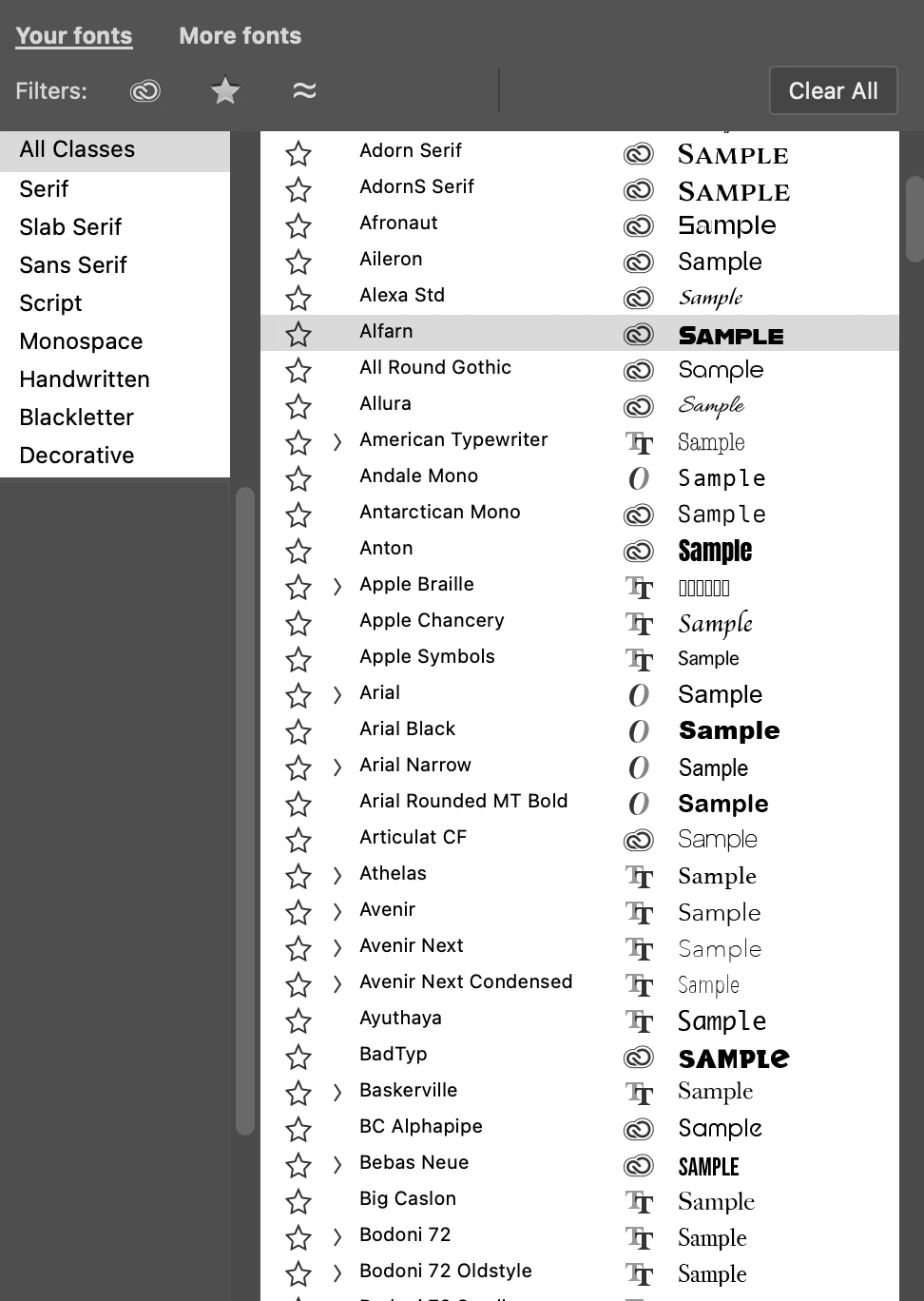


You can access the enhanced font browser in 3 places:
1. Options bar
2. Character panel
3. Properties panel (when a Type layer is selected)


What's new

  1. Your fonts” tab provides access to the currently installed fonts on your system or from Adobe Fonts.
  2. "More fonts" tab allows you to easily filter, browse, and preview fonts from the Adobe Fonts library directly on the canvas without the need to install them first.
  3. Clear All button lets you remove any filters you've applied such as, Adobe Fonts, Font Class, additional Font Tags, Favorites, Similar, and Language filters.


Feedback and votes

Please try this new font browsing experience and vote via the Beta Feedback panel to let us know if it's ready to be released.

Additionally, please let us know any feedback or ideas for improvement you have here in this thread!


Thank you!

返信数 18

Participant
July 4, 2024

Hate it! Takes up too much room and now my font window doesn't work properly. Makes the font window flicker, and won't allow me to correctly select a font. Hate it! Nothing but problems!

Participant
July 4, 2024

I agree! Nothing but problems!

Participant
June 28, 2024

Before I could start typing a font and then hit enter when it showed up. Now I can't seem to do that which interrupts my workflow. Is there a way to do that?


Known Participant
July 16, 2024

Huge workflow killer. Goes on showing that people behind this don't even use Photoshop / aren't designers or use a laptop trackpad so it's easy for them to hop between a keyboard and a mouse every time they need to change a font.


I can't believe I have to spend time here instead of working, reading people's rants on an issue that should be a non-issue to begin with. Talk about a poor feature roadmap... So disappointing to be going backwards.

Cornela
Participant
May 11, 2024

Hi, I hope it is possible to turn off this new font browser, I don’t need it! As a graphic designer I do not need more fonts... 
Thanks

Pete.Green
Community Manager
Pete.GreenCommunity Manager作成者
May 21, 2024

Hi @Jac_Irwin and @Cornela ,


Thanks for your feedback. I wonder what in particular is problematic for you and how we can make this font browser experience better for you?

In general, if you don't want to browse the additional fonts, you can stay within the "your fonts" section of the font browser. 

Are there other things that are getting in your way?


Regards,

Pete

Participant
May 28, 2024

Personally, It is just too much visually. I also do not need an additional font browser. I would like the ability to revert back to the previous style of the drop-down, where the font browser did not show up.  The new drop-down font window is huge and intrusive and is not needed by everyone, it would be nice to be able to turn it off. 🙂 

Participant
April 30, 2024

Hi! 

Can you please tell me how to turn this feature off? As a designer, I do not want or need more in my windows/drop-down menus. Please, tell me how to turn this feature off/revert to a previous version. 

PilcLaw
Participant
March 14, 2024

This is a good idea. We want to use it in our law firm website's journal work.

Pi Legal Consultancy
Pete.Green
Community Manager
Pete.GreenCommunity Manager作成者
March 13, 2024

@Carlos_Oliveras -- Great to hear that you're enjoying the new feature set for browsing fonts! Thanks for the feedback. I'll check with the team on what would be expected/reasonable amount of delay when clicking through More fonts (Adobe fonts). 


@Trevor.Dennis -- Yes, makes sense. That's too bad about fiber not being available for you yet, it looks so close! Hope they're able to extend it across the street. hah!


Will see what expected delay here is/should be. 


Trevor, you also wrote,

"when I fiirst looked at this, I was not understanding that I was seeing the Adobe (Typkit as was) fonts" -- Should I take that as this should be more obvious from your perspective? Or would you expect "More fonts" to be explicit in saying "Adobe fonts"?

Known Participant
March 15, 2024

@Pete.Green thanks but don't worry about the delay (at least for what I'm concerned with my connection) - I understand that a certain delay is to be expected given that it is connecting to Adobe Fonts (not browsing files on my computer). Sorry if I was not clear enough, I'm ok with how it works (except for not being able to set a custom sample text... but that's another story).

Trevor.Dennis
Community Expert
Community Expert
March 10, 2024

It's a nice feature Pete, but a bit slow. 

OK, I have restarted myu computer which helped a bit.

Reset Preferences, which helped a bit more.

I was thinking that it built a cache so the next time you selected a filter, it would be faster, but that doesn't seem to be happening.  The first filter I chose takes 1 to 2 seconds, and subsequent filters seem to take longer.  Least ways that's my impression.  Before I restarted and reset Preferences, it was pretty much freezing my system!


I definitely like it though.


FYI I have 201 font groups in Windows 11


i9-13900K

RTX4080

64GB RAM

Two 2TB Samsung 980PRO (plus a bunch of other fast NVMe drives.)


So what's slowing it down?

Pete.Green
Community Manager
Pete.GreenCommunity Manager作成者
March 11, 2024

Thanks @Trevor.Dennis, curious -- are you filtering within Your fonts or the More fonts? 


One other thing you could try is to clear the Photoshop font cache...can you give that a try?

Steps are here: https://helpx.adobe.com/photoshop/kb/troubleshoot-fonts-photoshop.html


If it's still slow, let us know and we'll take a deeper look at it. 


Regards,

Pete

Trevor.Dennis
Community Expert
Community Expert
March 12, 2024

OK, I'm confused now.  I'm using the More Fonts filters.  AFAICT the Your Fonts filters are unchanged and those filters are instant.

.

So I am guessing that the delays I am seeing are a factor of my internet connection?  I am rural New Zealand with no chance of getting connected to the fibre that runs across the road from me  It's only thanks to the nearby school that we have fibre to the cabinet


When using the More Fonts filters I see anything from 1 to 10 seconds delay, but when I fiirst looked at this, I was not understanding that I was seeing the Adobe (Typkit as was) fonts, so that delay is not unreasonable.   Does that sound right?

Known Participant
March 9, 2024

I think it is a great idea, some improvement in this area was long due. Still, if I display the fonts list from the options bar, in the regular PS version I can see up to 20 fonts on my display (I've set the preview size to huge). In the beta version with this new system, barely 13 fit the list before it cuts off. It's not the end of the world but I'd like being able to see as many fonts as possible.


As an improvement, I have always longed for the ability to set my custom sample text (instead of the word "Sample"). See this: https://community.adobe.com/t5/photoshop-ecosystem-ideas/photoshop-allow-user-to-change-font-sample-text/idi-p/12249721


Thanks.