


Exit
  • Global community
    • Language:
      • Deutsch
      • English
      • Español
      • Français
      • Português
  • 日本語コミュニティ
  • 한국 커뮤니티
Locked
1

Photoshop (beta version) 27.0 crashes when loading photos and error when updating to 27.1
Explorer ,
Nov 05, 2025 Nov 05, 2025

ValeriiN_0-1762334907518.png

I tried to install version 27.1.
After that, Creative Cloud gave me a download error. Then I tried to open Photoshop Beta itself, and it immediately crashed during startup.
I reinstalled Photoshop Beta, and the crashes during startup disappeared.
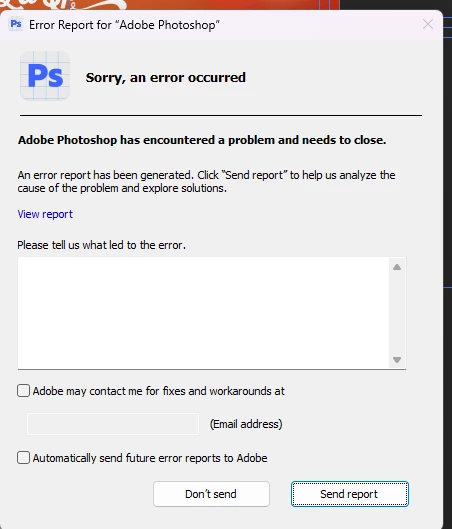
But now I can't even upload a photo to the workspace.
The program just freezes and displays an error window.
What should I do to fix this?

UPDATE: I saw that the version of Photoshop I have installed is now 27.1. But Creative Cloud still says that a new update 27.1 is available.

TOPICS
Desktop-Windows
262
Translate
Report
Community guidelines
Be kind and respectful, give credit to the original source of content, and search for duplicates before posting. Learn more
community guidelines

correct answers 1 Correct answer

Adobe Employee , Nov 10, 2025 Nov 10, 2025

Hi @ValeriiN are you able to install and launch the latest Ps Beta?


Adobe Photoshop Version: 27.2.0 20251109.m.3288 7a0357a arm64 (beta, PublicBeta)


Thanks,

Cory - Photoshop Product Manager

Translate

correct answers 1 Pinned Reply

Adobe Employee , Nov 13, 2025 Nov 13, 2025

Thank you for letting us know @ValeriiN 


Thanks,

Cory - Photoshop Product Manager

Translate
Adobe Employee ,
Nov 10, 2025 Nov 10, 2025

Hi @ValeriiN are you able to install and launch the latest Ps Beta?


Adobe Photoshop Version: 27.2.0 20251109.m.3288 7a0357a arm64 (beta, PublicBeta)


Thanks,

Cory - Photoshop Product Manager

Translate
Report
Community guidelines
Be kind and respectful, give credit to the original source of content, and search for duplicates before posting. Learn more
community guidelines
Explorer ,
Nov 13, 2025 Nov 13, 2025

Hello, Cory!
Yes, I just updated to version 27.2.
Everything is working now, thank you.

Translate
Report
Community guidelines
Be kind and respectful, give credit to the original source of content, and search for duplicates before posting. Learn more
community guidelines
Adobe Employee ,
Nov 13, 2025 Nov 13, 2025
LATEST

Thank you for letting us know @ValeriiN 


Thanks,

Cory - Photoshop Product Manager

Translate
Report
Community guidelines
Be kind and respectful, give credit to the original source of content, and search for duplicates before posting. Learn more
community guidelines