


Participant
September 3, 2024

“Could not complete the Camera Raw Filter command because of a program error”
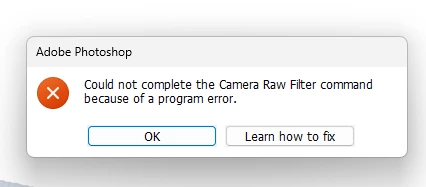
  • September 3, 2024
  • 返信数 98.
  • 18035 ビュー

i m facing issue in letest photoshop..
i try all the ways, like reinstallation, older version, but still not working 

any buddy knows solution ???
please Help me...
Bhargav


[subject renamed for clarity]


返信数 98

D Fosse
Community Expert
Community Expert
November 19, 2024

@Ged_Traynor 

I don't think it's ACR, I think it's Photoshop.


I have PS 25.9 still installed, and everything works properly there. From PS 25.11 up to the current 26.0 it fails and I get the error message.


They both use the same ACR (currently17.0, haven't updated to 17.0.1).

Ged_Traynor
Community Expert
Community Expert
November 19, 2024

You can download and install ACR version 17.0 from here, the installation should over right the current version

https://helpx.adobe.com/camera-raw/kb/camera-raw-plug-in-installer.html?linkId=100000309922335

Participating Frequently
November 19, 2024

I think it has to do with that window popping up offering some sort of discounted subscription. I didn't screenshot it and I forgot exactly what it is, but I think that is causing the issue. I already made it disappear by check marking the box saying "Don't show for 7 days" so it doesn't pop up anymore.

Participating Frequently
November 19, 2024

That won't even work. Edit >> Preferences >> Camera RAW, it also throws an error.

Participating Frequently
November 19, 2024

Happened to me too. Can't even reset Camera RAW. Did a reinstall, Camera RAW worked once, and then started throwing the same errors again. After I posted here and tried to chat with support, it started working again...

D Fosse
Community Expert
Community Expert
November 18, 2024

Note to moderators - I'm not quite sure how to handle all these new threads coming up. Since I'm not a moderator, I can't merge them directly; instead I have to do a lot of cross-referencing and linking back and forth. That quickly becomes a mess to navigate. If anyone feels the need to clean up this "master thread", feel free to delete my posts.

D Fosse
Community Expert
Community Expert
November 18, 2024
D Fosse
Community Expert
Community Expert
November 18, 2024
D Fosse
Community Expert
Community Expert
November 17, 2024
Participant
November 18, 2024

My unedited CR3 file won't open because of a Photoshop 26.0 program error. I was able to open the unedited files 8 hours ago. Windows 10.