


Techracer
Participant
April 8, 2017
解決済み

Adobe Photoshop PNG file image modification

  • April 8, 2017
  • 返信数 2.
  • 539 ビュー

Hi,

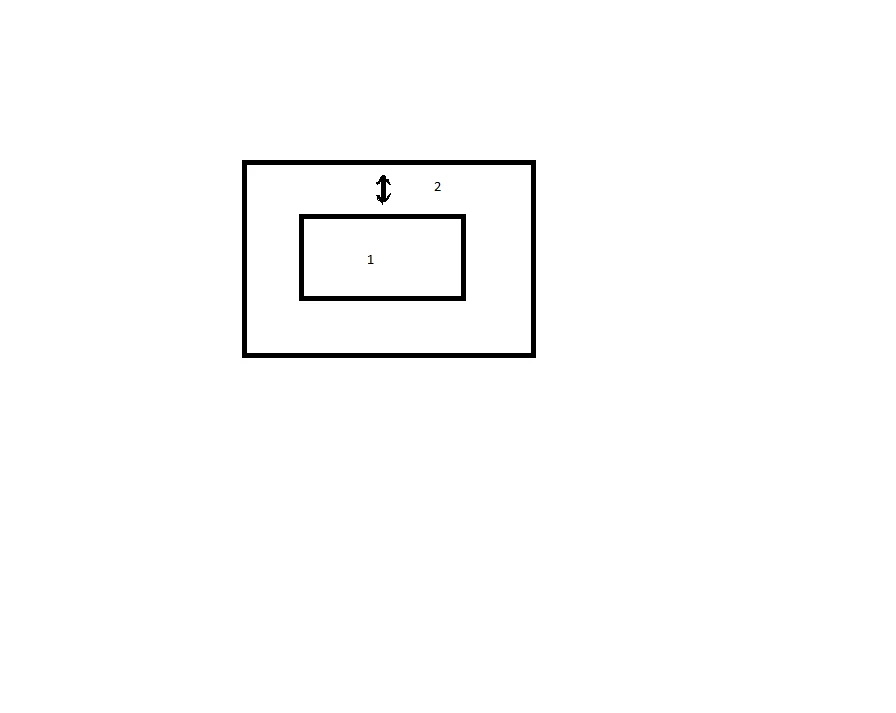
Just wondering if Adobe Photoshop or which version would allow me to take a PNG file, and expand the image parallel and larger or smaller (2.) while retaining the original size image (1.)? Please see diagram attached.

Cheers
    このトピックへの返信は締め切られました。
    解決に役立った回答 D Fosse

    I think Image > Canvas Size is what you want.

    For a more ad hoc approach you can also use the crop tool and drag outwards.

    返信数 2

    Participating Frequently
    April 8, 2017

    Layer > Duplicate Layer , to copy your png image

    Edit > Edge Transform (Ctrl or Cmd + T),

    Hold Alt + Shift, drag out the corner to resize, Alt expands from the center, Shift holds the image ratio constant.

    Press Enter  or Click on the Checkmark on the Transform toolbar to save changes.

    Here's a Seqoe font character opened as a png file, duplicated, and resized.

    D Fosse
    Community Expert
    Community Expert
    April 8, 2017

    It seems to me the whole point here is to not resize the image.

    Techracer, Canvas Size has been with Photoshop since the beginning. It's one of the most basic functions.

    JJMack
    Community Expert
    Community Expert
    April 8, 2017

    Do you mean duplicate an image later then transform the duped layer. So you have the image in two layer that have different sizes?

    JJMack
    Techracer
    Techracer作成者
    Participant
    April 8, 2017

    Hi,

    I want to be able to take an image from a PNG file then scale a second outline of the image up or down so that the second outline is parallel to the first, just a different overall size. The file image is not a photo it's just an outline of a shape.

    Thanks

    D Fosse
    Community Expert
    D FosseCommunity Expert解決!
    Community Expert
    April 8, 2017

    I think Image > Canvas Size is what you want.

    For a more ad hoc approach you can also use the crop tool and drag outwards.