

Participant
May 6, 2025
質問

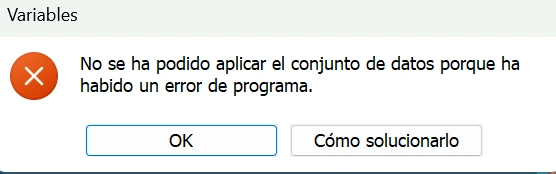
AYUDA "No se ha podido aplicar el conjunto de datos porque ha habido un error en el programa"
  • May 6, 2025
  • 返信数 1.
  • 303 ビュー


Cada vez que intento hacer un nuevo cambio en las variables me aparece este error.

Ryzen 9 7950x3d
4070ti
32gb ddr5

Como lo soluciono?

返信数 1

Community Manager
May 6, 2025

Hey @funlar_9318! Welcome to the community!

Could you share more details about the issue, such as the version of Photoshop you're using? If you could provide a screen recording showcasing the error or detailing the steps you take to reproduce it, that would be super helpful.

Thanks so much!

Alek

*(If you mention me with an @, like @Aleke, I’ll get a notification and can respond faster.)*
funlar_9318作成者
Participant
May 6, 2025

I had the 26.6 version with the same error. 
So i install the previous but the error keep popping

Community Manager
May 21, 2025

Hi @funlar_9318! Sorry for the delay in getting back to you, and thanks so much for sharing the video — that really helps!

I followed your steps, but I wasn’t able to reproduce the issue on my end — I’m not seeing any error messages when editing a data set. Just to help us narrow things down a bit, does this happen with other files too, or is it just this one? What happens when you click on the "how to fix this" button?

Also, could you share your System Info from Photoshop? You can find it under Help > System Info. Just copy the info into a text file and attach it to your reply, or share it via Google Drive, WeTransfer, or any file-sharing service you prefer.

Thanks a lot for your help and patience! 😊
Alek

*(If you mention me with an @, like @Aleke, I’ll get a notification and can respond faster.)*