



Can I set JGP compression choice in "save as" dialogue to be "baseline optimized" by default?
"Save as" for .jpg offers 3 compression choices: baseline, baseline optimized, or progressive. As you can see in the attache file the choices are radio buttons. You never know which will be preselected when you go to save (although Photoshop sometimes displays the last option used, sometimes it does not.)
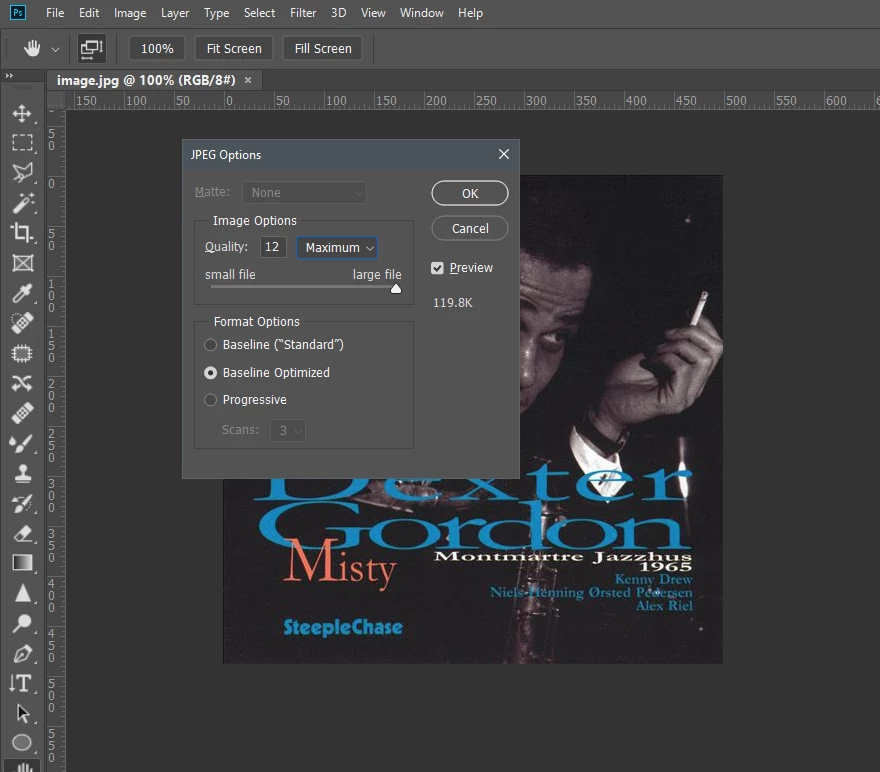
I use the keyboard as much as possible, & I use baseline optimized 98% of the time. When Photoshop offers one of the other choices I have to reach for the mouse to change back to baseline optimized, my question is: is there a way to make Photoshop display only "baseline optimized," or default to it exclusively every time? Alternately: I can tab to the radio buttons, but I do not know how to select a radion button via the keyboard ("Enter" simply closes the dialog, nor does "+" select the focused button).
And please don't say Photoshop always displays the last used option, it does not just like it does not always retain the same numerical quality setting. The "save as" dialog does not appear in "Edit/menus" so please don't suggest I look there.
Thanks!
 AdChoices