


Participant
March 30, 2024
解決済み

Can photoshop save large (50,000+ pixel) JPGs?

  • March 30, 2024
  • 返信数 2.
  • 938 ビュー

Can photoshop save large (50,000+ pixel) JPGs?  If not, what are the options for saving files where at least one of the dimentions are more than 50,000 pixels?


I've been using Affinity Photo for this and am comtemplating switching to Photoshop.


Thank you,

Chris
このトピックへの返信は締め切られました。
解決に役立った回答 Stephen Marsh

I didn't perform exhaustive testing, I tried 55,000 px on the longest edge for an 8-bpc RGB file and it did Save a Copy into JPEG – not Export As or Save for Web (Legacy) which have programmed input pixel size limits.


I then opened the JPEG in Apple Preview without issue.


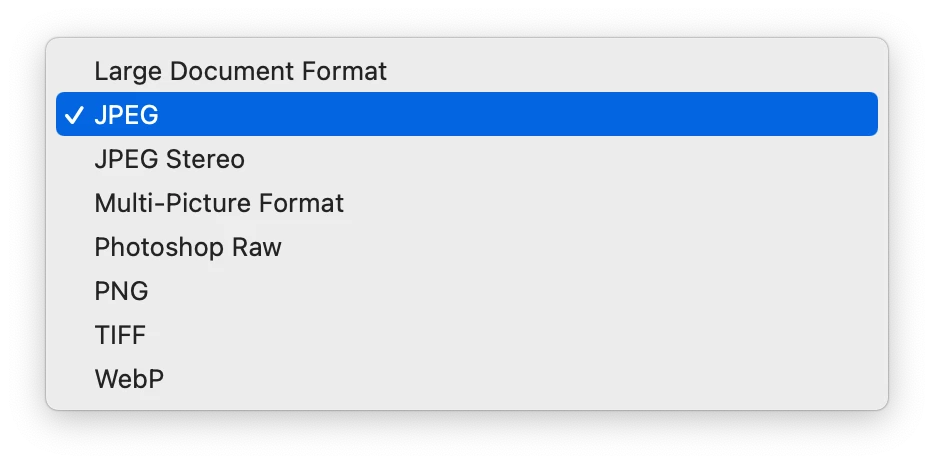
The Save a Copy offered the following formats for 55,000 px on the longest edge for an 8-bpc RGB file:


EDIT: 65,535 did save as a JPEG, but 65,536 did not.

返信数 2

Stephen Marsh
Community Expert
Stephen MarshCommunity Expert解決!
Community Expert
March 31, 2024

I didn't perform exhaustive testing, I tried 55,000 px on the longest edge for an 8-bpc RGB file and it did Save a Copy into JPEG – not Export As or Save for Web (Legacy) which have programmed input pixel size limits.


I then opened the JPEG in Apple Preview without issue.


The Save a Copy offered the following formats for 55,000 px on the longest edge for an 8-bpc RGB file:


EDIT: 65,535 did save as a JPEG, but 65,536 did not.

CJP001作成者
Participant
April 1, 2024

Stephen, thank you for testing that out!  I really appreciate it!


Chris


Stephen Marsh
Community Expert
Community Expert
April 1, 2024

@CJP001 – You’re welcome.

Nancy OShea
Community Expert
Community Expert
March 31, 2024

Not sure what you're asking or why.  But JPG's inherent pixel limit is 65,535 × 65,535 pixels, hence up to 4 gigapixels for an aspect ratio of 1:1

https://en.wikipedia.org/wiki/JPEG.


Saving Photoshop documents (PSD) larger than 2GB file size, use PSB (large document format).

https://photoshoptrainingchannel.com/tips/saving-documents-larger-2-gb/


Hope that helps.


Nancy O'Shea— Product User & Community Expert
CJP001作成者
Participant
March 31, 2024

Nancy, I'm asking if Photoshop can save an image with more than a 50,000 pixels in one of the dimensions as a JPG.  I know the the JPG spec allows them to be up to 65,535 square, but I'm not clear if Photoshop can save or work with them.  There are older references in Adobe forums that the limit is 30,000 pixels, but since those references are not current, I'm hoping to learn the current limit (if other than 65,535) here.


Thank you,


Chris


Nancy OShea
Community Expert
Community Expert
March 31, 2024

I think Photoshop Elements which I never use may have a pixel limit on JPG.


To be honest, I always save large files as layered TIFF, PSD or PSB files.  JPG is a compressed web format for viewing in a browser.  And 4 Gigapixel images would be too much bandwidth to use on the web.   That said, I just created a new document in Photoshop CC, 50K pixels x 50K pixels and used File > SaveAs > JPG.  It worked fine for me.


Nancy O'Shea— Product User & Community Expert