


Participant
August 8, 2020
解決済み

Can't find Legacy Gradients [PS 21.2.1]

  • August 8, 2020
  • 返信数 3.
  • 19755 ビュー

I cannot find the Legacy Gradients.  I'm using:

Adobe Photoshop Version: 21.2.1 20200716.r.265 2020/07/16: 2b9692040b x64


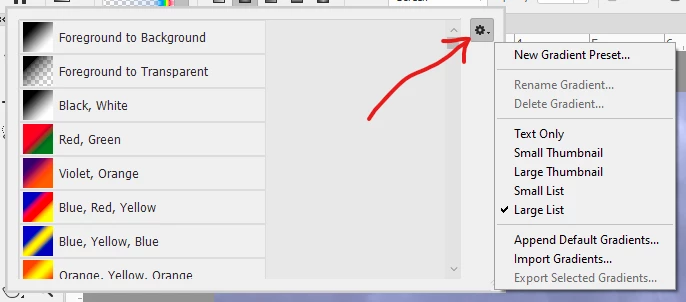
I see guidance on this site to use a drop down menu in the Gradient Editor and search for either a Special Effects folder or the Legacy Gradients folder.  I can't see either folder.  In fact, I can't see the little bars icon that bring up the drop down menu.  I do have a settings icon that does brings up the menu in this post.  Help!  Thx.
 

解決に役立った回答 Dan Rodney

You can do this directly within Photoshop. In 2020's new Gradient panel (Window > Gradient), you can go into the menu at the top right and choose Legacy Gradients. The key is going this through the full Gradient panel, not the Gradient pop-up in the Options bar.

返信数 3

Inspiring
July 6, 2023

I did this - I loaded the gradients window, and selected legacy gradients from near the bottom of the hamburger menu - but nothing changed.  Do you have any other ideas.... Oh but I'm using 24.6.0 

Maybe this is a whole new gradients problem.


Ged_Traynor
Community Expert
Community Expert
July 6, 2023

@jeremyp1470049 if you scroll down you should see the legacy gradients, screenshot is from 24.6

Participant
August 25, 2020

I can't find anything, and I can't follow the instructions.  New to 21.2.2 release from CS6.  I don't know what Window > Gradient is even!  I have done what someone suggested:   C:\Program Files\Adobe\Adobe Photoshop 2020\Required, but when I do that, and click the v by the rectangular box in the Gradient Map layer, the legacy folder shows up, but is empty.  Sorry, feeling stupid here, even though I was pretty good with the old CS6.

Michael Bullo
Community Expert
Community Expert
August 25, 2020

Photoshop contains numerous menus such as File and Filter. Window is one such menu item and clicking on the Gradients option within it will open up the Gradients panel.

Participant
August 26, 2020

Do I ever feel so STUPID!!!!!  What was I thinking this morning, not seeing the Window command???  I am sooooooooooo embarrassed!!!!  I am computer literate!  Really!!!  


Thank you for this help!  Everything is working perfectly now!!!!!  You are THE ABSOLUTE BEST!!!!!  Thank you so much for taking the time to show the screenshots!  EASY to follow!  You are the best teacher!

Michael Bullo
Community Expert
Community Expert
August 9, 2020

Look for the new Gradients panel within the Window menu. The Gradient panel itself contains many folders including a Legacy Gradients folder.

WmRowan作成者
Participant
August 9, 2020

Thanks, I found it in C:\Program Files\Adobe\Adobe Photoshop 2020\Required.  Honestly that's annoying difficult.  There are many, many possible folders and locations the file could be hiding in, and I ended up having to use the file search function to find it.  Should it be that hard?  At any rate, many thanks for enabling me to find it.

Michael Bullo
Community Expert
Community Expert
August 9, 2020

Ah. I didn't understand that's what you were looking for. Happy you found it 🙂