


Inspiring
February 10, 2025
解決済み

Can't keep series of image files in order in their folder

  • February 10, 2025
  • 返信数 1.
  • 894 ビュー

I don't recall running into this problem in Photoshop before, but I could be wrong: I have a series of 30-odd page images in one folder that I want to set up as a book-for myself only- that I can print out in color. I was hoping that simply identifying each image numerically would be sufficient  to keep them "stacked up" in the folder in the correct order, but that doesn't work. I'm not sure what principle-if any- governs the sequence of files currently, but it's a non-starter for printing a book. Is there a way to force Photoshop to list files in a folder alphabetically? Alphanumerically? What am I missing here?
解決に役立った回答 Conrad_C

The screen shot doesn’t have enough context around it to see the settings.

Is the screen shot from a macOS Open/Save dialog box in Photoshop?

It looks like you’re using Column view.


What is the macOS sort order for that folder?

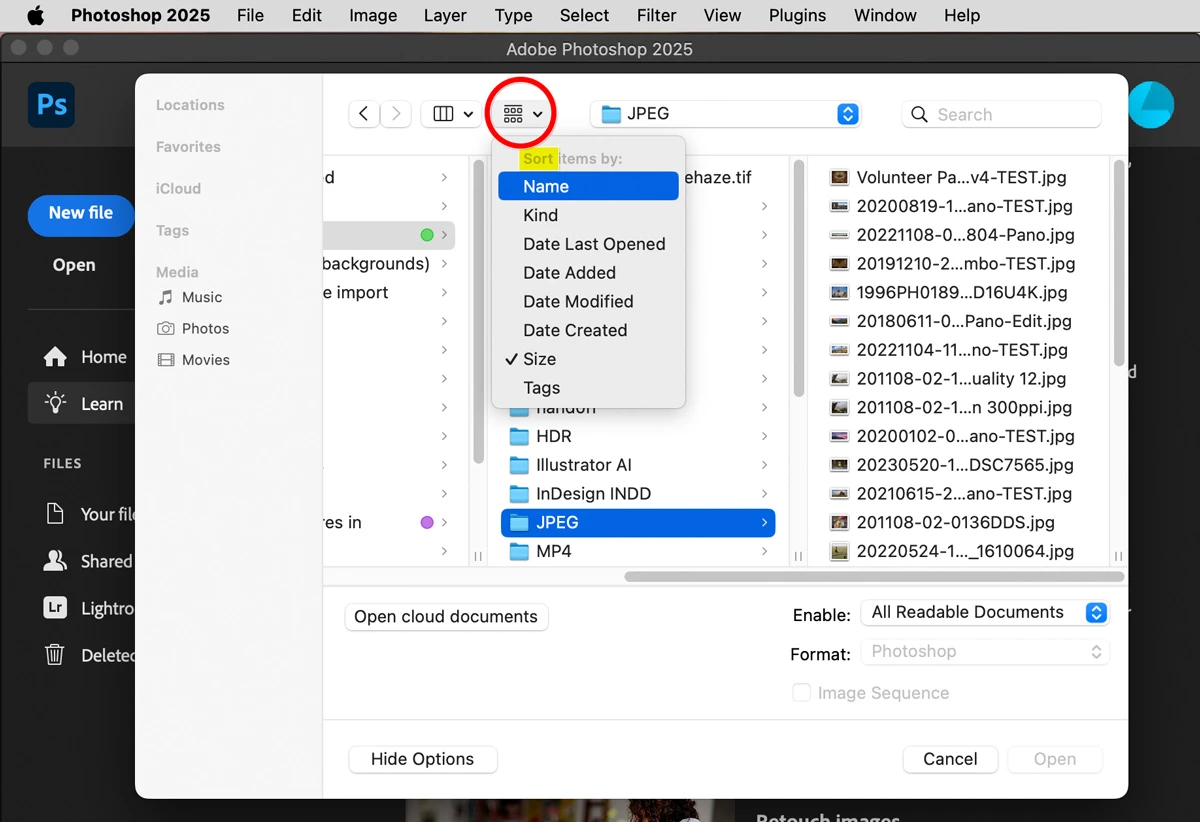
To see and change that folder’s sort order, Option-click the menu circled in the picture below. (Important: The menu must say Sort Items By at the top. If it says Group Items By, you didn’t hold down the Option key while clicking.)


Numbered files should sort as expected if Name is selected in that submenu.

In my example in the picture, the sort order of the JPEG folder is currently set to Size, so you see me selecting Name to change this.


You also see those menu buttons at the top of a folder window in the macOS Finder. In the Finder you can also view and change sort order in the submenu View > Sort By.

返信数 1

S_Gans
Community Expert
Community Expert
February 10, 2025

This is more of an operating system issue, if I'm reading your question correctly. 
Before I can continue to try to help, please clarify, when/where/how are you attempting to view your folder content? Maybe some screenshots would help.
Numbering your images SHOULD work, as long as you're sorting your view by Name. Did you use starting 0's for the first digit of your numbers under 10? If not, things may go out of sorts.
For me on my Mac, when I use a numbering system, it DOES seem to work, so more detail would be very helpful.

Adobe Community Expert / Adobe Certified Instructor
birckcmi作成者
Inspiring
February 10, 2025

Thanks for the quick reply. I hadn't been using 0's before single digits, but I immediately tried that. Nada.  I'm on a Mac Mini M1, running Sequioia 15.2.  I'm ready to believe that the problem is with the OS rather than with Photoshop, but if there's a way to fine-tune the Mac's file-sorting order per folder, I couldn't find it. I've included one or two screenshots to make my point. Thanks for your help.

Conrad_C
Community Expert
Conrad_CCommunity Expert解決!
Community Expert
February 10, 2025

The screen shot doesn’t have enough context around it to see the settings.

Is the screen shot from a macOS Open/Save dialog box in Photoshop?

It looks like you’re using Column view.


What is the macOS sort order for that folder?

To see and change that folder’s sort order, Option-click the menu circled in the picture below. (Important: The menu must say Sort Items By at the top. If it says Group Items By, you didn’t hold down the Option key while clicking.)


Numbered files should sort as expected if Name is selected in that submenu.

In my example in the picture, the sort order of the JPEG folder is currently set to Size, so you see me selecting Name to change this.


You also see those menu buttons at the top of a folder window in the macOS Finder. In the Finder you can also view and change sort order in the submenu View > Sort By.