

Known Participant
February 14, 2025
質問

Disable update dialog

  • February 14, 2025
  • 返信数 2.
  • 245 ビュー

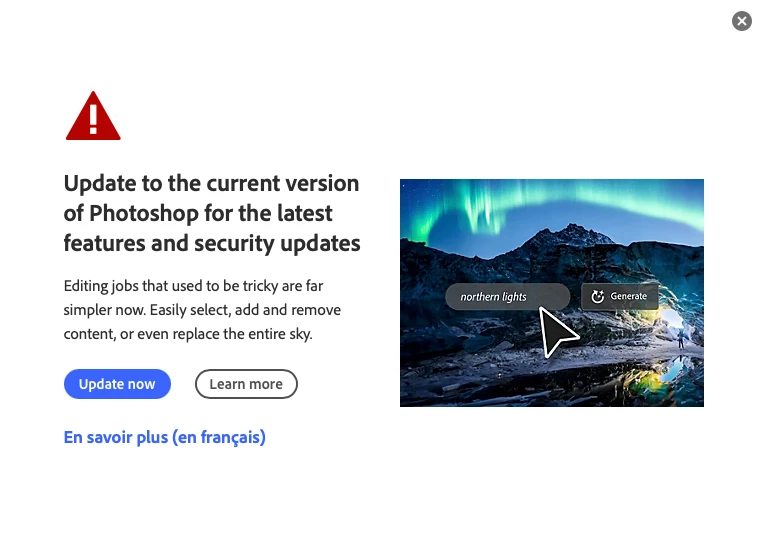
A new update dialog has recently started popping up in Photoshop 25.12.1 (MacOS). I'm running an older version of Photoshop by choice. Is there a way to disable this dialog permenately? 

返信数 2

shalanandpaul作成者
Known Participant
February 15, 2025

Thanks for sharing @Ged_Traynor. I tried searching this forum before posting and hadn't come across that thread.

creative explorer
Community Expert
Community Expert
February 15, 2025

@shalanandpaul I don't get this 'pop-up'...  you could try this... go to the Adobe Crative Cloud (desktop) and look in its preferences or settings for update controls. Here you will find options to manage updates for all installed Adobe applications, including Photoshop.

  1. Top-right corner, click on your photo or avatar
  2. Click on Preferences
  3.  Under 'Apps' you could turn on 'Auto Updates' which will automatcially update it for you


  4.  You can turn off the 'notifications'


    ------

    Also, if you go to the online account, of your adobe.com account, https://account.adobe.com/magazines


    ----


m
shalanandpaul作成者
Known Participant
February 15, 2025

Thanks for the info @creative explorer. I acknowledge that switching to a newer version of PS would eliminate the dialog. I am, however, cautious about PS updates (especially major revisions) and choose to disable auto-updates because I prefer to have control over when they're applied. Unfortunately, the other notification related settings you referenced have no effect on this dialog.