


TypoMan23
Known Participant
October 19, 2022
質問

Dragging a photo in Photoshop opens in smaller size, and not its actual size (?)

  • October 19, 2022
  • 返信数 6.
  • 3860 ビュー

I recently upgraded my OS from OSX to Monterey. And also from Photoshop CS3 to CC.


In the past one could drag a photo directly from iMac Photos into Photoshop and it would open at its actual full size.


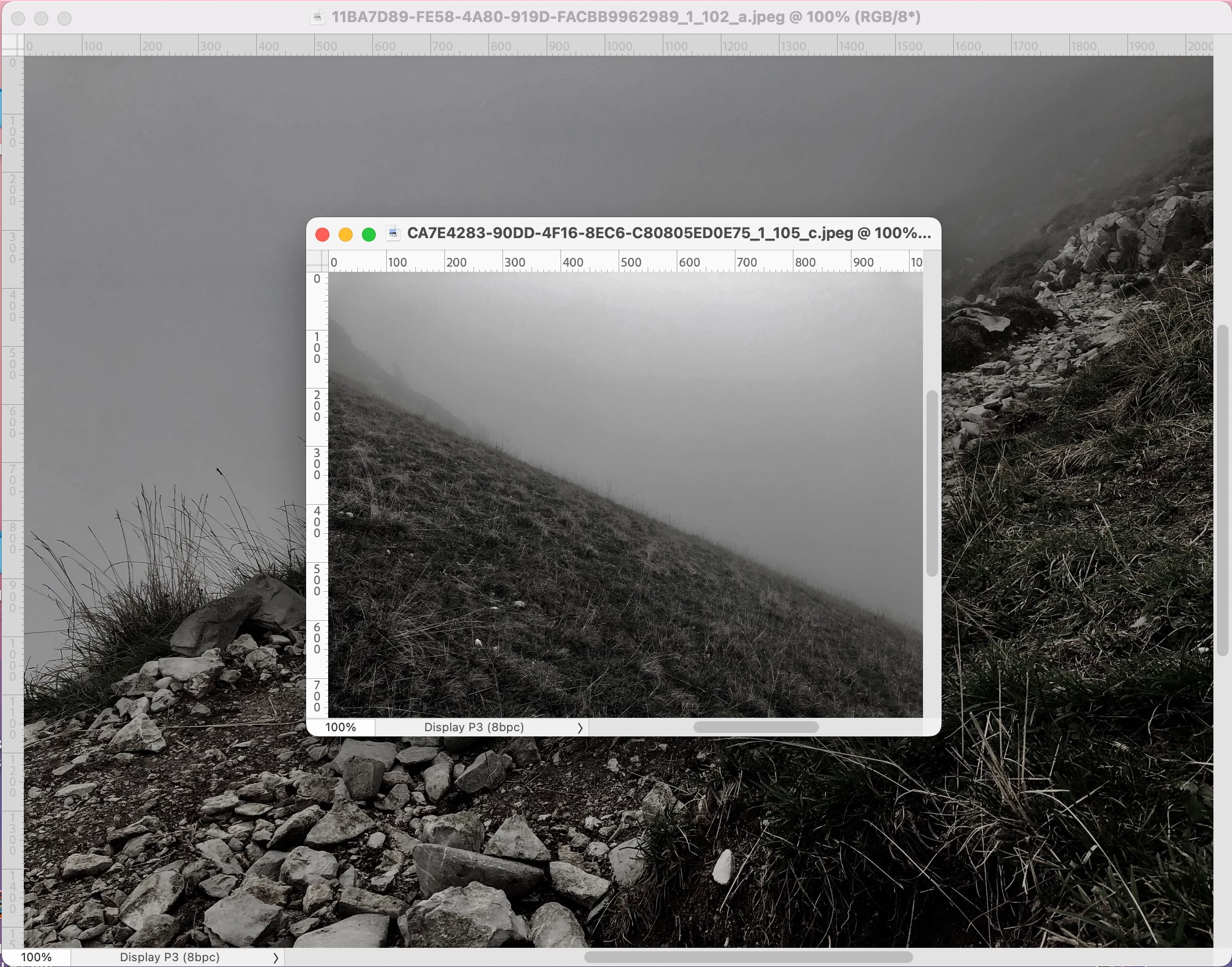
But just now I noticed that it only opens in a much reduced size, and even at random different sizes (see screenshot) - but never 100%.
Why is this?

How can I get it to open in actual size like how it used to in CS3?


Also the colour profile is Display P3 - I'm sure it never used to be this.

In the screenshot you can see 2 photos which opened in PS at different sizes. So strange and random. Also the file names are totally wrong, they should be: IMG_9428.JPG, IMG_9438.JPG


Any help much appreciated, thank you.
 

このトピックへの返信は締め切られました。

返信数 6

Jeff Arola
Community Expert
Community Expert
October 20, 2022

What version of macOS were you using with photoshop cs3?


On your older macOS with cs3 were you using iPhoto vs your new Monterey with Photos, two different applications.


You might also consider using Adobe Bridge instead of Photos.

That would entail importing your photos directy to your drive to say your Pictures folder rather than importing using Photos. Then use Adobe Bridge in conjuuction with photoshop.


TypoMan23
TypoMan23作成者
Known Participant
October 22, 2022

Thanks. I was using OSX with CS3. 


I am happy with Photos. All I wanted to know was why when I drag and drop I don't get the full size image in PS, like I used to - and how I can get it to work and open in full size. But it seems there is no way to do so. 

Participant
July 16, 2024

I'm having the exact same issue and NOT using Photos. I open .PNG's, from a folder on computer, at the original camera size by dragging the file into photoshop. They used to open at full size, now I can't get them to open at the correct size this way. If I open the file using the photoshop menu, no problem. Dragging & Dropping is so much easier with what we are trying to do. Totally confused as to why it's happening. The Photoshop file is set to 2000x2000 pixels @ 72dpi. The .JPG is an Adobe Bridge file - so maybe the thumbnail/preview suggestion is possible. 

jane-e
Community Expert
Community Expert
October 19, 2022

Hi @TypoMan23 


I just worked through this so I could take screenshots for you.


1. From Photos: 4032 x 3024 px


2. One thing I do is drag from Photos to Finder, then open in Photoshop. This is from Get Info in Finder: 4032 x 3024 px


3. A second thing I do is right-click the image in Photos > Edit With > Photoshop

Here is Image Size in Photoshop: 4032 x 3024 px

You need to be very careful if you use Edit with Photoshop from Photos. When you Cmd+Click the title bar, you will see the image is still in Photos.


The long names on yours make me wonder what the location is.


4. When I uae your CS3 and earlier version of Photos and drag this image from Photos to Photoshop, the options bar says 100% and it's very small.


4. When I use your method for CS3 and earlier version of Photos and drag this image from Photos to Photoshop, the options bar says 100% and it's very small.


If I accept in the options bar without scaling, it becomes a Smart Object. Properties says it is  only 1128 x 1504 px. (If I scale it to the size of the other image, it gets its original dimensions, but the percent zooms to just under 400%, which is unacceptable.)


My advice? Change your habits which worked in CS3 to habits that work properly in the current versions of Photos and Photoshop.


I hope this helps,


Jane


EDIT: I accidentally omitted two vital words in Step 4 that totally changed the meaning of the sentence. It's fixed now. Thank you @PECourtejoie !


Jane

Jumpenjax
Community Expert
Community Expert
October 19, 2022

Did you try to select all/Command (C)Copy/ go to new page and do Cammand(V)paste?

Lee- Graphic Designer, Print Specialist, Photographer
PECourtejoie
Community Expert
Community Expert
October 19, 2022

Hi, remember that it is also another version of Photos, maybe doesn't it export/preview images the same way either.

TypoMan23
TypoMan23作成者
Known Participant
October 19, 2022

Yes but the behaviour is erratic and inconsistent. It makes no sense how it is handling the files...

Legend
October 19, 2022

Are you sure this isn't just Photoshop working right on a hi resolution screen? Photoshop CS3 didn't work right, but later versions do. Photoshop CS3 showed it the same size as a web browser and many other apps, and that's wrong. If going to 200% "fixes" the "problem" then all is well.

TypoMan23
TypoMan23作成者
Known Participant
October 19, 2022

No it's wrong. The pixel dimensions are not correct (smaller than they should be).
And you can see in the screenshot that those 2 images are different sizes at 100%, but they should be exactly the same. 

D Fosse
Community Expert
Community Expert
October 19, 2022

What's clear is that you're not getting the actual original image, but a thumbnail/preview that Photos has generated from that original.


I don't do Mac, so I don't know any workaround - except the obvious one: don't drag and drop. There must be a way to open the file properly.

TypoMan23
TypoMan23作成者
Known Participant
October 19, 2022

There must be a way to open the file properly.

Yes, one can export it to the desktop from iMac Photos.


However drag and drop was a nice quick, intuitive way of doing things. I am just left scratching my head as to why it does not open at the correct full original size in CC. CS3 used to do this just fine.

Very erratic... every image I drag and drop seems to have very different pixel dimensions!


3024x3024 images, sometimes will open as 1773x1773, or 886x886!
Totally erratic...