Srishti Bali
Community Manager
Community Manager
October 28, 2025
質問

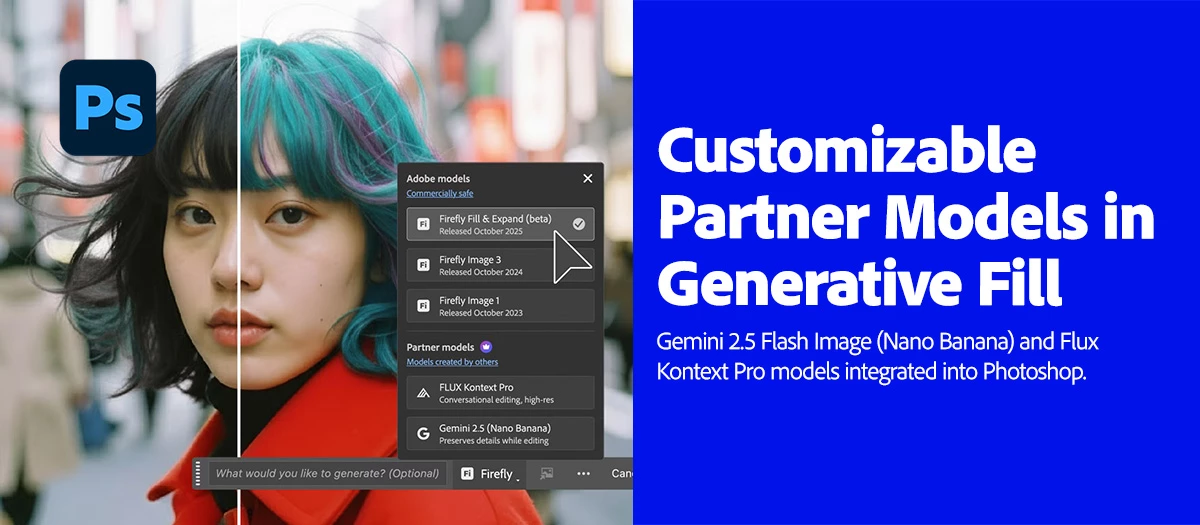
Gemini 2.5 (Nano Banana) and Flux Kontext Pro models now in Photoshop MAX update 27.0
  • October 28, 2025
  • 返信数 19.
  • 4837 ビュー

Big news for Photoshop creators! 

We’re thrilled to announce that Gemini 2.5 Flash Image (Nano Banana) and Flux Kontext Pro models are now integrated into the Photoshop Desktop Generative Fill workflow! These models unlock advanced capabilities to help with your creative vision, including:

  • Style transfer
  • Text editing
  • Object modification
  • Quick or controlled edits
  • Complex transformations

All within a non-destructive, creative control environment.

 

Try it out now

Download the latest version and dive into the new Adobe Photoshop features.

To update Photoshop 27.0, click "Update" in the Creative Cloud desktop app next to Photoshop. More detailed instructions for updating.

Here's how to use these Models in Photoshop's Generative Fill:

  • Open a file → Create a selection (try Select All or Selection Brush)
  • Click the Generative Fill button
  • Tap the Model Picker icon
  • Choose Flux Kontext Pro or Gemini 2.5 (Nano Banana)
  • Enter a detailed prompt → Generate!
  • Click here for more details.


Pro-Tips for using Generative Fill:

  • Use larger, loose selections with the Selection Brush.
  • Avoid hard edges to prevent shifting or visible seams.
  • Add clear prompts to guide the model’s output.
  • Use Flux Kontext for seamless, context-aware backgrounds. It is conversational, helping maintain character consistency and precise edits.
  • Use Nano Banana for stylistic fills. It is optimized for preserving details, making it ideal for creative transformations.


Important Note About Generation Credits:

  • Generative Fill and Generative Expand using Adobe Firefly models are standard features and will consume 1 credit per generation.
  • Generative Fill and Generative Expand, powered by Firefly Fill & Expand (beta) model in Photoshop (beta) on desktop, deduct 1 credit per generation.  
  • Generative Fill, powered by Gemini 2.5 (Nano Banana) and FLUX.1 Kontext [pro] (partner AI models), is a premium feature and deducts 10 credits per generation.
  • Learn more about premium features and generative credits in the generative credits FAQ.


Are you ready to get started? Update Photoshop to the latest version and explore these LLM models and other new exciting features. More details can be found here.


We’d love to hear from you!

Try out these new models in Photoshop 27.0 and let us know your thoughts. Feel free to reach out if you have any questions or need more tips!

If this was helpful, please click the Upvote icon in the top left corner of this post. Your feedback helps us improve the experience. Thank you!


We’d love to see what you’ve created and hear about your experience or feedback! Click 'Reply' below.

Click 'Follow' below to bookmark this post for easy reference.

For other questions, feel free to start a new post in the community.

返信数 19

Participating Frequently
November 10, 2025

Excited to try the Gemini 2.5 and Flux Kontext Pro models in the latest Photoshop MAX update. Looks like some powerful new tools.

Participant
November 4, 2025

This update sounds amazing! I'm excited to try the Gemini 2.5 and Flux Kontext Pro models in Photoshop. The new style transfer features could really boost my creative projects. Thanks for the helpful news!

Glenn 8675309
Legend
November 5, 2025

I tired the flux Kontext last night- I either got one 2 tries- then they want to stick you with a subscription for that feature.

Participant
November 4, 2025

will look into this

onazole
Known Participant
November 3, 2025

And the Harmonize option costs five credits.

Participant
November 2, 2025

As a Gemini Pro user, I naturally assumed I could use Nano Banana as part of my Adobe and Gemini subscriptions without having to pay Adobe again. Now I'm supposed to pay a third time. I don't think that will work for me.

Participant
November 1, 2025

Amazing update! The integration of Gemini 2.5 (Nano Banana) and Flux Kontext Pro really enhances the Generative Fill workflow. I’ve tested both models and the results are noticeably smoother and more accurate. Great job, Adobe team — love how fast these AI improvements are evolving!

Participant
October 30, 2025

This is a very powerful update. It's exciting to see advanced models like Gemini 2.5 and Flux directly integrated.

The 10-credit cost per generation for these new models is a steep jump, which will make experimentation more considered compared to the 1-credit Firefly.


That said, the pro-tip about using Flux for 'conversational' character consistency sounds like it could be a massive time-saver for complex projects.


Looking forward to testing if the performance justifies the cost. Thanks for the detailed breakdown!

CREAM Motion
Known Participant
October 29, 2025

I was very excited to have Nano Banana in Photoshop, but it doesn't work for me!
There is always a discrepancy between the original image and the generated image...
I used up a hundred credits for nothing.


Glenn 8675309
Legend
November 3, 2025

That's the same result I just got- it looked like a cutout from a paper doll set. 

onazole
Known Participant
October 28, 2025

I'm not a premium user and I've been able to use generative fill with Nano Banana and Flux. I'd like to know if the maximum of 100 uses per month that was in the beta is also available now in version 27.


Thanks.

Participant
November 3, 2025

I’m also curious about this. I’ve been using generative fill without a premium plan, and it’s been working great so far. Just wondering if the usage limit from the beta still applies in version 27 or if it’s changed.