


DaveMan1000
Participant
December 17, 2023
解決済み

How to Draw Motion Lines?

  • December 17, 2023
  • 返信数 2.
  • 2726 ビュー

I'm wanting to draw motion lines that simulate shaking and jiggling.


All tutorials I've watched refer to every other motion type except what I'm after.


Didn't know where esle to go.


I've attached a pictured to show what I mean.

解決に役立った回答 Conrad_C

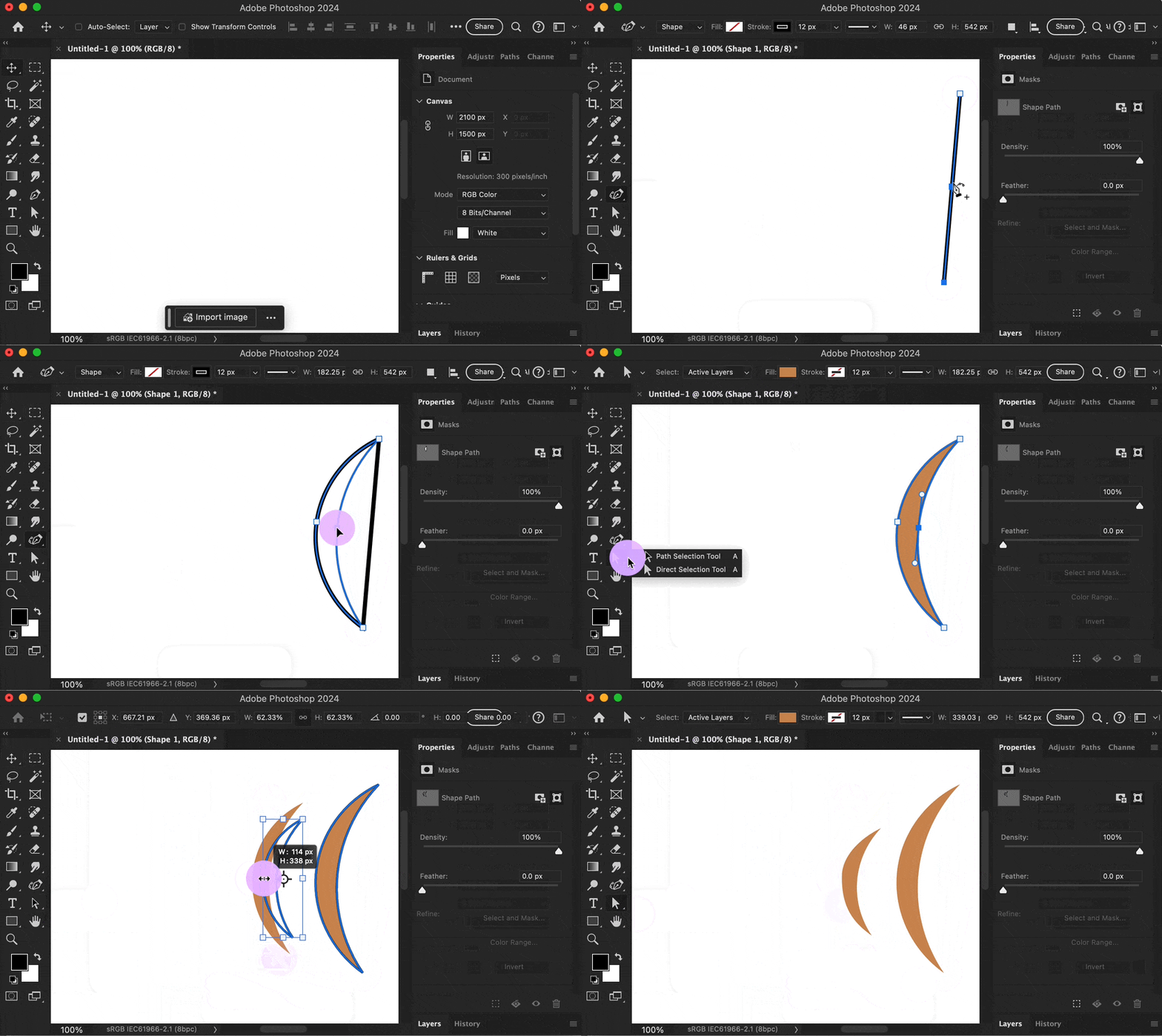
You can make some quickly if you understand how to create and work with vector (draw, not paint) graphics as a shape layer. The demo below shows one way it could be done precisely in a few seconds. Pros would use the Pen tool and I usually do, but in the demo I used the Curvature Pen tool because it can be easier for beginners.


The nice thing about doing it as shape layers is that it’s easy to make duplicates that you can vary in size, shape, and position to indicate different kinds of shaking.


If you need more info, study: Shape layers, drawing with the Curvature Pen tool or Pen tool, and path editing with the Path Selection and Direct Selection tools.
 

返信数 2

Conrad_C
Community Expert
Conrad_CCommunity Expert解決!
Community Expert
December 17, 2023

You can make some quickly if you understand how to create and work with vector (draw, not paint) graphics as a shape layer. The demo below shows one way it could be done precisely in a few seconds. Pros would use the Pen tool and I usually do, but in the demo I used the Curvature Pen tool because it can be easier for beginners.


The nice thing about doing it as shape layers is that it’s easy to make duplicates that you can vary in size, shape, and position to indicate different kinds of shaking.


If you need more info, study: Shape layers, drawing with the Curvature Pen tool or Pen tool, and path editing with the Path Selection and Direct Selection tools.


DaveMan1000
DaveMan1000作成者
Participant
December 18, 2023

Thanks very much. Any chance you can send that to me as a video that I can play back without needing to wait for the whole thing to finish and restart?

Semaphoric
Community Expert
Community Expert
December 17, 2023

I would call them vibration lines. You could draw a few arcs with the Pen tool where you want the lines, and choose a small hard brush with the size control set to Pen Pressure in Shape Dynamics. Select the path segments, and from the Paths panel menu, click on Stroke Path, and in the popup dialog, set Tool to Brush , with the Simulate Pressure box checked. This will give you tapered ends, or you can leave the box un-checked for constant width lines.
