Participant
February 9, 2019
解決済み

How to get Photoshop cc 2018 on mac?

  • February 9, 2019
  • 返信数 3.
  • 19929 ビュー

Hello,

I need some help. I've looked all over the Adobe website and still am unable to get photoshop cc 2018. You see I need photoshop cc 2018 for school so they can licence it but I can only seem to find 2019. I've seen a post saying under manage 'other versions' is supposed to appear but it hasn't. If anyone knows that would be great, thank you!

Bye.
このトピックへの返信は締め切られました。
解決に役立った回答 Trevor.Dennis

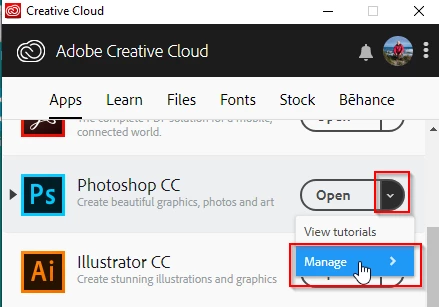
Open the desktop application manager, and click on the drop down next to Photoshop, and select Manage

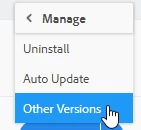
Then select Other Versions

And you'll be good to go.

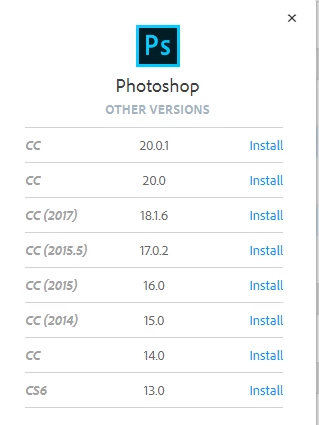
Hmmm..  Or maybe not.  I don't have CC 2018 in the previous versions list.  Can you confirm the _version_ number with your school?  As you can see below, the version numbers do not tally with the CC number so CC 2017 is V18, and CC2015.5 is V17

OK, we'll try ProDesignTools Direct Downloads

https://prodesigntools.com/adobe-cc-2018-direct-download-links.html

返信数 3

Participant
February 9, 2019

Thank you for your help. The direct download worked for me, while the other options didn't. Thank you again.

jane-e
Community Expert
Community Expert
February 9, 2019

Hi Trinity,

In addition to what Trevor.Dennis​ said, if 2018 does not show, then click the ... in the CC app > Prefs > enable Show Older Apps

Trevor.Dennis
Community Expert
Trevor.DennisCommunity Expert解決!
Community Expert
February 9, 2019

Open the desktop application manager, and click on the drop down next to Photoshop, and select Manage

Then select Other Versions

And you'll be good to go.

Hmmm..  Or maybe not.  I don't have CC 2018 in the previous versions list.  Can you confirm the _version_ number with your school?  As you can see below, the version numbers do not tally with the CC number so CC 2017 is V18, and CC2015.5 is V17

OK, we'll try ProDesignTools Direct Downloads

https://prodesigntools.com/adobe-cc-2018-direct-download-links.html

John Waller
Community Expert
Community Expert
February 9, 2019

Trevor.Dennis  wrote

I don't have CC 2018 in the previous versions list.

Curiously, Trevor, I'm running CC 2019 (20.0.2) and CC 2018 appears in my Previous Versions list even though the Show Older Apps checkbox is unchecked in my Cloud Desktop App preferences.

My Previous Versions list looks like this. I wonder why yours is different.