



Trevor.Dennis
Community Expert
Community Expert
December 18, 2018
質問

Loupedeck — How to waste money and slow down your workflow.

  • December 18, 2018
  • 返信数 2.
  • 7957 ビュー

I thought I'd share this as I'd not seen this device before.  It would cost me NZ$250 here, and a bit under US$180 on Amazon.  It's the size of a small house, and I can't think how you'd use it along with a keyboard and tablet.
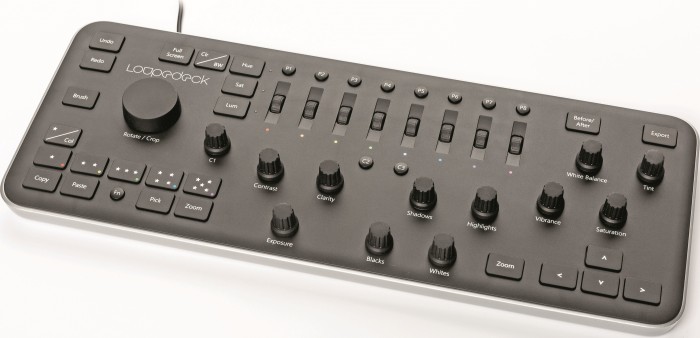
Image result for loupedeck

https://loupedeck.com/

https://petapixel.com/2018/12/14/loupedeck-can-now-be-used-for-photo-editing-in-photoshop/

The video made me cringe because it is so awful.  I mean don't get me wrong...  I love the single click solutions I get with my gaming mouse and keyboard, and while an analogue knob is great for fine adjustments, I am happy using the cursor keys.   (My wee tip of the day in fact, is to have my mouse sensitivity set with just two positions, normal and fine, so I can toggle instantly to fine control for the up close bits.)

So good luck to you if you have one of these on your Christmas list, but I feel there are better ways to streamline your workflow.

このトピックへの返信は締め切られました。

返信数 2

jane-e
Community Expert
Community Expert
December 19, 2018

Trevor.Dennis  wrote

The video made me cringe because it is so awful.  I mean don't get me wrong...  

So good luck to you if you have one of these on your Christmas list, but I feel there are better ways to streamline your workflow.

I’m pretty sure it would have made #1 on Dave Barry’s Gift Guide, but it looks like he may have stopped doing them. Some of his older lists are here:

Dave Barry Holiday Gift Guides

As for me, I barely made it almost halfway through, Trevor. I tried.

D Fosse
Community Expert
Community Expert
December 19, 2018

It's a turkey, right in time for Christmas

I don't know why, but this gives me a distinct '70s feel, an analog control device, James Bond-villain style...does it come in teak?

davescm
Community Expert
Community Expert
December 19, 2018

Hi,

..and yet such hardware controllers are very popular in the video world.

Me though, I'll stick with my pen, tablet and mouse.

Dave

Trevor.Dennis
Community Expert
Trevor.DennisCommunity Expert作成者
Community Expert
December 19, 2018

Trevor, how can you work with the monitor jerking around like that? Or is it tracking your face as you move around all your gizmos?


https://forums.adobe.com/people/D+Fosse  wrote

Trevor, how can you work with the monitor jerking around like that? Or is it tracking your face as you move around all your gizmos?

You've got that back to front Dag.  The monitor moves away as I try to look at it. 

Jane that's 25% better than I managed.