


Inspiring
September 22, 2024
質問

Mauvaise restitution de la couleur des photos

  • September 22, 2024
  • 返信数 5.
  • 5415 ビュー

Bonjour à toutes et à tous,

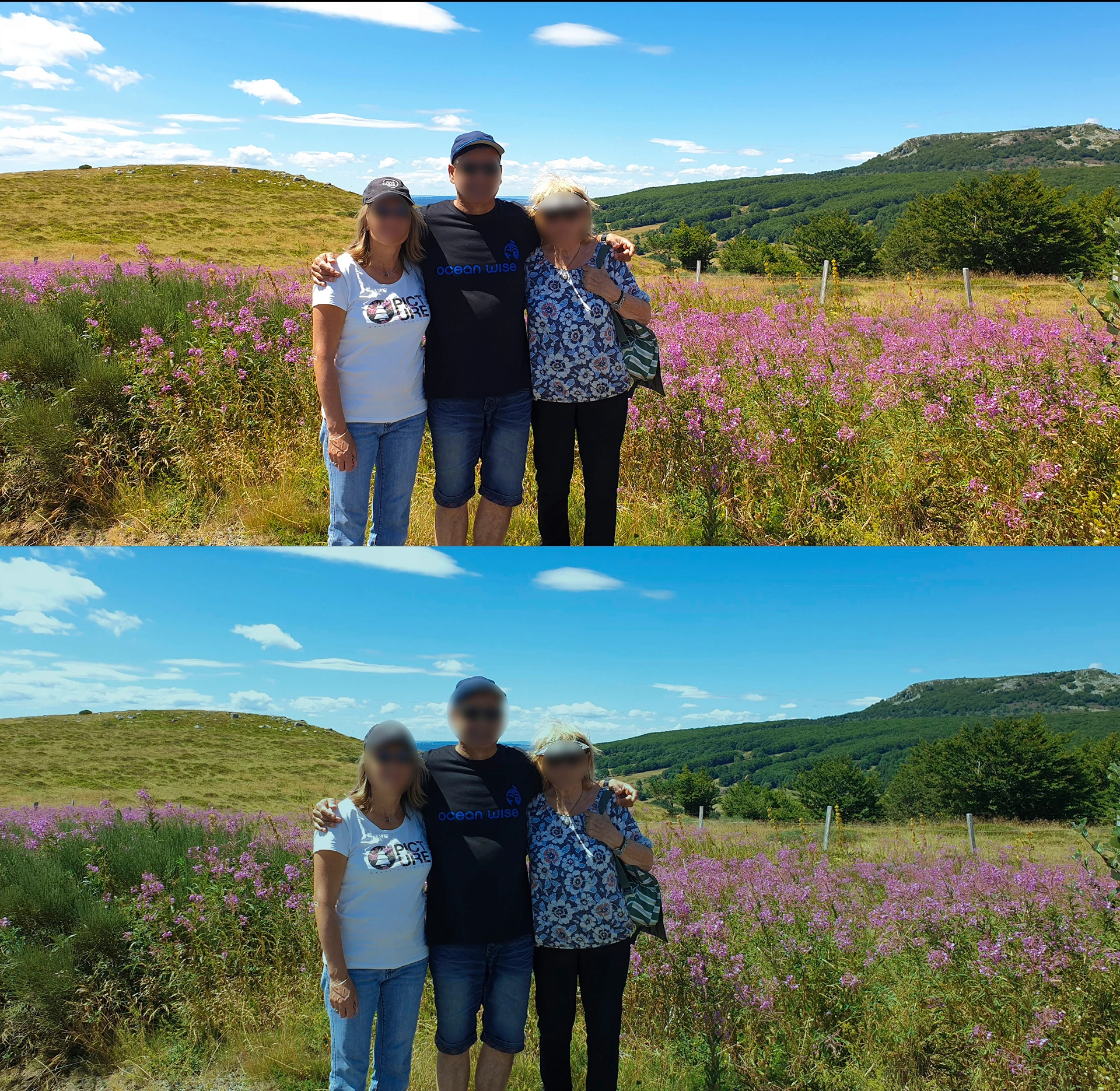
un exemple concret vaut mieux qu'une explication tronquée.  Dans PS, mes photos prennent une teinte verdâtre qui sont loin des couleurs d'origine, la photo du haut étant l'originale.

Sur TV, smartphone etc.... ou bien sur Luminar Neo, les couleurs de la photo originale sont respectées, mais pas sur PS.

J'ai lu ici ou là qu'il fallait mettre le profil couleur sur sRGBIEC61966-2. ainsi que dans le profil couleur de Windows, ce que j'ai tenté mais rien n'y fait, j'ai d'ailleurs essayé plusieurs profils mais sans succès. 

C'est frustrant car comment modifier la colorimétrie d'une photo si elle est mal restituée ? 

Je ne sais plus trop quoi faire, si quelqu'un a une solution à ce problème, je suis preneur.

Merci

Philippe
このトピックへの返信は締め切られました。

返信数 5

Inspiring
October 9, 2024

Bonjour,

je ne peux pas me permettre de payer un abonnement pour un logiciel que je ne peux pas utiliser pleinement. Je vais donc arrêter l'abonnement  avec regrets.

Merci à vous d'avoir tout tenter.

Philippe

Inspiring
September 30, 2024

Bonjour,

Je remercie tous ceux qui m’ont apportés leur soutien, malgré cela mon problème persiste.

Je voudrai savoir s’il est possible de joindre directement Adobe/support/PS, pour trouver une solution.  Si oui, savez vous comment ?

Merci beaucoup

Per Berntsen
Community Expert
Community Expert
September 30, 2024
quote

Disabling the Intel driver makes the elements (icons, text, etc.) very small, and therefore almost unreadable.


By @philippeh74678683


Have you tried setting Scaling to a higher value in Windows Display settings?


Inspiring
October 1, 2024

Non je n'ai pas essayé,  convenez que ce n'est pas une utilisation normale et logique de devoir désactiver le pilote Intel ensuite augmenter l'échelle, puis refaire l'inverse ensuite dès que l'on quitte PS.

J'ai aussi eu un bug qui a fermé seul ma séance de jeu (ce n'est pas la première fois). Dans le moniteur de fiabilité, j'ai pu observé un évenement critique " IGCCTray Stopped Responsing "  

Serait-ce lié ?

Inspiring
September 25, 2024

Bonjour,

même le blanc du sélecteur de couleurs a une teint verte.

Per Berntsen
Community Expert
Community Expert
September 25, 2024

This looks like a defective monitor profile, which can affect some color managed applications, but not others.

I see in one of your previous posts that you have tried setting the monitor profile to sRGB, but try it again, following this procedure:


  • Close Photoshop and all other color managed applications.
  • Press the Windows key + R, type colorcpl in the box and press Enter, which opens the Color management dialog.
  • Add the sRGB IEC61966-2.1 profile, and set it as default. If you have a wide gamut monitor, use Adobe RGB.


If this fixes the issue, you should calibrate your monitor with a hardware calibrator.

This will also create and install a custom monitor profile that will be more accurate than sRGB.


Inspiring
September 25, 2024

Bonjour,

merci pour votre intervention, malheureusement rien n'a changé.  Je suis désespéré.

Inspiring
September 23, 2024

Bonjour,

je viens de découvrir, un peu par hasard, que si je déplace ma photo sur un arrière plan (noir dans l'exemple), les couleurs de ma photo deviennent parfaitement conformes (voir photo jointe) . C'est une histoire de fou, je n'y comprend plus rien. 

mglush
Community Expert
Community Expert
September 23, 2024

That is very strange that the color shifts when you change the background area. What is the color profile of your image? If you go to Edit>Convert to Profile, it will tell you up at the top.


Inspiring
September 23, 2024

Per Berntsen
Community Expert
Community Expert
September 22, 2024
quote

Hello everyone,

a concrete example is better than a truncated explanation. In PS, my photos take on a greenish tint that are far from the original colors, the top photo being the original.

On TV, smartphone etc... or on Luminar Neo, the colors of the original photo are respected, but not on PS.

I read here and there that you have to put the color profile on sRGBIEC61966-2. as well as in the color profile of Windows, which I tried but nothing helped, I tried several profiles but without success.

It's frustrating because how can you change the colorimetry of a photo if it is badly rendered?

I don't really know what to do, if anyone has a solution to this problem, I'm all for it.

Thank you

Philippe


By @philippeh74678683


Most likely, Photoshop, which is color managed, is displaying correct colors, and the others are wrong.

TVs and smartphones are not color managed, and can not be expected to display correct colors.

I'm not familiar with Luminar Neo, but I find no mention of color management in their documentation.


There is a possibility that Photoshop is displaying wrong colors – either caused by a bug in the GPU driver, or by a defective or incompatible monitor profile.

Also note that applications that cannot display raw files will display the jpg embedded in the raw files instead.

Depending on your camera settings, the jpgs may display differently from the raw files.


Are your originals raw or jpg?

Can you post an unedited original here?

You can attach files up to 47 MB.

Inspiring
September 22, 2024

Bonjour et merci pour la réponse,

oui il s'agit d'une photo jpg,  je n'ai pas l'original non modifié.