


解決済み
Missing Old Photoshop Shapes
On my Mac, how do I restore my legacy shapes in Photoshop 2020? I'm missing the basics shapes such as arrows, bubbles, etc
I deleted my older version of Photoshop assuming the new version would already include them.

On my Mac, how do I restore my legacy shapes in Photoshop 2020? I'm missing the basics shapes such as arrows, bubbles, etc
I deleted my older version of Photoshop assuming the new version would already include them.
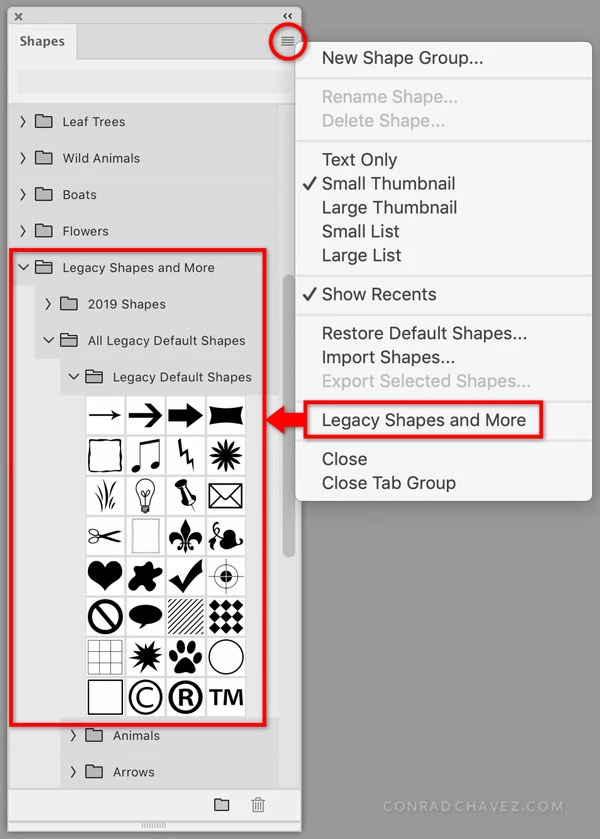
Click to open the Shapes panel menu, and choose Legacy Shapes and More. That will add preset groups to the Shapes panel. Then expand or reorganize the preset groups so that you can get to the shapes you want in a way that's most efficient for you. For example, you might choose to move your favorite shapes into a group that you keep at the top of the panel list.
UPDATE: If you can’t open the Shapes panel menu because it is not there, that menu appears only in the Shapes panel (choose Window > Shapes), not when you see the list of shapes provided in other parts of Photoshop such as the options bar. This is consistent with Gradients, Patterns, Swatches, etc. in Photoshop: You manage the list in its panel, which you open by choosing its name from the Window menu.
Enter your E-mail address. We'll send you an e-mail with instructions to reset your password.
 AdChoices