Participant
January 2, 2016
解決済み

My photoshop timeline menu is not showing all the options I need to crate a frame animation. Help please!

  • January 2, 2016
  • 返信数 2.
  • 54015 ビュー

Hi there,

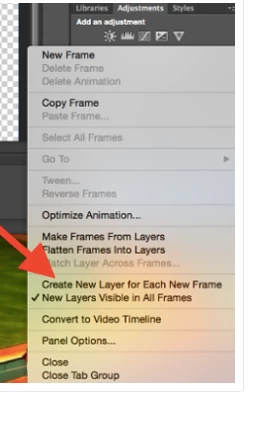
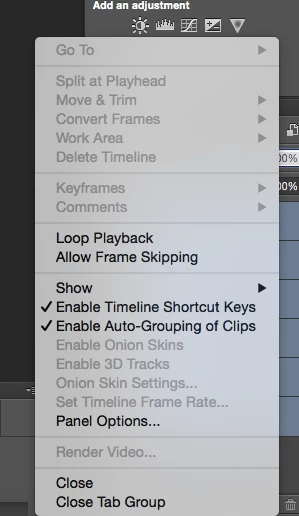
My photoshop timeline is not showing all the options I need in order to create a frame animation. It seems as though some of the options are not available (mouse arrow turns into a black circle with a cross through it when I hover my mouse over such options) and the menu bar is not showing all the options that should be there in order to create an animated gif.

Is this because I need to update my photoshop? I have attached 2 photos to help - 1st photo is the menu options I see on my computer. 2nd photo (with the red arrow in it) is what the timeline menu should look like based on the online photoshop GIF tutorial I am following.

Thanks for your help!
解決に役立った回答 PatriciaMcB

well, it wasn't really clear , was it?!!!

thanks.


Well EUREKA!! So easy when you click on Create Frame Animation, not just select in from the dropdown.... Phew!

返信数 2

Participant
July 18, 2021

It doset let me press it anyway.

Participant
August 2, 2021

I'm having the same exact issue. someone please help.

War Unicorn
Community Expert
Community Expert
January 2, 2016

You have a Video Timeline. Convert it to a Frame Animation via the teeny-tiny button in the lower left corner of the Timeline panel. (It'll look like 3 hollow squares.)

February 23, 2016

I have used the drop list to change to 'Create Frame Animation' and nothing changes with the menu. I have tried clicking the three boxes, but the cursor changes to a 'you can't do that' symbol (See attached photo). Any idea what gives?

Participant
February 28, 2018

I had ticked Frame Animation in that drop down list in the center of the screen, but didn't realize that it became a button I had to click as well. Seems redundant, but as long as it is working it's all good. Thanks.


So relieved to find this thread.  I had exactly the same issue and it has been driving me nuts!