



Zealous_dare5ED5
Inspiring
October 31, 2022
解決済み

Photos qui "clignotent" sous photoshop CC

  • October 31, 2022
  • 返信数 6.
  • 2353 ビュー

Depuis la dernière MAJ (avant-hier) je ne peux plus retoucher mes photos (sous Mac), elles "sautent", elles clignotent, impossible de poser la souris dessus ! Quand j'approche la souris un morceau de la photo disparait et devient grise. Ensuite ça clignote. 
Je m'arrache les cheveux, j'ai re-démarré 10 fois, rien à faire...
Des idées ?
Merci 🙂 
このトピックへの返信は締め切られました。
解決に役立った回答 Ged_Traynor

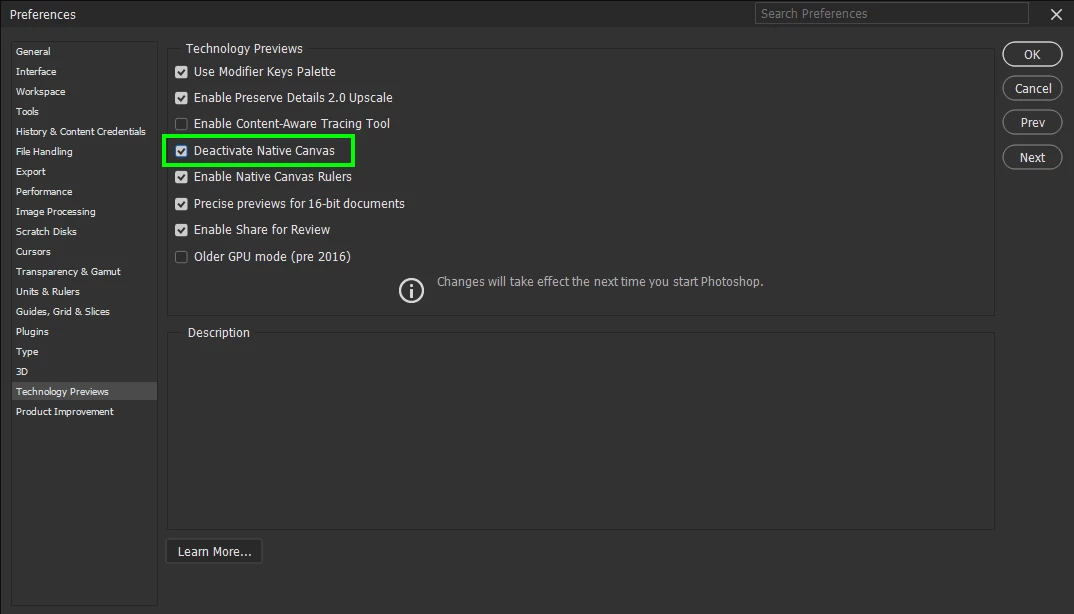
You need to enable it, as in put a check mark in it and don't forget to restart Photoshop

返信数 6

Ged_Traynor
Community Expert
Community Expert
October 31, 2022

You're welcome 🙂

Zealous_dare5ED5
Inspiring
October 31, 2022

Ok sorry for the misunderstanding. I activated it and reboot PS + the computer. First it was worse (photos cut in 10 parts like a puzzle) but it seems to be stable now... The photo is back  normal... Thanks a lot for your help!

Participant
February 1, 2023

For those who have this flickering problem when selecting an image on windows 10, this trick worked very well for me and solved all my problems, I'm on windows 10, photoshop 24.0.1 (GPU Nvidia 3070ti + CPU Intel 13700KF).
Thank you for taking the time to fix this, I was going crazy with this, I searched for several days, obviously disabling my GPU in the "performance" tab also solved this problem, but I was able reactivated it thanks to this trick. I hope Adobe will fix this problem soon. Ty for your help again 🙂

Ged_Traynor
Community Expert
Ged_TraynorCommunity Expert解決!
Community Expert
October 31, 2022

You need to enable it, as in put a check mark in it and don't forget to restart Photoshop

Zealous_dare5ED5
Inspiring
October 31, 2022

Ok I found it, it was already deactivated! 

Zealous_dare5ED5
Inspiring
October 31, 2022

Thanks for your help, but where do you find this option?...

Ged_Traynor
Community Expert
Community Expert
October 31, 2022

Hi

Try enabling this option in preferences and restarting Photoshop to see if it helps