


Chre
Inspiring
October 29, 2018
解決済み

Photoshop CC 2019 (20.0) crash d3dcompiler_47.dll on win7

  • October 29, 2018
  • 返信数 6.
  • 26428 ビュー

Hi all,

This morning, our Creative Cloud software have some updates (because CC 2019), and Photoshop CC now doesn't run.

It is on Win7 64 bits (version 6.1, number 7601, service pack 1).

I have this error on Photoshop launch :

"Can't start software because missing D3DCOMPILER_47.dll file. Try to reinstall to solve this issue" or something like that because my error message is in french.
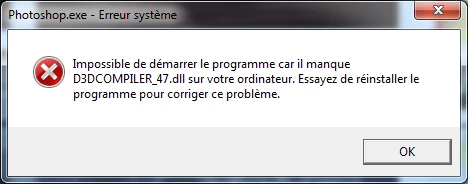
Any idea to solve that?

Thanks for help.

My graphical card : AMD FirePro W2100 (FireGL V) Graphics Adapter

Ce message a été modifié par : CR

このトピックへの返信は締め切られました。
解決に役立った回答 Test Screen Name

Hmm I see you are on Windows 7. Still, maybe this patch will work anyway - Update for the d3dcompiler_47.dll component on Windows Server 2012, Windows 7, and Windows Server 2008 R2

返信数 6

June 1, 2020

Здравствуйте. Приобрёл "Фотошоп" и "Лайтрум". Установил. Программа "Фотошоп" не открывается, не работает. Постоянно выдаёт какую-то ошибку. Скриншот ошибки прикрепляю. Переустановил программу трижды, но всё безрезультатно. Помогите решить проблему.


Hello. Acquired "Photoshop" and "Lythrum". Established. The program "Photoshop" does not open, does not work. Always gives some error. I attach a screenshot of the error. I reinstalled the program three times, but to no avail. Help me solve the problem.

AxelMatt
Community Expert
Community Expert
June 1, 2020

I can't translate the message in the screenshot, but I hope it will be help.


Please take a look here:

Photoshop не запускается — отсутствует файл D3DCOMPILER_47.dll

Photoshop CC 2019 (20.0) crash d3dcompiler_47.dll on win7


My System: Intel i7-8700K - 64GB RAM - NVidia Geforce RTX 3060 - Windows 11 Pro 25H2 -- LR-Classic 15 - Photoshop 27 - Nik Collection 8 - PureRAW 6 - Topaz Photo AI
Participant
July 24, 2019

This just happened to me also.  I'll try the link.  It's Windows 7, but Photoshop was working fine until this morning.

alireza852019
Participating Frequently
April 25, 2019

I link you to these solutions HERE . Which I tried the second solution and it worked for me!

Participant
July 24, 2019

Where do you get the file to copy if it's not on your computer?

Chre
Chre作成者
Inspiring
July 25, 2019

Hi all, hi @7300967_S,


Sorry, maybe I don't understand your question, but according answers here, this DLL file can be obtained directly from MS :

Update for the d3dcompiler_47.dll component on Windows Server 2012, Windows 7, and Windows Server 2008 R2


(see solution 1 from link gived by alireza852019

Photoshop can't start because D3DCOMPILER_47.dll is missing)

JohnRPrice
Participant
November 11, 2018

Nearly all the Adobe software apps have the D3DCompliler_47.dll in their directories, including Photoshop.  My problem was with running Photoshop only as all the other Apps worked ok including Lightroom.  If I used the 'Edit in' option in Lightroom and selected Photoshop CC 2019, then Photoshop opened ok for some reason.

I simply copied the D3DCompliler_47.dll from the Photoshop folder and pasted it into the Windows/System32 folder and it now works ok.

Hope this is helpful.

Participant
November 17, 2018

I was having the same issue (only a problem with Photoshop CC 2019) and this fixed it! Thank you!

Legend
October 29, 2018

I had the same problem on my second computer with Win 7. (The one with Win7 Pro had no problem but the Win 7 Home computer threw the error)

I copied the file to both folders:

C:\windows\system32

C:\windows\CysWOW64

and all was well

See if the file is maybe in one of the two directories, then copy it to the other. If not try to find it on the internet or email me and I'll send the file to you.

Legend
October 29, 2018

Are you running on Windows Server? What operating system?

Legend
October 29, 2018

Hmm I see you are on Windows 7. Still, maybe this patch will work anyway - Update for the d3dcompiler_47.dll component on Windows Server 2012, Windows 7, and Windows Server 2008 R2

Chre
Chre作成者
Inspiring
October 29, 2018

Good catch, thanks testScreenName​!

I'm just install KB4019990 on my Windows 7 workstation computer, and then Photoshop CC 2019 20.0 now run.

Cheers for help.