


Participant
October 5, 2019
質問

PhotoShop CC Will not Load At All

  • October 5, 2019
  • 返信数 3.
  • 891 ビュー

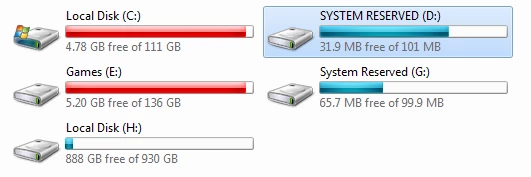
Recently I went to try and get a trial version of PhotoShop CC through the free Creative Cloud, but I ran into a few errors. On load it fires "Could not initilize because Scratch is disk full" or something to that effect. I have tried to assign my H: drive with 800+ GB free as the Scratch by pressing Alt+Ctrl at the begging of loading. I have no idea what to do. (Would it make any difference having an older version of PS installed on the PC? Here is a screenshot of my hardrives.
このトピックへの返信は締め切られました。

返信数 3

Community Expert
October 5, 2019

Press Ctrl + Alt when you launch Photoshop. A dialog box should appear to select a different scratch disk, where you can choose the H drive.

floramc
Community Expert
Community Expert
October 5, 2019

Hello,


the presence of an older version does not interfere with the installation. It might give you that message if you are using both version and you are running out of RAM.


I think Tony is absolutely on spot as to where to go looking for the issue. 


Normally I clean up my laptop, that has a very limited budget in ram and gives me the scratch disk full message more often than not when I work on Bridge. Many things depend on the capacity of the computer we are using. I notice that, while cleaning the scratch disk opens to more space, it does not save me from the application eventually filling it up again.


As a general advice, try not to have too many applications open and running at the same time.

Tom Winkelmann
Inspiring
October 5, 2019

Have you set H: as your first scratch disk or have you seen the menu when loading PS not at all?

Do you start Photoshop as Administrator (right click on PS Icon > Properties > Compatibility > Run this program as an administrator)?

If this doesn't work, you can run "Disk Cleanup" to get more extra space on C:

https://support.microsoft.com/en-us/help/4026616/windows-10-disk-cleanup