


konrad79
Inspiring
March 25, 2023
解決済み

Photoshop not opening any photos since last update (Win11)

  • March 25, 2023
  • 返信数 1.
  • 2563 ビュー

Since the last photoshop update yesterday (version: 4.3.0 20230316.r.376 37b4b38  x64) I cannot open any photo. Each photo ends up flickering black/white in the window. The navigation preview seems correct. But the main view is just flickering black/white.


How can I roll back to an earlier photoshop version?


Windows 11 – latest updates
このトピックへの返信は締め切られました。
解決に役立った回答 Ged_Traynor

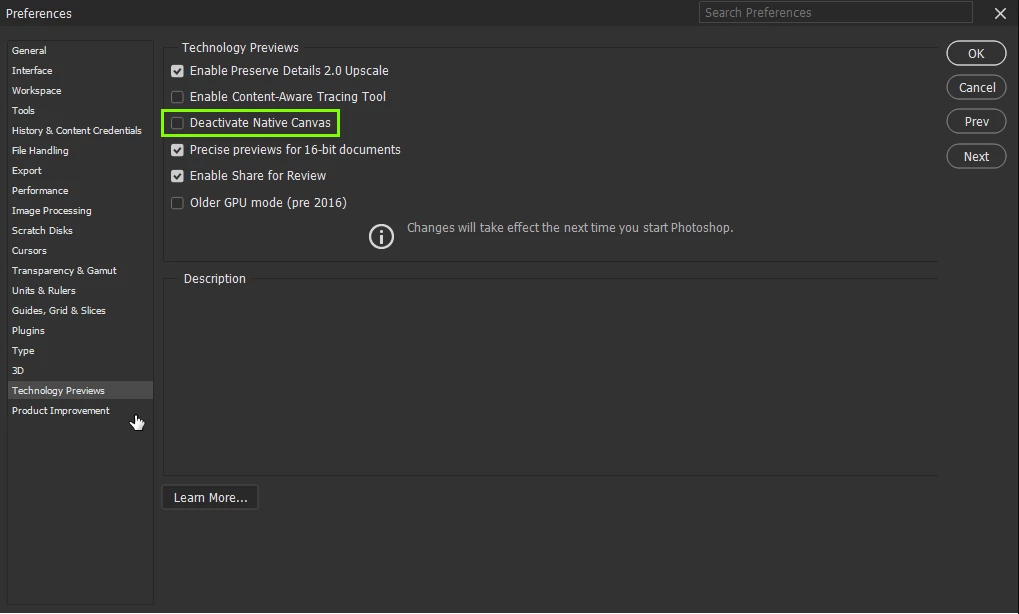
@konrad79 enable this option in preferences and restart Photoshop, this issue has been documented hundreds of times on the forum over the last 3 days

返信数 1

Ged_Traynor
Community Expert
Ged_TraynorCommunity Expert解決!
Community Expert
March 25, 2023

@konrad79 enable this option in preferences and restart Photoshop, this issue has been documented hundreds of times on the forum over the last 3 days

Inspiring
December 12, 2023

This did not work to solve the problem in Win11

I have set Photoshop to be the default program to open my TIFF files.

If I click a photo's file name, nothing happens.

If I right click the file name and choose Open with Photoshop, Photoshop opens then the file is opened.

If I then left click another photo's file name, nothing happens.

Meanwhile there are 15 Adobe and Creative Cloud background services running, doing nothing useful to make Photoshop actually work.

I have no problems when clicking other relevant file types in Word, WordPerfect, Adobe Reader etc which open immediately , so this does not seem to be an OS Win11 problem.


The problem seems to be a failure of Photoshop to interact fully with the OS filing system.  Has MS done anything to it recently?


Ged_Traynor
Community Expert
Community Expert
December 12, 2023

@CVHManchester the issue the OP was having is unrelated to the issue you described, what exact version of Photoshop do you have, have you tried manually resetting your Photoshop preferences
https://helpx.adobe.com/ie/photoshop/using/preferences.html#Manually
Remember to backup your settings before doing the preference reset
https://helpx.adobe.com/ie/photoshop/using/preset-migration.html

If that doesn't help, try using the Adobe cleaner tool

https://helpx.adobe.com/ie/creative-cloud/kb/cc-cleaner-tool-installation-problems.html