Participant
October 5, 2020
解決済み

Photoshop Purple Skin

  • October 5, 2020
  • 返信数 8.
  • 23771 ビュー

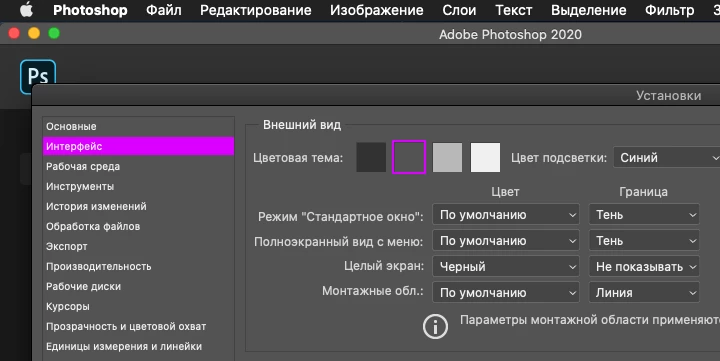
Hello, I saw this Photoshop skin in purple on Youtube.

How can I set my Photoshop to purple.

Do I have to edit a skin file for this ?
Unfortunately I have not found anything on the internet.

I would be very grateful for help.


解決に役立った回答 jazz-y

In that case he probably doesn't need Photoshop. Photoshop is professional software that people use for a living, it's not a toy.


I do not know why, but let it be 🙂 Only view values. Maybe someone will come in handy.
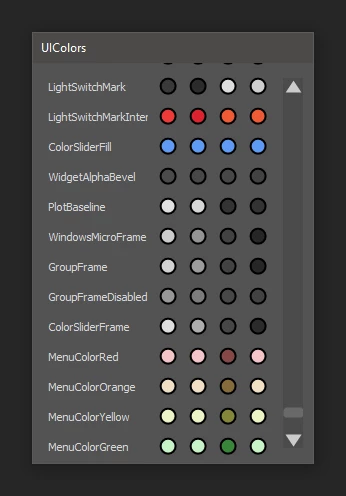
 

#target photoshop

var f = File(app.path + '/Required/UIColors.txt')
if (f.exists) {
  var s = '('
  f.open('r')
  while (!f.eof) { s += f.readln() }
  f.close()
  s += ')'
  s = s.replace(/00\./g, '0.') //some lines contain numbers like 00.90
}

var obj = eval(s)

var w = new Window("dialog"),
  g = w.add("group"),
  s = w.add("scrollbar"),
  c = obj.Colors;

w.text = "UIColors"
w.maximumSize.height = 400
w.orientation = "row"
g.orientation = "column"

for (a in c) {
  colorGroup(g, a, [c[a][0], c[a][1], c[a][2], c[a][3]])
}

s.onChanging = function () { g.location.y = -100 * this.value }

w.onShow = function () {
  s.size.height = w.size.height - 30
  s.size.width = 20
  s.location = [g.size.width + 30, 15]
  s.maxvalue = (g.size.height - w.size.height + 15) / 100
  w.size.width = 280
}

w.show()

function colorGroup(parent, cpt, color) {
  var g = parent.add("group"),
    s = g.add("statictext");
  g.orientation = "row"
  g.alignChildren = ["left", "center"]
  s.preferredSize.width = 100
  s.text = cpt

  for (var i = 0; i < 4; i++) {
    addColor(g, color[i])
  }

  function addColor(parent, c) {
    var img = parent.add("image")
    img.preferredSize.width = img.preferredSize.height = 20

    img.onDraw = function () {
      gfx = this.graphics
      gfx.ellipsePath(2, 2, 15, 15)
      gfx.fillPath(gfx.newBrush(gfx.BrushType.SOLID_COLOR, [c[0] / 255, c[1] / 255, c[2] / 255, c[3]]))
      gfx.strokePath(gfx.newPen(gfx.PenType.SOLID_COLOR, [0, 0, 0], 2))
    }
  }
}


EDIT 1: Added the ability to change colors from the interface and save to file. In theory, the colors of the interface can be edited - in practice there are so many of them that it is still inconvenient to do it.
(forgive me)
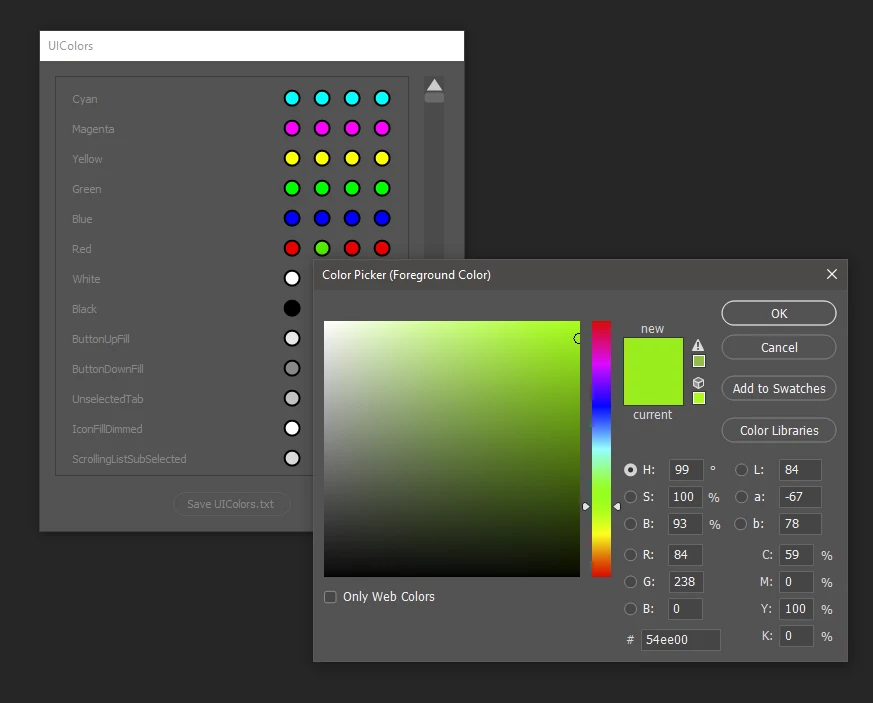
 

#target photoshop

var f = File(app.path + '/Required/UIColors.txt')
if (f.exists) {
  var s = '('
  f.open('r')
  while (!f.eof) { s += f.readln() }
  f.close()
  s += ')'
  s = s.replace(/00\./g, '0.') //some lines contain numbers like 00.90

  var obj = eval(s),
    w = new Window("dialog", "UIColors"),
    p = w.add("panel"),
    g = p.add("group"),
    b = w.add("button", undefined, "Save UIColors.txt", { name: "ok" }),
    s = w.add("scrollbar");

  p.maximumSize.height = 400
  g.orientation = "column"

  for (a in obj.Colors) {
    colorGroup(g, a, [obj.Colors[a][0], obj.Colors[a][1], obj.Colors[a][2], obj.Colors[a][3]])
  }

  s.onChanging = function () { g.location.y = -100 * this.value }

  b.onClick = function () {
    var s = obj.toSource()
    s = s.substr(1, s.length - 2)
    f = (new File(app.path + '/Required/UIColors.txt')).saveDlg("Save file", "*.txt");
    f.open('w');
    f.write(s)
    f.close()
    w.close()
  }

  w.onShow = function () {
    s.size.height = p.size.height
    s.size.width = 20
    s.location = [p.size.width + 30, 15]
    s.maxvalue = (g.size.height - p.size.height + 15) / 100
    w.size.width = s.location.x + 40
    w.size.height = b.location.y + 40
  }

  w.show()

  function colorGroup(parent, cpt, col) {
    var g = parent.add("group"),
      s = g.add("statictext", undefined, cpt);
    g.orientation = "row"
    g.alignChildren = ["left", "center"]
    s.preferredSize.width = 200

    for (var i = 0; i < 4; i++) {
      addColor(g, col[i], cpt, i)
    }

    function addColor(parent, col, cpt, idx) {
      var img = parent.add("image")
      img.preferredSize.width = img.preferredSize.height = 20

      img.onDraw = function () {
        var gfx = this.graphics
        gfx.ellipsePath(2, 2, 15, 15)
        gfx.fillPath(gfx.newBrush(gfx.BrushType.SOLID_COLOR, [col[0] / 255, col[1] / 255, col[2] / 255, col[3]]))
        gfx.strokePath(gfx.newPen(gfx.PenType.SOLID_COLOR, [0, 0, 0], 2))
      }

      img.onClick = function () {
        var a = new SolidColor
        a.rgb.red = col[0]
        a.rgb.green = col[1]
        a.rgb.blue = col[2]
        app.foregroundColor = a
        if (app.showColorPicker()) {
          var a = app.foregroundColor;
          obj.Colors[cpt][idx][0] = col[0] = a.rgb.red
          obj.Colors[cpt][idx][1] = col[1] = a.rgb.green
          obj.Colors[cpt][idx][2] = col[2] = a.rgb.blue
          parent.location.y = parent.location.y - 1
          parent.location.y = parent.location.y + 1
        }
      }
    }
  }
}


EDIT 2: add filter panel to fast search settings
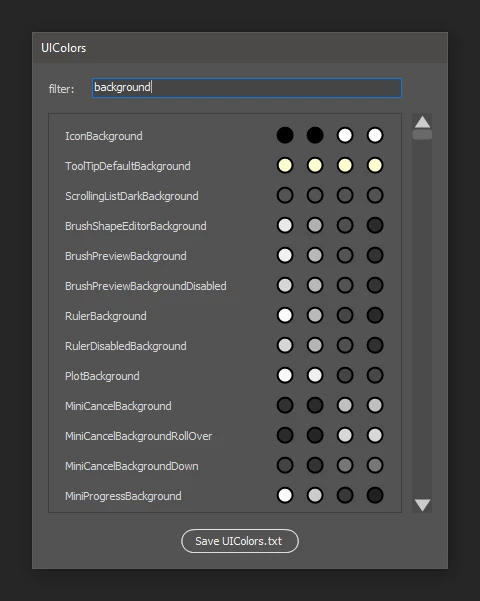
 

#target photoshop

var f = new File(app.path + '/Required/UIColors.txt')
if (!f.exists) f = File.openDialog("Select your UIColors.txt", "*.txt", false)
if (f.exists) {
  var s = '('
  f.open('r')
  while (!f.eof) { s += f.readln() }
  f.close()
  s += ')'
  s = s.replace(/00\./g, '0.') //some lines contain numbers like 00.90

  try { var obj = eval(s) } catch (e) { alert(e, decodeURI(f.name), true) }

  if (obj) {
    var w = new Window("dialog", "UIColors"),
      gt = w.add("group"),
      st = gt.add('statictext'),
      e = gt.add('edittext'),
      gc = w.add("group"),
      p = gc.add("panel"),
      s = gc.add("scrollbar {stepdelta: 100}", [0, 0, 20, 400]),
      g = p.add("group"),
      b = w.add("button", undefined, "Save UIColors.txt", { name: "ok" });

    gt.alignChildren = ["left", "fill"];
    gt.alignment = ["fill", "center"];
    st.text = "filter:"
    p.maximumSize.height = p.minimumSize.height = 400
    e.preferredSize.width = 310
    g.orientation = "column"

    loadLabels()

    s.onChanging = function () { g.location.y = -100 * this.value }

    b.onClick = function () {
      var s = obj.toSource()
      s = s.substr(1, s.length - 2)
      f = (new File(app.path + '/Required/UIColors.txt')).saveDlg("Save file", "*.txt");
      if (f) {
        f.open('w');
        f.write(s)
        f.close()
        w.close()
      }
    }

    e.onChanging = function () {
      var len = g.children.length - 1
      for (var i = len; i >= 0; i--) { g.remove(g.children[0]) }
      loadLabels(e.text)
      w.layout.layout(true)
      s.value = s.minvalue = 0
      s.maxvalue = (g.size.height - p.size.height + 15) / 100
    }

    w.onShow = function () {
      s.value = s.minvalue = 0
      s.maxvalue = (g.size.height - p.size.height + 15) / 100
    }

    w.show()

    function loadLabels(filter) {
      filter = filter ? filter.toUpperCase() : null
      for (a in obj.Colors) {
        if (a.toUpperCase().indexOf(filter) != -1 || !filter) {
          colorGroup(g, a, [obj.Colors[a][0], obj.Colors[a][1], obj.Colors[a][2], obj.Colors[a][3]])
        }
      }
    }

    function colorGroup(parent, cpt, col) {
      var g = parent.add("group"),
        s = g.add("statictext", undefined, cpt);
      g.orientation = "row"
      g.alignChildren = ["left", "center"]
      s.preferredSize.width = 200

      for (var i = 0; i < 4; i++) {
        addColor(g, col[i], cpt, i)
      }

      function addColor(parent, col, cpt, idx) {
        var img = parent.add("image")
        img.preferredSize.width = img.preferredSize.height = 20

        img.onDraw = function () {
          var gfx = this.graphics
          gfx.ellipsePath(2, 2, 15, 15)
          gfx.fillPath(gfx.newBrush(gfx.BrushType.SOLID_COLOR, [col[0] / 255, col[1] / 255, col[2] / 255, col[3]]))
          gfx.strokePath(gfx.newPen(gfx.PenType.SOLID_COLOR, [0, 0, 0], 2))
        }

        img.onClick = function () {
          var a = new SolidColor
          a.rgb.red = col[0]
          a.rgb.green = col[1]
          a.rgb.blue = col[2]
          app.foregroundColor = a
          if (app.showColorPicker()) {
            var a = app.foregroundColor;
            obj.Colors[cpt][idx][0] = col[0] = a.rgb.red
            obj.Colors[cpt][idx][1] = col[1] = a.rgb.green
            obj.Colors[cpt][idx][2] = col[2] = a.rgb.blue
            parent.location.y = parent.location.y - 1
            parent.location.y = parent.location.y + 1
          }
        }
      }
    }
  }
}


EDIT 3:

Added compatibility with the hex format used in CS6 and fixed a couple of points for new versions of Photoshop.
Compatibility with CS6 is rather arbitrary, since a different approach to the organization of the script interface is required to remove hangs during rendering.


#target photoshop

var f = new File(app.path + '/Required/UIColors.txt')
if (!f.exists) f = File.openDialog('Select your UIColors.txt', '*.txt,*.cel', false)
if (f) {
  var s = '('
  f.open('r')
  while (!f.eof) { s += f.readln() }
  f.close()
  s = s.replace(/00\./g, '0.') + ')'
  var isHex = s.indexOf('0x') != -1 ? true : false
  try { var obj = eval(s) } catch (e) { alert(e, decodeURI(f.name), true) }


  if (obj) { if (isHex) HexColor(obj) }

  var w = new Window('dialog', 'UIColors'),
    gt = w.add('group'),
    st = gt.add('statictext', undefined, 'filter:'),
    e = gt.add('edittext'),
    gc = w.add('group'),
    p = gc.add('panel'),
    s = gc.add('scrollbar {stepdelta: 100}', [0, 0, 20, 400]),
    g = p.add('group'),
    b = w.add('button', undefined, 'Save UIColors.txt', { name: 'ok' });

  gt.alignChildren = ['left', 'fill'];
  gt.alignment = ['fill', 'center'];
  p.maximumSize.height = p.minimumSize.height = 400
  e.preferredSize.width = 310
  g.orientation = 'column'

  loadLabels()

  s.onChanging = function () { g.location.y = -100 * this.value }

  b.onClick = function () {
    var ext = isHex ? 'cel' : 'txt',
      f = new File(app.path + '/Required/UIColors.' + ext).saveDlg('Save file', '*.' + ext);
    if (f) {
      w.close()
      if (isHex) HexColor(obj, true)
      var s = obj.toSource()
      f.open('w')
      if (!f.write(s.substr(1, s.length - 2))) alert('File access error\nMake sure you have the required access rights')
      f.close()
    }
  }

  e.onChanging = function () {
    var len = g.children.length - 1
    for (var i = len; i >= 0; i--) { g.remove(g.children[0]) }
    loadLabels(e.text)
    w.layout.layout(true)
    s.value = s.minvalue = 0
    s.maxvalue = (g.size.height - p.size.height + 15) / 100
  }

  w.onShow = function () {
    s.value = s.minvalue = 0
    s.maxvalue = (g.size.height - p.size.height + 15) / 100
  }

  w.show()

  function loadLabels(filter) {
    filter = filter ? filter.toUpperCase() : null
    for (a in obj.Colors) {
      if (a.toUpperCase().indexOf(filter) != -1 || !filter) {
        colorGroup(g, a, [obj.Colors[a][0], obj.Colors[a][1], obj.Colors[a][2], obj.Colors[a][3]])
      }
    }
  }

  function colorGroup(parent, cpt, col) {
    var g = parent.add('group'),
      s = g.add('statictext', undefined, cpt);
    g.orientation = 'row'
    g.alignChildren = ['left', 'center']
    s.preferredSize.width = 200

    for (var i = 0; i < 4; i++) {
      addColor(g, col[i], cpt, i)
    }

    function addColor(parent, col, cpt, idx) {
      var img = parent.add('image')
      img.preferredSize.width = img.preferredSize.height = 20

      img.onDraw = function () {
        var gfx = this.graphics
        gfx.ellipsePath(2, 2, 15, 15)
        gfx.fillPath(gfx.newBrush(gfx.BrushType.SOLID_COLOR, [col[0] / 255, col[1] / 255, col[2] / 255, col[3]]))
        gfx.strokePath(gfx.newPen(gfx.PenType.SOLID_COLOR, [0, 0, 0], 2))
      }

      img.onClick = function () {
        var a = new SolidColor
        a.rgb.red = col[0]
        a.rgb.green = col[1]
        a.rgb.blue = col[2]
        app.foregroundColor = a
        if (app.showColorPicker()) {
          var a = app.foregroundColor;
          obj.Colors[cpt][idx][0] = col[0] = a.rgb.red
          obj.Colors[cpt][idx][1] = col[1] = a.rgb.green
          obj.Colors[cpt][idx][2] = col[2] = a.rgb.blue
          parent.visible = false
          parent.visible = true
        }
      }
    }
  }

  function HexColor(obj, backwardMode) {
    for (a in obj.Colors) {
      for (var i = 0; i < 4; i++) {
        for (var x = 0; x < 3; x++) {
          if (backwardMode) {
            obj.Colors[a][i][x] = '0x' + ((obj.Colors[a][i][x] / 255 * 65535) + Math.pow(16, 4)).toString(16).substr(-4)
          } else {
            obj.Colors[a][i][x] = obj.Colors[a][i][x] / 65535 * 255
          }
        }
      }
    }
  }
}


EDIT 4:

- added macOS support (tnx to c.pfaffenbichler)
- added automatic creation of a backup of the original UIColors.txt
 

#target photoshop

f = $.os.indexOf('Windows') != -1 ? new File(app.path + '/Required/UIColors.txt') : new File(app.path.getFiles('*.app')[0] + '/Contents/Required/UIColors.txt')
if (!f.exists) f = File.openDialog('Select your UIColors.txt', '*.txt,*.cel', false)
if (f) {
  var s = '('
  f.open('r')
  while (!f.eof) { s += f.readln() }
  f.close()
  s = s.replace(/00\./g, '0.') + ')'
  var isHex = s.indexOf('0x') != -1 ? true : false
  try { var obj = eval(s) } catch (e) { alert(e, decodeURI(f.name), true) }

  if (obj) {
    if (isHex) HexColor(obj)

    var w = new Window('dialog', 'UIColors'),
      gt = w.add('group {alignment : ["fill", "center"], alignChildren : ["left", "fill"]}'),
      st = gt.add('statictext {text : "filter:"}'),
      e = gt.add('edittext {preferredSize: [310,-1]}'),
      gc = w.add('group'),
      p = gc.add('panel {maximumSize: [355, 400], minimumSize: [355, 400]}'),
      s = gc.add('scrollbar {stepdelta: 100}', [0, 0, 20, 400]),
      g = p.add('group{orientation : "column"}'),
      b = w.add('button', undefined, 'Save UIColors.txt', { name: 'ok' });

    loadLabels()

    s.onChanging = function () { g.location.y = -100 * this.value }

    b.onClick = function () {
      var ext = isHex ? 'cel' : 'txt',
        n = f.saveDlg('Save file', '*.' + ext);
      if (n) {
        if (n.exists) {
          var b = new File(n.path + '/UIColors.bak')
          if (!b.exists) n.copy(b)
        }
        if (n.open('w')) {
          w.close()
          if (isHex) HexColor(obj, true)
          var s = obj.toSource()
          n.write(s.substr(1, s.length - 2))
          n.close()
        } else { alert(decodeURI(n) + '\nFile access error\nMake sure you have the required access rights') }
      }
    }

    e.onChanging = function () {
      var len = g.children.length - 1
      for (var i = len; i >= 0; i--) { g.remove(g.children[0]) }
      loadLabels(e.text)
      w.layout.layout(true)
      s.value = s.minvalue = 0
      s.maxvalue = (g.size.height - p.size.height + 15) / 100
    }

    w.onShow = function () {
      s.value = s.minvalue = 0
      s.maxvalue = (g.size.height - p.size.height + 15) / 100
    }

    w.show()

    function loadLabels(filter) {
      filter = filter ? filter.toUpperCase() : null
      for (a in obj.Colors) {
        if (a.toUpperCase().indexOf(filter) != -1 || !filter) {
          colorGroup(g, a, [obj.Colors[a][0], obj.Colors[a][1], obj.Colors[a][2], obj.Colors[a][3]])
        }
      }
    }

    function colorGroup(parent, cpt, col) {
      var g = parent.add('group{orientation : "row", alignChildren : ["left", "center"]}'),
        s = g.add('statictext', undefined, cpt);
      s.preferredSize.width = 200

      for (var i = 0; i < 4; i++) {
        addColor(g, col[i], cpt, i)
      }

      function addColor(parent, col, cpt, idx) {
        var img = parent.add('image {preferredSize : [20,20]}')

        img.onDraw = function () {
          var g = this.graphics
          g.ellipsePath(2, 2, 15, 15)
          g.fillPath(g.newBrush(g.BrushType.SOLID_COLOR, [col[0] / 255, col[1] / 255, col[2] / 255, col[3]]))
          g.strokePath(g.newPen(g.PenType.SOLID_COLOR, [0, 0, 0], 2))
        }

        img.onClick = function () {
          var a = new SolidColor
          a.rgb.red = col[0]
          a.rgb.green = col[1]
          a.rgb.blue = col[2]
          app.foregroundColor = a
          if (app.showColorPicker()) {
            var a = app.foregroundColor;
            obj.Colors[cpt][idx][0] = col[0] = a.rgb.red
            obj.Colors[cpt][idx][1] = col[1] = a.rgb.green
            obj.Colors[cpt][idx][2] = col[2] = a.rgb.blue
            parent.visible = false
            parent.visible = true
          }
        }
      }
    }

    function HexColor(obj, backwardMode) {
      for (a in obj.Colors) {
        for (var i = 0; i < 4; i++) {
          for (var x = 0; x < 3; x++) {
            obj.Colors[a][i][x] = backwardMode ? '0x' + ((obj.Colors[a][i][x] / 255 * 65535) + Math.pow(16, 4)).toString(16).substr(-4) : obj.Colors[a][i][x] / 65535 * 255
          }
        }
      }
    }
  }
} else { alert(decodeURI(f.name) + ' format is wrong!') }


EDIT 5:

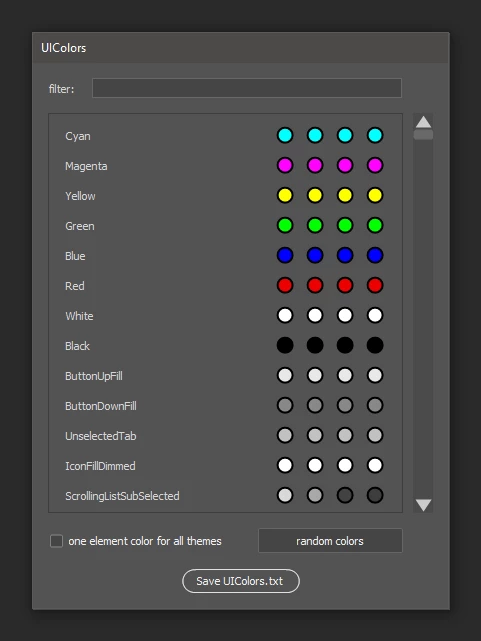
- added the ability to change the color of an element at once for all color themes
- for fun added a mode for generating random colors of elements. It can work in conjunction with a filter and helps to find the name of the element responsible for a particular interface element (visually by color)

This is the last revision. Sometime i need to stop 😄
 

#target photoshop

f = $.os.indexOf('Windows') != -1 ? new File(app.path + '/Required/UIColors.txt') : new File(app.path.getFiles('*.app')[0] + '/Contents/Required/UIColors.txt')
if (!f.exists) f = File.openDialog('Select your UIColors.txt', '*.txt,*.cel', false)
if (f) {
  var s = '('
  f.open('r')
  while (!f.eof) { s += f.readln() }
  f.close()
  s = s.replace(/00\./g, '0.') + ')'
  var isHex = s.indexOf('0x') != -1 ? true : false
  try { var obj = eval(s) } catch (e) { alert(e, decodeURI(f.name), true) }

  if (obj) {
    if (isHex) HexColor(obj)

    var w = new Window('dialog', 'UIColors'),
      gt = w.add('group {alignment : ["fill", "center"], alignChildren : ["left", "fill"]}'),
      st = gt.add('statictext {text : "filter:"}'),
      e = gt.add('edittext {preferredSize: [310,-1]}'),
      gc = w.add('group'),
      p = gc.add('panel {maximumSize: [355, 400], minimumSize: [355, 400]}'),
      s = gc.add('scrollbar {stepdelta: 100}', [0, 0, 20, 400]),
      g = p.add('group{orientation : "column"}'),
      gh = w.add('group {alignment : ["fill", "center"], alignChildren : ["left", "fill"], orientation : "row"}'),
      c = gh.add('checkbox', [0,0,200,20], 'one element color for all themes'),
      r = gh.add('button', [0,0,145,20], 'random colors'),
      b = w.add('button', undefined, 'Save UIColors.txt', { name: 'ok' });

    w.filter = null
    w.changeAll = false

    e.onChanging = function () {
      w.filter = this.text.toUpperCase()
      for (var i = g.children.length - 1; i >= 0; i--) { g.remove(g.children[0]) }
      loadLabels()
    }

    s.onChanging = function () { g.location.y = -100 * this.value }
    c.onClick = function () { w.changeAll = this.value }

    r.onClick = function () {
      for (a in obj.Colors) {
        if (a.toUpperCase().indexOf(w.filter) != -1 || !w.filter) {
          var rnd = [Math.random(), Math.random(), Math.random()]
          for (var i = 0; i < 4; i++) {
            for (var x = 0; x < 3; x++) {
              obj.Colors[a][i][x] = w.changeAll ? rnd[x] * 255 : Math.random() * 255
            }
          }
        }
      }
      w.layout.layout(true)
    }

    b.onClick = function () {
      var ext = isHex ? 'cel' : 'txt',
        n = f.saveDlg('Save file', '*.' + ext);
      if (n) {
        if (n.exists) {
          var b = new File(n.path + '/UIColors.bak')
          if (!b.exists) n.copy(b)
        }
        if (n.open('w')) {
          w.close()
          if (isHex) HexColor(obj, true)
          var s = obj.toSource()
          n.write(s.substr(1, s.length - 2))
          n.close()
        } else { alert(decodeURI(n) + '\nFile access error\nMake sure you have the required access rights') }
      }
    }

    w.onShow = function () {
      loadLabels()
    }

    w.show()

    function loadLabels() {
      for (a in obj.Colors) {
        if (a.toUpperCase().indexOf(w.filter) != -1 || !w.filter) {
          colorGroup(g, a, [obj.Colors[a][0], obj.Colors[a][1], obj.Colors[a][2], obj.Colors[a][3]])
        }
      }
      w.layout.layout(true)
      s.value = s.minvalue = 0
      s.maxvalue = (g.size.height - p.size.height + 15) / 100
    }

    function colorGroup(parent, cpt, col) {
      var g = parent.add('group{orientation : "row", alignChildren : ["left", "center"]}'),
        s = g.add('statictext', undefined, cpt);
      s.preferredSize.width = 200

      for (var i = 0; i < 4; i++) { addColor(g, col[i], cpt, i) }

      function addColor(parent, col, cpt, idx) {
        var img = parent.add('image {preferredSize : [20,20]}')

        img.onDraw = function () {
          var g = this.graphics
          g.ellipsePath(2, 2, 15, 15)
          g.fillPath(g.newBrush(g.BrushType.SOLID_COLOR, [col[0] / 255, col[1] / 255, col[2] / 255, col[3]]))
          g.strokePath(g.newPen(g.PenType.SOLID_COLOR, [0, 0, 0], 2))
        }

        img.onClick = function () {
          var a = new SolidColor
          a.rgb.red = col[0]
          a.rgb.green = col[1]
          a.rgb.blue = col[2]
          app.foregroundColor = a
          if (app.showColorPicker()) {
            var a = app.foregroundColor,
              from = w.changeAll ? 0 : idx,
              to = w.changeAll ? 3 : idx;
            for (var i = from; i <= to; i++) {
              obj.Colors[cpt][i][0] = col[0] = a.rgb.red
              obj.Colors[cpt][i][1] = col[1] = a.rgb.green
              obj.Colors[cpt][i][2] = col[2] = a.rgb.blue
              parent.visible = false
              parent.visible = true
            }
          }
        }
      }
    }

    function HexColor(obj, backwardMode) {
      for (a in obj.Colors) {
        for (var i = 0; i < 4; i++) {
          for (var x = 0; x < 3; x++) {
            obj.Colors[a][i][x] = backwardMode ? '0x' + ((obj.Colors[a][i][x] / 255 * 65535) + Math.pow(16, 4)).toString(16).substr(-4) : obj.Colors[a][i][x] / 65535 * 255
          }
        }
      }
    }
  }
} else { alert(decodeURI(f.name) + ' format is wrong!') }


EDIT 6:

This version removes support for old UIColors.cel files (in HEX format). 

Added:

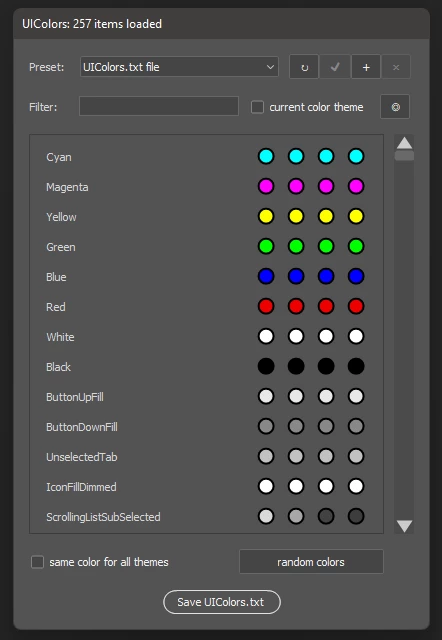
  • preset system. Presets are stored in a separate file, which allows you to transfer them between computers if necessary (the UIColors.desc preset file is stored in the Adobe Photoshop Settings folder) or between versions of Photoshop. This can be handy if you have a need to store and quickly switch between different themes.
  • you can import any UIColors.txt file into presets (for example, my version with a gray share button).
  • filter field can now search by HEX color values
  • checkbox 'current color theme' allows you to work only with the colors of the current theme
  • added ability to get color swatch directly from photoshop window (this function only works if script file is placed in photoshop presets folder)
/*
<javascriptresource>
<name>UI colors</name>
<eventid>962b569a-c528-4dc1-a084-9735a1e72688</eventid>
</javascriptresource>
*/
#target photoshop;
var s2t = stringIDToTypeID,
  t2s = typeIDToStringID,
  currentColorTheme = null,
  colorBars = [],
  samplerEnabled = false,
  colors = {},
  cfg = new Config,
  presets = new Preset;
const defaultName = 'UIColors.txt',
  loadFromFile = 'load from file...',
  colorThemes = {
    kPanelBrightnessOriginal: 0,
    kPanelBrightnessLightGray: 1,
    kPanelBrightnessMediumGray: 2,
    kPanelBrightnessDarkGray: 3
  },
  UUID = [
    '962b569a-c528-4dc1-a084-9735a1e72688',
    'f9835b6c-b235-429b-b370-52334040d2ad'
  ];
if (!playbackParameters.count) {
  var f = $.os.indexOf('Windows') != -1 ? new File(app.path + '/Required/' + defaultName) :
    new File(app.path.getFiles('*.app')[0] + '/Contents/Required/' + defaultName);
  var source = readColorsFromFile(f);
  if (source.content) {
    (r = new ActionReference()).putProperty(s2t('property'), p = s2t('interfacePrefs'));
    r.putEnumerated(s2t('application'), s2t('ordinal'), s2t('targetEnum'));
    currentColorTheme = colorThemes[t2s(executeActionGet(r).getObjectValue(p).getEnumerationValue(s2t('kuiBrightnessLevel')))];
    try {
      (d = new ActionDescriptor()).putBoolean(s2t("checkEvent"), true);
      executeAction(s2t("962b569a-c528-4dc1-a084-9735a1e72688"), d, DialogModes.NO);
      samplerEnabled = true;
    } catch (e) { }
    if (copyColorObject(source.content.Colors, colors));
    {
      presets.getPresets();
      var w = new Window('dialog', 'UIColors: ' + function () { var i = 0; for (var a in colors) i++; return i }() + ' items loaded'),
        gPreset = w.add("group{alignment : ['fill', 'center'], orientation: 'row', alignChildren: ['left', 'center']}"),
        stPreset = gPreset.add("statictext{text:'Preset:', preferredSize: [40,-1]}"),
        dlPreset = gPreset.add("dropdownlist{selection:0, preferredSize: [200, -1]}"),
        gPresetButtons = gPreset.add("group{orientation: 'row', alignChildren: ['left', 'center'], spacing: 0, margins:0}"),
        bnRefresh = gPresetButtons.add("button{text:'↻',helpTip: 'reload', preferredSize: [30, -1]}"),
        bnSave = gPresetButtons.add("button{text:'✔',helpTip: 'save',preferredSize: [30, -1]}"),
        bnAdd = gPresetButtons.add("button{text:'+',helpTip: 'add new',preferredSize: [30, -1]}"),
        bnDel = gPresetButtons.add("button{text:'×',helpTip: 'delete',preferredSize: [30, 10]}"),
        gFilter = w.add('group {alignment : ["fill", "center"], alignChildren : ["left", "center"]}'),
        stFilter = gFilter.add('statictext {text : "Filter:", preferredSize: [40,-1]}'),
        etFilter = gFilter.add('edittext {helpTip:"keyword or hex value", preferredSize: [160,-1]}'),
        chCurrentTheme = gFilter.add('checkbox', [0, 0, 120, -1], 'current color theme'),
        bnSampler = gFilter.add("button{text:'◎',helpTip: 'eyedropper tool', preferredSize: [30, -1]}"),
        gColors = w.add('group'),
        pColors = gColors.add('panel {maximumSize: [355, 400], minimumSize: [355, 400]}'),
        sbColors = gColors.add('scrollbar {stepdelta: 100}', [0, 0, 20, 400]),
        gColorBars = pColors.add('group{orientation : "column"}'),
        gOptions = w.add('group {alignment : ["fill", "center"], alignChildren : ["left", "fill"], orientation : "row"}'),
        chChangeAll = gOptions.add('checkbox', [0, 0, 200, 20], 'same color for all themes'),
        bnRandom = gOptions.add('button', [0, 0, 145, 20], 'random colors'),
        bnOk = w.add('button', undefined, 'Save UIColors.txt', { name: 'ok' });
      dlPreset.onChange = function () {
        if (w.visible) {
          if (this.selection.index) {
            if (this.selection.text != loadFromFile) {
              cfg.preset = copyColorObject(presets.presetList[this.selection.text], colors) ? this.selection.text : ''
            } else {
              var tmp = readColorsFromFile()
              if (tmp.content) {
                if (copyColorObject(tmp.content.Colors, colors)) {
                  if (!bnAdd.onClick(decodeURI(tmp.path.name))) {
                    loadPresets()
                  }
                }
              } else loadPresets()
            }
          } else {
            cfg.preset = '';
            copyColorObject(source.content.Colors, colors)
          }
          gColorBars.visible = false
          gColorBars.visible = true
          presets.checkPresetIntegrity(this.selection.text, bnSave, bnDel)
        }
      }
      bnRefresh.onClick = function () { dlPreset.onChange() }
      bnSave.onClick = function () {
        presets.putPreset(dlPreset.selection.text, colors, 'save')
        presets.checkPresetIntegrity(dlPreset.selection.text, bnSave, bnDel)
      }
      bnAdd.onClick = function (s) {
        s = s ? s : dlPreset.selection.text + ' copy';
        nm = prompt('Specify name of new preset', s, 'Add preset');
        if (nm != null && nm != "") {
          if (dlPreset.find(nm) == null) {
            presets.putPreset(nm, colors, 'add')
            cfg.preset = nm;
            loadPresets();
            return true
          } else {
            if (nm != (defaultName + ' file') && nm != UUID[1]) {
              if (confirm(localize('Preset \"%1\" already exists. Overwrite?', nm), false, 'Add preset')) {
                presets.putPreset(nm, colors, 'save');
                cfg.preset = nm;
                loadPresets();
                return true
              }
            } else alert('Default preset cannot be overwritten!')
          }
        }
        return false
      }
      bnDel.onClick = function () {
        cfg.preset = dlPreset.items[dlPreset.selection.index - 1].text
        presets.putPreset(dlPreset.selection.text, colors, 'delete')
        loadPresets();
      }
      etFilter.onChanging = function () {
        cfg.filter = this.text.toUpperCase()
        for (var i = gColorBars.children.length - 1; i >= 0; i--) { gColorBars.remove(gColorBars.children[0]) }
        loadColors()
      }
      chCurrentTheme.onClick = function () {
        cfg.currentTheme = this.value;
        if (cfg.filter != '') {
          for (var i = gColorBars.children.length - 1; i >= 0; i--) { gColorBars.remove(gColorBars.children[0]) }
          loadColors()
        }
        colorThemeVisiblity(colorBars)
      }
      bnSampler.onClick = function () {
        cfg.filter = etFilter.text
        cfg.putScriptSettings(UUID[1])
        presets.putPreset(UUID[1], colors, 'add')
        var bt = new BridgeTalk();
        bt.target = BridgeTalk.getSpecifier('photoshop');
        bt.body = "var f=" + samplerWindow.toSource() + "; f();";
        bt.send();
        currentTool = 'eyedropperTool';
        var f = File(Folder.temp + "/samplerWindow.jsx");
        f.open('w');
        f.encoding = 'text';
        f.write("var f=" + samplerEvent.toSource() + ";f();");
        f.close();
        var f = File(Folder.temp + '/samplerWindow.jsx');
        for (var i = 0; i < app.notifiers.length; i++) {
          var ntf = app.notifiers[i];
          if (ntf.eventFile.name == f.name) { ntf.remove(); i-- };
        }
        var tmp = app.preferences.rulerUnits;
        app.preferences.rulerUnits = Units.PIXELS
        app.documents.add(500, 500, 72, UUID[1])
        app.preferences.rulerUnits = tmp;
        app.notifiersEnabled = true
        app.notifiers.add('setd', f, 'Clr ')
        w.close()
      }
      sbColors.onChanging = function () { gColorBars.location.y = -100 * this.value }
      chChangeAll.onClick = function () { cfg.changeAll = this.value }
      bnRandom.onClick = function () {
        var hexFilter = cfg.filter ? cfg.filter.replace('#', '') : '';
        for (a in colors) {
          if (a.toUpperCase().indexOf(cfg.filter) != -1 || !cfg.filter || findColorByHex(colors[a], hexFilter)) {
            var rnd = [Math.random(), Math.random(), Math.random()]
            for (var i = 0; i < 4; i++) {
              if (currentColorTheme != i && cfg.currentTheme) continue;
              for (var x = 0; x < 3; x++) {
                colors[a][i][x] = Math.round(cfg.changeAll ? rnd[x] * 255 : Math.random() * 255)
              }
            }
          }
        }
        gColorBars.visible = false
        gColorBars.visible = true
        presets.checkPresetIntegrity(dlPreset.selection.text, bnSave, bnDel)
      }
      bnOk.onClick = function () {
        cfg.preset = cfg.filter = ''
        cfg.putScriptSettings(UUID[0])
        var tmp = new File(source.content.path + '/' + (new Date()).getTime());
        if (tmp.open('w')) {
          tmp.close();
          tmp.remove();
          w.close();
          writeColorsToFile(source.content.path, source, colors)
        } else {
          n = f.saveDlg('Save file', '*.txt');
          if (n) {
            var tmp = new File(n.path + '/' + (new Date()).getTime());
            if (tmp.open('a')) {
              tmp.close();
              tmp.remove();
              w.close()
              writeColorsToFile(n, source, colors)
            }
            else { alert(n.fsName + '\nFile access error!\nMake sure you have the required access rights') }
          }
        }
      }
      w.onShow = function () {
        cfg.getScriptSettings(UUID[0])
        if (cfg.getScriptSettings(UUID[1])) {
          cfg.eraseScriptSettings(UUID[1])
          try { (documents.getByName(UUID[1])).close(SaveOptions.DONOTSAVECHANGES) } catch (e) { }
          etFilter.text = foregroundColor.rgb.hexValue
          cfg.filter = foregroundColor.rgb.hexValue.toUpperCase();
          copyColorObject(presets.presetList[UUID[1]], colors)
          presets.putPreset(UUID[1], colors, 'delete')
        }
        chCurrentTheme.value = cfg.currentTheme
        chChangeAll.value = cfg.changeAll
        bnSampler.enabled = samplerEnabled
        loadColors()
        colorThemeVisiblity(colorBars)
        loadPresets()
        presets.checkPresetIntegrity(dlPreset.selection.text, bnSave, bnDel)
      }
      w.show();
      function loadColors() {
        {
          var hexFilter = cfg.filter ? cfg.filter.replace('#', '') : '';
          colorBars = [];
          for (a in colors) {
            if (a.toUpperCase().indexOf(cfg.filter) != -1 || !cfg.filter || findColorByHex(colors[a], hexFilter)) {
              colorBars.push(addColorBar(gColorBars, a, colors[a]))
            }
          }
          w.layout.layout(true)
          sbColors.value = sbColors.minvalue = 0
          sbColors.maxvalue = (gColorBars.size.height - pColors.size.height + 100) / 100
        }
        function addColorBar(parent, cpt, col) {
          {
            var g = parent.add('group{orientation : "row", alignChildren : ["left", "center"]}'),
              s = g.add('statictext', undefined, cpt),
              colorBar = [];
            s.preferredSize.width = 200
            for (var i = 0; i < 4; i++) colorBar.push(addColor(g, col[i], cpt, i))
            return colorBar
          }
          function addColor(parent, col, cpt, idx) {
            var img = parent.add('image {preferredSize : [20,20]}')
            img.onDraw = function () {
              var g = this.graphics
              g.ellipsePath(2, 2, 15, 15)
              g.fillPath(g.newBrush(g.BrushType.SOLID_COLOR, [col[0] / 255, col[1] / 255, col[2] / 255, col[3]]))
              g.strokePath(g.newPen(g.PenType.SOLID_COLOR, [0, 0, 0], 2))
            }
            img.onClick = function () {
              var a = new SolidColor
              with (a.rgb) {
                red = col[0]
                green = col[1]
                blue = col[2]
              }
              app.foregroundColor = a
              if (app.showColorPicker()) {
                var a = app.foregroundColor,
                  from = !cfg.changeAll || (idx == currentColorTheme && cfg.currentTheme) ? idx : 0,
                  to = !cfg.changeAll || (idx == currentColorTheme && cfg.currentTheme) ? idx : 3;
                for (var i = from; i <= to; i++) {
                  colors[cpt][i][0] = col[0] = Math.round(a.rgb.red)
                  colors[cpt][i][1] = col[1] = Math.round(a.rgb.green)
                  colors[cpt][i][2] = col[2] = Math.round(a.rgb.blue)
                }
                parent.visible = false
                parent.visible = true
              }
              presets.checkPresetIntegrity(dlPreset.selection.text, bnSave, bnDel)
            }
            return img
          }
        }
      }
      function loadPresets() {
        dlPreset.removeAll()
        dlPreset.add('item', defaultName + ' file')
        for (var a in presets.presetList) dlPreset.add('item', a)
        dlPreset.add('separator', '-')
        dlPreset.add('item', loadFromFile)
        dlPreset.selection = dlPreset.find(cfg.preset) ? dlPreset.find(cfg.preset) : 0
      }
      function findColorByHex(a, s) {
        if (s.length == 6) {
          for (var i = 0; i < 4; i++) {
            if (currentColorTheme != i && cfg.currentTheme) continue;
            if ((RgbToHex(a[i])).indexOf(s) != -1) return true
          }
        }
      }
      function colorThemeVisiblity(p) {
        len = p.length
        for (var i = 0; i < len; i++) {
          cur = p[i]
          for (var x = 0; x < 4; x++) {
            cur[x].visible = !cfg.currentTheme ? true : (x == currentColorTheme ? true : false);
          }
        }
      }
    }
  }
  function readColorsFromFile(f) {
    if (!f || !f.exists) f = File.openDialog('Select your ' + defaultName, '*.txt', false);
    var output;
    if (f && f.exists) {
      var obj = '('
      f.open('r')
      while (!f.eof) { obj += f.readln() }
      f.close()
      obj = obj.replace(/00\./g, '0.') + ')'
      try {
        if (obj.indexOf('0x') != -1) throw new Error()
        output = eval(obj)
      } catch (e) { alert(decodeURI(f.name) + ' format is wrong!', '', true) }
    }
    return { content: output, path: f }
  }
  function writeColorsToFile(f, source, target) {
    if (f.exists) f.copy(new File(f.path + '/UIColors ' + (new Date()).getTime() + '.bak'))
    if (copyColorObject(target, source.content.Colors)) {
      var s = source.content.toSource()
      f.open('w')
      f.write(s.substr(1, s.length - 2))
      f.close()
    }
  }
  function RgbToHex(color) {
    var hex = ''
    for (var i = 0; i < 3; i++) hex += ('0' + color[i].toString(16)).substr(-2);
    return hex.toUpperCase()
  }
  function copyColorObject(a, b) {
    b = b ? b : {};
    try {
      for (var k in a) {
        b[k] = b[k] ? b[k] : [];
        for (var i = 0; i < 4; i++) {
          b[k][i] = b[k][i] ? b[k][i] : []
          for (var x = 0; x < 4; x++) {
            b[k][i][x] = a[k][i][x]
          }
        }
      }
    } catch (e) { alert(e + 'Color object structure is broken!'); return false; }
    return true
  }
  function samplerWindow() {
    var z = Window.find('palette', 'Select color');
    if (z) {
      z.show();
      return;
    }
    var d = new Window('palette');
    d.text = 'Select color';
    d.orientation = 'row';
    d.alignChildren = ['left', 'top'];
    d.spacing = 10;
    d.margins = 16;
    var grTool = d.add('group');
    grTool.orientation = 'row';
    grTool.alignChildren = ['left', 'center'];
    grTool.spacing = 10;
    grTool.alignment = ['left', 'center'];
    var img = grTool.add('image {preferredSize : [20,20]}');
    var stTip = grTool.add('statictext');
    stTip.preferredSize.width = 300;
    stTip.justify = 'center';
    stTip.text = 'Use Eyedropper Tool to get a color sample';
    var grBn = d.add('group');
    grBn.orientation = 'column';
    grBn.alignChildren = ['center', 'center'];
    grBn.spacing = 10;
    var ok = grBn.add('button');
    ok.text = 'Ok';
    ok.preferredSize.width = 90;
    ok.onClick = function () {
      var f = File(Folder.temp + '/samplerWindow.jsx');
      for (var i = 0; i < app.notifiers.length; i++) {
        var ntf = app.notifiers[i];
        if (ntf.eventFile.name == f.name) { ntf.remove(); i-- };
      }
      f.remove();
      d.hide();
      executeAction(stringIDToTypeID("962b569a-c528-4dc1-a084-9735a1e72688"), undefined, DialogModes.NO);
    }
    img.onDraw = function () {
      var g = this.graphics;
      g.ellipsePath(2, 2, 15, 15);
      g.fillPath(g.newBrush(g.BrushType.SOLID_COLOR, [foregroundColor.rgb.red / 255, foregroundColor.rgb.green / 255, foregroundColor.rgb.blue / 255, 1]));
      g.strokePath(g.newPen(g.PenType.SOLID_COLOR, [0, 0, 0], 2));
    }
    d.show();
  }
  function samplerEvent() {
    var z = Window.find('palette', 'Select color');
    z.show();
    z.children[0].visible = false;
    z.children[0].visible = true;
  }
}
function Preset() {
  var f = new File(app.preferencesFolder + '/UIColors.desc');
  this.presetList = {};
  this.putPreset = function (key, val, mode) {
    var result = false;
    switch (mode) {
      case "add":
        this.presetList[key] = {}
        result = copyColorObject(val, this.presetList[key])
        break;
      case "save":
        result = copyColorObject(val, this.presetList[key])
        break;
      case "delete":
        result = true
        delete this.presetList[key]
        break;
    }
    if (result) {
      var presetList = new ActionDescriptor();
      for (var a in this.presetList) {
        var currentPreset = new ActionList(),
          cur = this.presetList[a];
        for (var b in cur) {
          var d = new ActionDescriptor(),
            colors = new ActionList();
          for (var x = 0; x < 4; x++) {
            var l = new ActionList();
            l.putInteger(cur[b][x][0])
            l.putInteger(cur[b][x][1])
            l.putInteger(cur[b][x][2])
            l.putDouble(cur[b][x][3])
            colors.putList(l)
          }
          d.putList(s2t(b), colors);
          currentPreset.putObject(s2t('object'), d)
        }
        presetList.putList(s2t(a), currentPreset);
      }
      if (presetList.count) {
        try {
          f.open('w')
          f.encoding = 'BINARY'
          f.write(presetList.toStream())
          f.close()
        } catch (e) { alert(e, '', 1) }
      } else {
        f.remove()
      }
    } else {
      delete this.presetList[key]
    }
  }
  this.getPresets = function () {
    try {
      var d = new ActionDescriptor();
      if (f.exists) {
        f.open('r')
        f.encoding = 'BINARY'
        var s = f.read()
        f.close();
        d.fromStream(s);
      }
      this.presetList = {};
      for (var i = 0; i < d.count; i++) {
        key = t2s(d.getKey(i));
        var presetList = d.getList(s2t(key)),
          colors = {};
        for (var x = 0; x < presetList.count; x++) {
          var cur = presetList.getObjectValue(x),
            typename = t2s(cur.getKey(0)),
            colorList = cur.getList(s2t(typename));
          colors[typename] = [];
          for (var y = 0; y < colorList.count; y++) {
            colors[typename].push([
              colorList.getList(y).getInteger(0),
              colorList.getList(y).getInteger(1),
              colorList.getList(y).getInteger(2),
              colorList.getList(y).getDouble(3)
            ])
          }
        }
        this.presetList[key] = colors;
      }
    } catch (e) { alert('Preset file currupted!\n' + f.fsName, '', 1); f.remove(); }
  }
  this.checkPresetIntegrity = function (k, bnSave, bnDel) {
    var cur = !this.presetList[k] ? source.content.Colors : this.presetList[k]
    found = false;
    for (a in cur) {
      for (var i = 0; i < 4 && !found; i++) {
        for (var x = 0; x < 3 && !found; x++) {
          if (cur[a][i][x] != colors[a][i][x]) {
            found = true
          }
        }
      }
    }
    if (cur == source.content.Colors) bnSave.enabled = bnDel.enabled = false else {
      bnSave.enabled = found
      bnDel.enabled = true
    }
  }
}
function Config() {
  this.preset = ''
  this.filter = ''
  this.currentTheme = false
  this.changeAll = false
  this.getScriptSettings = function (UUID) {
    try { var d = app.getCustomOptions(UUID) } catch (e) { }
    if (d != undefined) { descriptorToObject(this, d); return true; }
    else return false;
    function descriptorToObject(o, d) {
      var l = d.count;
      if (l) {
        for (var i = 0; i < l; i++) {
          var k = d.getKey(i),
            t = d.getType(k),
            v = t2s(k);
          switch (t) {
            case DescValueType.BOOLEANTYPE: o[v] = d.getBoolean(k); break;
            case DescValueType.STRINGTYPE: o[v] = d.getString(k); break;
            case DescValueType.INTEGERTYPE: o[v] = d.getDouble(k); break;
          }
        }
      }
    }
  }
  this.putScriptSettings = function (UUID) {
    var d = objectToDescriptor(this)
    app.putCustomOptions(UUID, d)
    function objectToDescriptor(o) {
      var d = new ActionDescriptor,
        l = o.reflect.properties.length;
      for (var i = 0; i < l; i++) {
        var k = o.reflect.properties[i].toString();
        if (k == "__proto__" || k == "__count__" || k == "__class__" || k == "reflect") continue;
        var v = o[k];
        k = app.stringIDToTypeID(k);
        switch (typeof (v)) {
          case "boolean": d.putBoolean(k, v); break;
          case "string": d.putString(k, v); break;
          case "number": d.putInteger(k, v); break;
        }
      }
      return d;
    }
  }
  this.eraseScriptSettings = function (UUID) {
    eraseCustomOptions(UUID);
  }
}


HOW TO USE:

Copy code from that post into a plain text file (*.txt), change its extension to jsx, drag it into the Photoshop window, or double click to run (if you plan to run it often, you can put this file to the Presets\ Scripts\ folder of your photoshop - in this case it will appear in the application scripts menu).


After you've changed the colors of the controls you want, save the UIColors.txt file to disk and place it in your photoshop directory:

  • In Windows: path to your version of Photoshop\Required\UIColors.txt
  • In MacOS, you need to go to Programs -> Photoshop, open the menu and select 'Show Package Contents', then move saved file to the /Contents/Required/UIColors.txt

返信数 8

Participant
November 1, 2024

Came here to change the color of the text on the ruler.  Copied the script.  

Whiel I did not create a full skin at all, i can say this does work in 2024 with PS Version 26.0.0

Legend
June 27, 2022

I didn't plan to work on this script anymore, but because of a problem with the share button, I decided to update it (I got tired of keeping track of the number of elements inside the file and updating it manually with each update).

This version removes support for old UIColors.cel files (in HEX format). It was an interesting experiment, but it had no practical meaning.

Added:

  • preset system. Presets are stored in a separate file, which allows you to transfer them between computers if necessary (the UIColors.desc preset file is stored in the Adobe Photoshop Settings folder) or between versions of Photoshop. This can be handy if you have a need to store and quickly switch between different themes.
  • you can import any UIColors.txt file into presets (for example, my version with a gray share button).
  • filter field can now search by HEX color values
  • checkbox current color theme allows you to work only with the colors of the current theme
  • added ability to get color swatch directly from photoshop window (this function only works if script file is placed in photoshop presets folder)

/*
<javascriptresource>
<name>UI colors</name>
<eventid>962b569a-c528-4dc1-a084-9735a1e72688</eventid>
</javascriptresource>
*/
#target photoshop;
var s2t = stringIDToTypeID,
  t2s = typeIDToStringID,
  currentColorTheme = null,
  colorBars = [],
  samplerEnabled = false,
  colors = {},
  cfg = new Config,
  presets = new Preset;
const defaultName = 'UIColors.txt',
  loadFromFile = 'load from file...',
  colorThemes = {
    kPanelBrightnessOriginal: 0,
    kPanelBrightnessLightGray: 1,
    kPanelBrightnessMediumGray: 2,
    kPanelBrightnessDarkGray: 3
  },
  UUID = [
    '962b569a-c528-4dc1-a084-9735a1e72688',
    'f9835b6c-b235-429b-b370-52334040d2ad'
  ];
if (!playbackParameters.count) {
  var f = $.os.indexOf('Windows') != -1 ? new File(app.path + '/Required/' + defaultName) :
    new File(app.path.getFiles('*.app')[0] + '/Contents/Required/' + defaultName);
  var source = readColorsFromFile(f);
  if (source.content) {
    (r = new ActionReference()).putProperty(s2t('property'), p = s2t('interfacePrefs'));
    r.putEnumerated(s2t('application'), s2t('ordinal'), s2t('targetEnum'));
    currentColorTheme = colorThemes[t2s(executeActionGet(r).getObjectValue(p).getEnumerationValue(s2t('kuiBrightnessLevel')))];
    try {
      (d = new ActionDescriptor()).putBoolean(s2t("checkEvent"), true);
      executeAction(s2t("962b569a-c528-4dc1-a084-9735a1e72688"), d, DialogModes.NO);
      samplerEnabled = true;
    } catch (e) { }
    if (copyColorObject(source.content.Colors, colors));
    {
      presets.getPresets();
      var w = new Window('dialog', 'UIColors: ' + function () { var i = 0; for (var a in colors) i++; return i }() + ' items loaded'),
        gPreset = w.add("group{alignment : ['fill', 'center'], orientation: 'row', alignChildren: ['left', 'center']}"),
        stPreset = gPreset.add("statictext{text:'Preset:', preferredSize: [40,-1]}"),
        dlPreset = gPreset.add("dropdownlist{selection:0, preferredSize: [200, -1]}"),
        gPresetButtons = gPreset.add("group{orientation: 'row', alignChildren: ['left', 'center'], spacing: 0, margins:0}"),
        bnRefresh = gPresetButtons.add("button{text:'↻',helpTip: 'reload', preferredSize: [30, -1]}"),
        bnSave = gPresetButtons.add("button{text:'✔',helpTip: 'save',preferredSize: [30, -1]}"),
        bnAdd = gPresetButtons.add("button{text:'+',helpTip: 'add new',preferredSize: [30, -1]}"),
        bnDel = gPresetButtons.add("button{text:'×',helpTip: 'delete',preferredSize: [30, 10]}"),
        gFilter = w.add('group {alignment : ["fill", "center"], alignChildren : ["left", "center"]}'),
        stFilter = gFilter.add('statictext {text : "Filter:", preferredSize: [40,-1]}'),
        etFilter = gFilter.add('edittext {helpTip:"keyword or hex value", preferredSize: [160,-1]}'),
        chCurrentTheme = gFilter.add('checkbox', [0, 0, 120, -1], 'current color theme'),
        bnSampler = gFilter.add("button{text:'◎',helpTip: 'eyedropper tool', preferredSize: [30, -1]}"),
        gColors = w.add('group'),
        pColors = gColors.add('panel {maximumSize: [355, 400], minimumSize: [355, 400]}'),
        sbColors = gColors.add('scrollbar {stepdelta: 100}', [0, 0, 20, 400]),
        gColorBars = pColors.add('group{orientation : "column"}'),
        gOptions = w.add('group {alignment : ["fill", "center"], alignChildren : ["left", "fill"], orientation : "row"}'),
        chChangeAll = gOptions.add('checkbox', [0, 0, 200, 20], 'same color for all themes'),
        bnRandom = gOptions.add('button', [0, 0, 145, 20], 'random colors'),
        bnOk = w.add('button', undefined, 'Save UIColors.txt', { name: 'ok' });
      dlPreset.onChange = function () {
        if (w.visible) {
          if (this.selection.index) {
            if (this.selection.text != loadFromFile) {
              cfg.preset = copyColorObject(presets.presetList[this.selection.text], colors) ? this.selection.text : ''
            } else {
              var tmp = readColorsFromFile()
              if (tmp.content) {
                if (copyColorObject(tmp.content.Colors, colors)) {
                  if (!bnAdd.onClick(decodeURI(tmp.path.name))) {
                    loadPresets()
                  }
                }
              } else loadPresets()
            }
          } else {
            cfg.preset = '';
            copyColorObject(source.content.Colors, colors)
          }
          gColorBars.visible = false
          gColorBars.visible = true
          presets.checkPresetIntegrity(this.selection.text, bnSave, bnDel)
        }
      }
      bnRefresh.onClick = function () { dlPreset.onChange() }
      bnSave.onClick = function () {
        presets.putPreset(dlPreset.selection.text, colors, 'save')
        presets.checkPresetIntegrity(dlPreset.selection.text, bnSave, bnDel)
      }
      bnAdd.onClick = function (s) {
        s = s ? s : dlPreset.selection.text + ' copy';
        nm = prompt('Specify name of new preset', s, 'Add preset');
        if (nm != null && nm != "") {
          if (dlPreset.find(nm) == null) {
            presets.putPreset(nm, colors, 'add')
            cfg.preset = nm;
            loadPresets();
            return true
          } else {
            if (nm != (defaultName + ' file') && nm != UUID[1]) {
              if (confirm(localize('Preset \"%1\" already exists. Overwrite?', nm), false, 'Add preset')) {
                presets.putPreset(nm, colors, 'save');
                cfg.preset = nm;
                loadPresets();
                return true
              }
            } else alert('Default preset cannot be overwritten!')
          }
        }
        return false
      }
      bnDel.onClick = function () {
        cfg.preset = dlPreset.items[dlPreset.selection.index - 1].text
        presets.putPreset(dlPreset.selection.text, colors, 'delete')
        loadPresets();
      }
      etFilter.onChanging = function () {
        cfg.filter = this.text.toUpperCase()
        for (var i = gColorBars.children.length - 1; i >= 0; i--) { gColorBars.remove(gColorBars.children[0]) }
        loadColors()
      }
      chCurrentTheme.onClick = function () {
        cfg.currentTheme = this.value;
        if (cfg.filter != '') {
          for (var i = gColorBars.children.length - 1; i >= 0; i--) { gColorBars.remove(gColorBars.children[0]) }
          loadColors()
        }
        colorThemeVisiblity(colorBars)
      }
      bnSampler.onClick = function () {
        cfg.filter = etFilter.text
        cfg.putScriptSettings(UUID[1])
        presets.putPreset(UUID[1], colors, 'add')
        var bt = new BridgeTalk();
        bt.target = BridgeTalk.getSpecifier('photoshop');
        bt.body = "var f=" + samplerWindow.toSource() + "; f();";
        bt.send();
        currentTool = 'eyedropperTool';
        var f = File(Folder.temp + "/samplerWindow.jsx");
        f.open('w');
        f.encoding = 'text';
        f.write("var f=" + samplerEvent.toSource() + ";f();");
        f.close();
        var f = File(Folder.temp + '/samplerWindow.jsx');
        for (var i = 0; i < app.notifiers.length; i++) {
          var ntf = app.notifiers[i];
          if (ntf.eventFile.name == f.name) { ntf.remove(); i-- };
        }
        var tmp = app.preferences.rulerUnits;
        app.preferences.rulerUnits = Units.PIXELS
        app.documents.add(500, 500, 72, UUID[1])
        app.preferences.rulerUnits = tmp;
        app.notifiersEnabled = true
        app.notifiers.add('setd', f, 'Clr ')
        w.close()
      }
      sbColors.onChanging = function () { gColorBars.location.y = -100 * this.value }
      chChangeAll.onClick = function () { cfg.changeAll = this.value }
      bnRandom.onClick = function () {
        var hexFilter = cfg.filter ? cfg.filter.replace('#', '') : '';
        for (a in colors) {
          if (a.toUpperCase().indexOf(cfg.filter) != -1 || !cfg.filter || findColorByHex(colors[a], hexFilter)) {
            var rnd = [Math.random(), Math.random(), Math.random()]
            for (var i = 0; i < 4; i++) {
              if (currentColorTheme != i && cfg.currentTheme) continue;
              for (var x = 0; x < 3; x++) {
                colors[a][i][x] = Math.round(cfg.changeAll ? rnd[x] * 255 : Math.random() * 255)
              }
            }
          }
        }
        gColorBars.visible = false
        gColorBars.visible = true
        presets.checkPresetIntegrity(dlPreset.selection.text, bnSave, bnDel)
      }
      bnOk.onClick = function () {
        cfg.preset = cfg.filter = ''
        cfg.putScriptSettings(UUID[0])
        var tmp = new File(source.content.path + '/' + (new Date()).getTime());
        if (tmp.open('w')) {
          tmp.close();
          tmp.remove();
          w.close();
          writeColorsToFile(source.content.path, source, colors)
        } else {
          n = f.saveDlg('Save file', '*.txt');
          if (n) {
            var tmp = new File(n.path + '/' + (new Date()).getTime());
            if (tmp.open('a')) {
              tmp.close();
              tmp.remove();
              w.close()
              writeColorsToFile(n, source, colors)
            }
            else { alert(n.fsName + '\nFile access error!\nMake sure you have the required access rights') }
          }
        }
      }
      w.onShow = function () {
        cfg.getScriptSettings(UUID[0])
        if (cfg.getScriptSettings(UUID[1])) {
          cfg.eraseScriptSettings(UUID[1])
          try { (documents.getByName(UUID[1])).close(SaveOptions.DONOTSAVECHANGES) } catch (e) { }
          etFilter.text = foregroundColor.rgb.hexValue
          cfg.filter = foregroundColor.rgb.hexValue.toUpperCase();
          copyColorObject(presets.presetList[UUID[1]], colors)
          presets.putPreset(UUID[1], colors, 'delete')
        }
        chCurrentTheme.value = cfg.currentTheme
        chChangeAll.value = cfg.changeAll
        bnSampler.enabled = samplerEnabled
        loadColors()
        colorThemeVisiblity(colorBars)
        loadPresets()
        presets.checkPresetIntegrity(dlPreset.selection.text, bnSave, bnDel)
      }
      w.show();
      function loadColors() {
        {
          var hexFilter = cfg.filter ? cfg.filter.replace('#', '') : '';
          colorBars = [];
          for (a in colors) {
            if (a.toUpperCase().indexOf(cfg.filter) != -1 || !cfg.filter || findColorByHex(colors[a], hexFilter)) {
              colorBars.push(addColorBar(gColorBars, a, colors[a]))
            }
          }
          w.layout.layout(true)
          sbColors.value = sbColors.minvalue = 0
          sbColors.maxvalue = (gColorBars.size.height - pColors.size.height + 100) / 100
        }
        function addColorBar(parent, cpt, col) {
          {
            var g = parent.add('group{orientation : "row", alignChildren : ["left", "center"]}'),
              s = g.add('statictext', undefined, cpt),
              colorBar = [];
            s.preferredSize.width = 200
            for (var i = 0; i < 4; i++) colorBar.push(addColor(g, col[i], cpt, i))
            return colorBar
          }
          function addColor(parent, col, cpt, idx) {
            var img = parent.add('image {preferredSize : [20,20]}')
            img.onDraw = function () {
              var g = this.graphics
              g.ellipsePath(2, 2, 15, 15)
              g.fillPath(g.newBrush(g.BrushType.SOLID_COLOR, [col[0] / 255, col[1] / 255, col[2] / 255, col[3]]))
              g.strokePath(g.newPen(g.PenType.SOLID_COLOR, [0, 0, 0], 2))
            }
            img.onClick = function () {
              var a = new SolidColor
              with (a.rgb) {
                red = col[0]
                green = col[1]
                blue = col[2]
              }
              app.foregroundColor = a
              if (app.showColorPicker()) {
                var a = app.foregroundColor,
                  from = !cfg.changeAll || (idx == currentColorTheme && cfg.currentTheme) ? idx : 0,
                  to = !cfg.changeAll || (idx == currentColorTheme && cfg.currentTheme) ? idx : 3;
                for (var i = from; i <= to; i++) {
                  colors[cpt][i][0] = col[0] = Math.round(a.rgb.red)
                  colors[cpt][i][1] = col[1] = Math.round(a.rgb.green)
                  colors[cpt][i][2] = col[2] = Math.round(a.rgb.blue)
                }
                parent.visible = false
                parent.visible = true
              }
              presets.checkPresetIntegrity(dlPreset.selection.text, bnSave, bnDel)
            }
            return img
          }
        }
      }
      function loadPresets() {
        dlPreset.removeAll()
        dlPreset.add('item', defaultName + ' file')
        for (var a in presets.presetList) dlPreset.add('item', a)
        dlPreset.add('separator', '-')
        dlPreset.add('item', loadFromFile)
        dlPreset.selection = dlPreset.find(cfg.preset) ? dlPreset.find(cfg.preset) : 0
      }
      function findColorByHex(a, s) {
        if (s.length == 6) {
          for (var i = 0; i < 4; i++) {
            if (currentColorTheme != i && cfg.currentTheme) continue;
            if ((RgbToHex(a[i])).indexOf(s) != -1) return true
          }
        }
      }
      function colorThemeVisiblity(p) {
        len = p.length
        for (var i = 0; i < len; i++) {
          cur = p[i]
          for (var x = 0; x < 4; x++) {
            cur[x].visible = !cfg.currentTheme ? true : (x == currentColorTheme ? true : false);
          }
        }
      }
    }
  }
  function readColorsFromFile(f) {
    if (!f || !f.exists) f = File.openDialog('Select your ' + defaultName, '*.txt', false);
    var output;
    if (f && f.exists) {
      var obj = '('
      f.open('r')
      while (!f.eof) { obj += f.readln() }
      f.close()
      obj = obj.replace(/00\./g, '0.') + ')'
      try {
        if (obj.indexOf('0x') != -1) throw new Error()
        output = eval(obj)
      } catch (e) { alert(decodeURI(f.name) + ' format is wrong!', '', true) }
    }
    return { content: output, path: f }
  }
  function writeColorsToFile(f, source, target) {
    if (f.exists) f.copy(new File(f.path + '/UIColors ' + (new Date()).getTime() + '.bak'))
    if (copyColorObject(target, source.content.Colors)) {
      var s = source.content.toSource()
      f.open('w')
      f.write(s.substr(1, s.length - 2))
      f.close()
    }
  }
  function RgbToHex(color) {
    var hex = ''
    for (var i = 0; i < 3; i++) hex += ('0' + color[i].toString(16)).substr(-2);
    return hex.toUpperCase()
  }
  function copyColorObject(a, b) {
    b = b ? b : {};
    try {
      for (var k in a) {
        b[k] = b[k] ? b[k] : [];
        for (var i = 0; i < 4; i++) {
          b[k][i] = b[k][i] ? b[k][i] : []
          for (var x = 0; x < 4; x++) {
            b[k][i][x] = a[k][i][x]
          }
        }
      }
    } catch (e) { alert(e + 'Color object structure is broken!'); return false; }
    return true
  }
  function samplerWindow() {
    var z = Window.find('palette', 'Select color');
    if (z) {
      z.show();
      return;
    }
    var d = new Window('palette');
    d.text = 'Select color';
    d.orientation = 'row';
    d.alignChildren = ['left', 'top'];
    d.spacing = 10;
    d.margins = 16;
    var grTool = d.add('group');
    grTool.orientation = 'row';
    grTool.alignChildren = ['left', 'center'];
    grTool.spacing = 10;
    grTool.alignment = ['left', 'center'];
    var img = grTool.add('image {preferredSize : [20,20]}');
    var stTip = grTool.add('statictext');
    stTip.preferredSize.width = 300;
    stTip.justify = 'center';
    stTip.text = 'Use Eyedropper Tool to get a color sample';
    var grBn = d.add('group');
    grBn.orientation = 'column';
    grBn.alignChildren = ['center', 'center'];
    grBn.spacing = 10;
    var ok = grBn.add('button');
    ok.text = 'Ok';
    ok.preferredSize.width = 90;
    ok.onClick = function () {
      var f = File(Folder.temp + '/samplerWindow.jsx');
      for (var i = 0; i < app.notifiers.length; i++) {
        var ntf = app.notifiers[i];
        if (ntf.eventFile.name == f.name) { ntf.remove(); i-- };
      }
      f.remove();
      d.hide();
      executeAction(stringIDToTypeID("962b569a-c528-4dc1-a084-9735a1e72688"), undefined, DialogModes.NO);
    }
    img.onDraw = function () {
      var g = this.graphics;
      g.ellipsePath(2, 2, 15, 15);
      g.fillPath(g.newBrush(g.BrushType.SOLID_COLOR, [foregroundColor.rgb.red / 255, foregroundColor.rgb.green / 255, foregroundColor.rgb.blue / 255, 1]));
      g.strokePath(g.newPen(g.PenType.SOLID_COLOR, [0, 0, 0], 2));
    }
    d.show();
  }
  function samplerEvent() {
    var z = Window.find('palette', 'Select color');
    z.show();
    z.children[0].visible = false;
    z.children[0].visible = true;
  }
}
function Preset() {
  var f = new File(app.preferencesFolder + '/UIColors.desc');
  this.presetList = {};
  this.putPreset = function (key, val, mode) {
    var result = false;
    switch (mode) {
      case "add":
        this.presetList[key] = {}
        result = copyColorObject(val, this.presetList[key])
        break;
      case "save":
        result = copyColorObject(val, this.presetList[key])
        break;
      case "delete":
        result = true
        delete this.presetList[key]
        break;
    }
    if (result) {
      var presetList = new ActionDescriptor();
      for (var a in this.presetList) {
        var currentPreset = new ActionList(),
          cur = this.presetList[a];
        for (var b in cur) {
          var d = new ActionDescriptor(),
            colors = new ActionList();
          for (var x = 0; x < 4; x++) {
            var l = new ActionList();
            l.putInteger(cur[b][x][0])
            l.putInteger(cur[b][x][1])
            l.putInteger(cur[b][x][2])
            l.putDouble(cur[b][x][3])
            colors.putList(l)
          }
          d.putList(s2t(b), colors);
          currentPreset.putObject(s2t('object'), d)
        }
        presetList.putList(s2t(a), currentPreset);
      }
      if (presetList.count) {
        try {
          f.open('w')
          f.encoding = 'BINARY'
          f.write(presetList.toStream())
          f.close()
        } catch (e) { alert(e, '', 1) }
      } else {
        f.remove()
      }
    } else {
      delete this.presetList[key]
    }
  }
  this.getPresets = function () {
    try {
      var d = new ActionDescriptor();
      if (f.exists) {
        f.open('r')
        f.encoding = 'BINARY'
        var s = f.read()
        f.close();
        d.fromStream(s);
      }
      this.presetList = {};
      for (var i = 0; i < d.count; i++) {
        key = t2s(d.getKey(i));
        var presetList = d.getList(s2t(key)),
          colors = {};
        for (var x = 0; x < presetList.count; x++) {
          var cur = presetList.getObjectValue(x),
            typename = t2s(cur.getKey(0)),
            colorList = cur.getList(s2t(typename));
          colors[typename] = [];
          for (var y = 0; y < colorList.count; y++) {
            colors[typename].push([
              colorList.getList(y).getInteger(0),
              colorList.getList(y).getInteger(1),
              colorList.getList(y).getInteger(2),
              colorList.getList(y).getDouble(3)
            ])
          }
        }
        this.presetList[key] = colors;
      }
    } catch (e) { alert('Preset file currupted!\n' + f.fsName, '', 1); f.remove(); }
  }
  this.checkPresetIntegrity = function (k, bnSave, bnDel) {
    var cur = !this.presetList[k] ? source.content.Colors : this.presetList[k]
    found = false;
    for (a in cur) {
      for (var i = 0; i < 4 && !found; i++) {
        for (var x = 0; x < 3 && !found; x++) {
          if (cur[a][i][x] != colors[a][i][x]) {
            found = true
          }
        }
      }
    }
    if (cur == source.content.Colors) bnSave.enabled = bnDel.enabled = false else {
      bnSave.enabled = found
      bnDel.enabled = true
    }
  }
}
function Config() {
  this.preset = ''
  this.filter = ''
  this.currentTheme = false
  this.changeAll = false
  this.getScriptSettings = function (UUID) {
    try { var d = app.getCustomOptions(UUID) } catch (e) { }
    if (d != undefined) { descriptorToObject(this, d); return true; }
    else return false;
    function descriptorToObject(o, d) {
      var l = d.count;
      if (l) {
        for (var i = 0; i < l; i++) {
          var k = d.getKey(i),
            t = d.getType(k),
            v = t2s(k);
          switch (t) {
            case DescValueType.BOOLEANTYPE: o[v] = d.getBoolean(k); break;
            case DescValueType.STRINGTYPE: o[v] = d.getString(k); break;
            case DescValueType.INTEGERTYPE: o[v] = d.getDouble(k); break;
          }
        }
      }
    }
  }
  this.putScriptSettings = function (UUID) {
    var d = objectToDescriptor(this)
    app.putCustomOptions(UUID, d)
    function objectToDescriptor(o) {
      var d = new ActionDescriptor,
        l = o.reflect.properties.length;
      for (var i = 0; i < l; i++) {
        var k = o.reflect.properties[i].toString();
        if (k == "__proto__" || k == "__count__" || k == "__class__" || k == "reflect") continue;
        var v = o[k];
        k = app.stringIDToTypeID(k);
        switch (typeof (v)) {
          case "boolean": d.putBoolean(k, v); break;
          case "string": d.putString(k, v); break;
          case "number": d.putInteger(k, v); break;
        }
      }
      return d;
    }
  }
  this.eraseScriptSettings = function (UUID) {
    eraseCustomOptions(UUID);
  }
}
Zesty_wanderlust15A7
Known Participant
June 28, 2022

Tried UI Color changes for the first time, loaded your file, and seems to work a treat in v23.3.1

TYVM 🙂

Known Participant
June 5, 2022

could someone pls send the origanal code i have photoshop 2022

Participant
October 11, 2020

Hi, I have been looking for how to change my scrollbar colors (colors like red, blue, green e.t.c. Example in photo above) in photoshop for a long time now and am still not finding it. Please i need help to beautify my workspace. So when my workspace look colorful ideas come fast.


[Title changed by moderator for clarity. Was "Urgent".]


jane-e
Community Expert
Community Expert
October 11, 2020

See this thread for a longer discussion:

Photoshop Purple Skin

~ Jane

Participant
October 12, 2020

Please doesn’t this mean I can change my color in photoshop windows latest version?? And how please 

Nancy OShea
Community Expert
Community Expert
October 5, 2020

"I saw this Photoshop skin in purple on Youtube."

Ewwww, yuck!


Nancy O'Shea— Product User & Community Expert
Legend
October 5, 2020

\Adobe\Adobe Photoshop 2020\Required\UIColors.txt


There RGBA matrices for 4 themes (from dark to light)

Have some fun with it. 

c.pfaffenbichler
Community Expert
Community Expert
October 5, 2020

Nice to know … but this color modification itself would seem to be a degredation of Photoshop’s interface that no professional user should consider except for temporary »messing around«. 

jazz-y解決!
Legend
October 5, 2020

In that case he probably doesn't need Photoshop. Photoshop is professional software that people use for a living, it's not a toy.


I do not know why, but let it be 🙂 Only view values. Maybe someone will come in handy.


#target photoshop

var f = File(app.path + '/Required/UIColors.txt')
if (f.exists) {
  var s = '('
  f.open('r')
  while (!f.eof) { s += f.readln() }
  f.close()
  s += ')'
  s = s.replace(/00\./g, '0.') //some lines contain numbers like 00.90
}

var obj = eval(s)

var w = new Window("dialog"),
  g = w.add("group"),
  s = w.add("scrollbar"),
  c = obj.Colors;

w.text = "UIColors"
w.maximumSize.height = 400
w.orientation = "row"
g.orientation = "column"

for (a in c) {
  colorGroup(g, a, [c[a][0], c[a][1], c[a][2], c[a][3]])
}

s.onChanging = function () { g.location.y = -100 * this.value }

w.onShow = function () {
  s.size.height = w.size.height - 30
  s.size.width = 20
  s.location = [g.size.width + 30, 15]
  s.maxvalue = (g.size.height - w.size.height + 15) / 100
  w.size.width = 280
}

w.show()

function colorGroup(parent, cpt, color) {
  var g = parent.add("group"),
    s = g.add("statictext");
  g.orientation = "row"
  g.alignChildren = ["left", "center"]
  s.preferredSize.width = 100
  s.text = cpt

  for (var i = 0; i < 4; i++) {
    addColor(g, color[i])
  }

  function addColor(parent, c) {
    var img = parent.add("image")
    img.preferredSize.width = img.preferredSize.height = 20

    img.onDraw = function () {
      gfx = this.graphics
      gfx.ellipsePath(2, 2, 15, 15)
      gfx.fillPath(gfx.newBrush(gfx.BrushType.SOLID_COLOR, [c[0] / 255, c[1] / 255, c[2] / 255, c[3]]))
      gfx.strokePath(gfx.newPen(gfx.PenType.SOLID_COLOR, [0, 0, 0], 2))
    }
  }
}


EDIT 1: Added the ability to change colors from the interface and save to file. In theory, the colors of the interface can be edited - in practice there are so many of them that it is still inconvenient to do it.
(forgive me)


#target photoshop

var f = File(app.path + '/Required/UIColors.txt')
if (f.exists) {
  var s = '('
  f.open('r')
  while (!f.eof) { s += f.readln() }
  f.close()
  s += ')'
  s = s.replace(/00\./g, '0.') //some lines contain numbers like 00.90

  var obj = eval(s),
    w = new Window("dialog", "UIColors"),
    p = w.add("panel"),
    g = p.add("group"),
    b = w.add("button", undefined, "Save UIColors.txt", { name: "ok" }),
    s = w.add("scrollbar");

  p.maximumSize.height = 400
  g.orientation = "column"

  for (a in obj.Colors) {
    colorGroup(g, a, [obj.Colors[a][0], obj.Colors[a][1], obj.Colors[a][2], obj.Colors[a][3]])
  }

  s.onChanging = function () { g.location.y = -100 * this.value }

  b.onClick = function () {
    var s = obj.toSource()
    s = s.substr(1, s.length - 2)
    f = (new File(app.path + '/Required/UIColors.txt')).saveDlg("Save file", "*.txt");
    f.open('w');
    f.write(s)
    f.close()
    w.close()
  }

  w.onShow = function () {
    s.size.height = p.size.height
    s.size.width = 20
    s.location = [p.size.width + 30, 15]
    s.maxvalue = (g.size.height - p.size.height + 15) / 100
    w.size.width = s.location.x + 40
    w.size.height = b.location.y + 40
  }

  w.show()

  function colorGroup(parent, cpt, col) {
    var g = parent.add("group"),
      s = g.add("statictext", undefined, cpt);
    g.orientation = "row"
    g.alignChildren = ["left", "center"]
    s.preferredSize.width = 200

    for (var i = 0; i < 4; i++) {
      addColor(g, col[i], cpt, i)
    }

    function addColor(parent, col, cpt, idx) {
      var img = parent.add("image")
      img.preferredSize.width = img.preferredSize.height = 20

      img.onDraw = function () {
        var gfx = this.graphics
        gfx.ellipsePath(2, 2, 15, 15)
        gfx.fillPath(gfx.newBrush(gfx.BrushType.SOLID_COLOR, [col[0] / 255, col[1] / 255, col[2] / 255, col[3]]))
        gfx.strokePath(gfx.newPen(gfx.PenType.SOLID_COLOR, [0, 0, 0], 2))
      }

      img.onClick = function () {
        var a = new SolidColor
        a.rgb.red = col[0]
        a.rgb.green = col[1]
        a.rgb.blue = col[2]
        app.foregroundColor = a
        if (app.showColorPicker()) {
          var a = app.foregroundColor;
          obj.Colors[cpt][idx][0] = col[0] = a.rgb.red
          obj.Colors[cpt][idx][1] = col[1] = a.rgb.green
          obj.Colors[cpt][idx][2] = col[2] = a.rgb.blue
          parent.location.y = parent.location.y - 1
          parent.location.y = parent.location.y + 1
        }
      }
    }
  }
}


EDIT 2: add filter panel to fast search settings


#target photoshop

var f = new File(app.path + '/Required/UIColors.txt')
if (!f.exists) f = File.openDialog("Select your UIColors.txt", "*.txt", false)
if (f.exists) {
  var s = '('
  f.open('r')
  while (!f.eof) { s += f.readln() }
  f.close()
  s += ')'
  s = s.replace(/00\./g, '0.') //some lines contain numbers like 00.90

  try { var obj = eval(s) } catch (e) { alert(e, decodeURI(f.name), true) }

  if (obj) {
    var w = new Window("dialog", "UIColors"),
      gt = w.add("group"),
      st = gt.add('statictext'),
      e = gt.add('edittext'),
      gc = w.add("group"),
      p = gc.add("panel"),
      s = gc.add("scrollbar {stepdelta: 100}", [0, 0, 20, 400]),
      g = p.add("group"),
      b = w.add("button", undefined, "Save UIColors.txt", { name: "ok" });

    gt.alignChildren = ["left", "fill"];
    gt.alignment = ["fill", "center"];
    st.text = "filter:"
    p.maximumSize.height = p.minimumSize.height = 400
    e.preferredSize.width = 310
    g.orientation = "column"

    loadLabels()

    s.onChanging = function () { g.location.y = -100 * this.value }

    b.onClick = function () {
      var s = obj.toSource()
      s = s.substr(1, s.length - 2)
      f = (new File(app.path + '/Required/UIColors.txt')).saveDlg("Save file", "*.txt");
      if (f) {
        f.open('w');
        f.write(s)
        f.close()
        w.close()
      }
    }

    e.onChanging = function () {
      var len = g.children.length - 1
      for (var i = len; i >= 0; i--) { g.remove(g.children[0]) }
      loadLabels(e.text)
      w.layout.layout(true)
      s.value = s.minvalue = 0
      s.maxvalue = (g.size.height - p.size.height + 15) / 100
    }

    w.onShow = function () {
      s.value = s.minvalue = 0
      s.maxvalue = (g.size.height - p.size.height + 15) / 100
    }

    w.show()

    function loadLabels(filter) {
      filter = filter ? filter.toUpperCase() : null
      for (a in obj.Colors) {
        if (a.toUpperCase().indexOf(filter) != -1 || !filter) {
          colorGroup(g, a, [obj.Colors[a][0], obj.Colors[a][1], obj.Colors[a][2], obj.Colors[a][3]])
        }
      }
    }

    function colorGroup(parent, cpt, col) {
      var g = parent.add("group"),
        s = g.add("statictext", undefined, cpt);
      g.orientation = "row"
      g.alignChildren = ["left", "center"]
      s.preferredSize.width = 200

      for (var i = 0; i < 4; i++) {
        addColor(g, col[i], cpt, i)
      }

      function addColor(parent, col, cpt, idx) {
        var img = parent.add("image")
        img.preferredSize.width = img.preferredSize.height = 20

        img.onDraw = function () {
          var gfx = this.graphics
          gfx.ellipsePath(2, 2, 15, 15)
          gfx.fillPath(gfx.newBrush(gfx.BrushType.SOLID_COLOR, [col[0] / 255, col[1] / 255, col[2] / 255, col[3]]))
          gfx.strokePath(gfx.newPen(gfx.PenType.SOLID_COLOR, [0, 0, 0], 2))
        }

        img.onClick = function () {
          var a = new SolidColor
          a.rgb.red = col[0]
          a.rgb.green = col[1]
          a.rgb.blue = col[2]
          app.foregroundColor = a
          if (app.showColorPicker()) {
            var a = app.foregroundColor;
            obj.Colors[cpt][idx][0] = col[0] = a.rgb.red
            obj.Colors[cpt][idx][1] = col[1] = a.rgb.green
            obj.Colors[cpt][idx][2] = col[2] = a.rgb.blue
            parent.location.y = parent.location.y - 1
            parent.location.y = parent.location.y + 1
          }
        }
      }
    }
  }
}


EDIT 3:

Added compatibility with the hex format used in CS6 and fixed a couple of points for new versions of Photoshop.
Compatibility with CS6 is rather arbitrary, since a different approach to the organization of the script interface is required to remove hangs during rendering.


#target photoshop

var f = new File(app.path + '/Required/UIColors.txt')
if (!f.exists) f = File.openDialog('Select your UIColors.txt', '*.txt,*.cel', false)
if (f) {
  var s = '('
  f.open('r')
  while (!f.eof) { s += f.readln() }
  f.close()
  s = s.replace(/00\./g, '0.') + ')'
  var isHex = s.indexOf('0x') != -1 ? true : false
  try { var obj = eval(s) } catch (e) { alert(e, decodeURI(f.name), true) }


  if (obj) { if (isHex) HexColor(obj) }

  var w = new Window('dialog', 'UIColors'),
    gt = w.add('group'),
    st = gt.add('statictext', undefined, 'filter:'),
    e = gt.add('edittext'),
    gc = w.add('group'),
    p = gc.add('panel'),
    s = gc.add('scrollbar {stepdelta: 100}', [0, 0, 20, 400]),
    g = p.add('group'),
    b = w.add('button', undefined, 'Save UIColors.txt', { name: 'ok' });

  gt.alignChildren = ['left', 'fill'];
  gt.alignment = ['fill', 'center'];
  p.maximumSize.height = p.minimumSize.height = 400
  e.preferredSize.width = 310
  g.orientation = 'column'

  loadLabels()

  s.onChanging = function () { g.location.y = -100 * this.value }

  b.onClick = function () {
    var ext = isHex ? 'cel' : 'txt',
      f = new File(app.path + '/Required/UIColors.' + ext).saveDlg('Save file', '*.' + ext);
    if (f) {
      w.close()
      if (isHex) HexColor(obj, true)
      var s = obj.toSource()
      f.open('w')
      if (!f.write(s.substr(1, s.length - 2))) alert('File access error\nMake sure you have the required access rights')
      f.close()
    }
  }

  e.onChanging = function () {
    var len = g.children.length - 1
    for (var i = len; i >= 0; i--) { g.remove(g.children[0]) }
    loadLabels(e.text)
    w.layout.layout(true)
    s.value = s.minvalue = 0
    s.maxvalue = (g.size.height - p.size.height + 15) / 100
  }

  w.onShow = function () {
    s.value = s.minvalue = 0
    s.maxvalue = (g.size.height - p.size.height + 15) / 100
  }

  w.show()

  function loadLabels(filter) {
    filter = filter ? filter.toUpperCase() : null
    for (a in obj.Colors) {
      if (a.toUpperCase().indexOf(filter) != -1 || !filter) {
        colorGroup(g, a, [obj.Colors[a][0], obj.Colors[a][1], obj.Colors[a][2], obj.Colors[a][3]])
      }
    }
  }

  function colorGroup(parent, cpt, col) {
    var g = parent.add('group'),
      s = g.add('statictext', undefined, cpt);
    g.orientation = 'row'
    g.alignChildren = ['left', 'center']
    s.preferredSize.width = 200

    for (var i = 0; i < 4; i++) {
      addColor(g, col[i], cpt, i)
    }

    function addColor(parent, col, cpt, idx) {
      var img = parent.add('image')
      img.preferredSize.width = img.preferredSize.height = 20

      img.onDraw = function () {
        var gfx = this.graphics
        gfx.ellipsePath(2, 2, 15, 15)
        gfx.fillPath(gfx.newBrush(gfx.BrushType.SOLID_COLOR, [col[0] / 255, col[1] / 255, col[2] / 255, col[3]]))
        gfx.strokePath(gfx.newPen(gfx.PenType.SOLID_COLOR, [0, 0, 0], 2))
      }

      img.onClick = function () {
        var a = new SolidColor
        a.rgb.red = col[0]
        a.rgb.green = col[1]
        a.rgb.blue = col[2]
        app.foregroundColor = a
        if (app.showColorPicker()) {
          var a = app.foregroundColor;
          obj.Colors[cpt][idx][0] = col[0] = a.rgb.red
          obj.Colors[cpt][idx][1] = col[1] = a.rgb.green
          obj.Colors[cpt][idx][2] = col[2] = a.rgb.blue
          parent.visible = false
          parent.visible = true
        }
      }
    }
  }

  function HexColor(obj, backwardMode) {
    for (a in obj.Colors) {
      for (var i = 0; i < 4; i++) {
        for (var x = 0; x < 3; x++) {
          if (backwardMode) {
            obj.Colors[a][i][x] = '0x' + ((obj.Colors[a][i][x] / 255 * 65535) + Math.pow(16, 4)).toString(16).substr(-4)
          } else {
            obj.Colors[a][i][x] = obj.Colors[a][i][x] / 65535 * 255
          }
        }
      }
    }
  }
}


EDIT 4:

- added macOS support (tnx to c.pfaffenbichler)
- added automatic creation of a backup of the original UIColors.txt


#target photoshop

f = $.os.indexOf('Windows') != -1 ? new File(app.path + '/Required/UIColors.txt') : new File(app.path.getFiles('*.app')[0] + '/Contents/Required/UIColors.txt')
if (!f.exists) f = File.openDialog('Select your UIColors.txt', '*.txt,*.cel', false)
if (f) {
  var s = '('
  f.open('r')
  while (!f.eof) { s += f.readln() }
  f.close()
  s = s.replace(/00\./g, '0.') + ')'
  var isHex = s.indexOf('0x') != -1 ? true : false
  try { var obj = eval(s) } catch (e) { alert(e, decodeURI(f.name), true) }

  if (obj) {
    if (isHex) HexColor(obj)

    var w = new Window('dialog', 'UIColors'),
      gt = w.add('group {alignment : ["fill", "center"], alignChildren : ["left", "fill"]}'),
      st = gt.add('statictext {text : "filter:"}'),
      e = gt.add('edittext {preferredSize: [310,-1]}'),
      gc = w.add('group'),
      p = gc.add('panel {maximumSize: [355, 400], minimumSize: [355, 400]}'),
      s = gc.add('scrollbar {stepdelta: 100}', [0, 0, 20, 400]),
      g = p.add('group{orientation : "column"}'),
      b = w.add('button', undefined, 'Save UIColors.txt', { name: 'ok' });

    loadLabels()

    s.onChanging = function () { g.location.y = -100 * this.value }

    b.onClick = function () {
      var ext = isHex ? 'cel' : 'txt',
        n = f.saveDlg('Save file', '*.' + ext);
      if (n) {
        if (n.exists) {
          var b = new File(n.path + '/UIColors.bak')
          if (!b.exists) n.copy(b)
        }
        if (n.open('w')) {
          w.close()
          if (isHex) HexColor(obj, true)
          var s = obj.toSource()
          n.write(s.substr(1, s.length - 2))
          n.close()
        } else { alert(decodeURI(n) + '\nFile access error\nMake sure you have the required access rights') }
      }
    }

    e.onChanging = function () {
      var len = g.children.length - 1
      for (var i = len; i >= 0; i--) { g.remove(g.children[0]) }
      loadLabels(e.text)
      w.layout.layout(true)
      s.value = s.minvalue = 0
      s.maxvalue = (g.size.height - p.size.height + 15) / 100
    }

    w.onShow = function () {
      s.value = s.minvalue = 0
      s.maxvalue = (g.size.height - p.size.height + 15) / 100
    }

    w.show()

    function loadLabels(filter) {
      filter = filter ? filter.toUpperCase() : null
      for (a in obj.Colors) {
        if (a.toUpperCase().indexOf(filter) != -1 || !filter) {
          colorGroup(g, a, [obj.Colors[a][0], obj.Colors[a][1], obj.Colors[a][2], obj.Colors[a][3]])
        }
      }
    }

    function colorGroup(parent, cpt, col) {
      var g = parent.add('group{orientation : "row", alignChildren : ["left", "center"]}'),
        s = g.add('statictext', undefined, cpt);
      s.preferredSize.width = 200

      for (var i = 0; i < 4; i++) {
        addColor(g, col[i], cpt, i)
      }

      function addColor(parent, col, cpt, idx) {
        var img = parent.add('image {preferredSize : [20,20]}')

        img.onDraw = function () {
          var g = this.graphics
          g.ellipsePath(2, 2, 15, 15)
          g.fillPath(g.newBrush(g.BrushType.SOLID_COLOR, [col[0] / 255, col[1] / 255, col[2] / 255, col[3]]))
          g.strokePath(g.newPen(g.PenType.SOLID_COLOR, [0, 0, 0], 2))
        }

        img.onClick = function () {
          var a = new SolidColor
          a.rgb.red = col[0]
          a.rgb.green = col[1]
          a.rgb.blue = col[2]
          app.foregroundColor = a
          if (app.showColorPicker()) {
            var a = app.foregroundColor;
            obj.Colors[cpt][idx][0] = col[0] = a.rgb.red
            obj.Colors[cpt][idx][1] = col[1] = a.rgb.green
            obj.Colors[cpt][idx][2] = col[2] = a.rgb.blue
            parent.visible = false
            parent.visible = true
          }
        }
      }
    }

    function HexColor(obj, backwardMode) {
      for (a in obj.Colors) {
        for (var i = 0; i < 4; i++) {
          for (var x = 0; x < 3; x++) {
            obj.Colors[a][i][x] = backwardMode ? '0x' + ((obj.Colors[a][i][x] / 255 * 65535) + Math.pow(16, 4)).toString(16).substr(-4) : obj.Colors[a][i][x] / 65535 * 255
          }
        }
      }
    }
  }
} else { alert(decodeURI(f.name) + ' format is wrong!') }


EDIT 5:

- added the ability to change the color of an element at once for all color themes
- for fun added a mode for generating random colors of elements. It can work in conjunction with a filter and helps to find the name of the element responsible for a particular interface element (visually by color)

This is the last revision. Sometime i need to stop 😄


#target photoshop

f = $.os.indexOf('Windows') != -1 ? new File(app.path + '/Required/UIColors.txt') : new File(app.path.getFiles('*.app')[0] + '/Contents/Required/UIColors.txt')
if (!f.exists) f = File.openDialog('Select your UIColors.txt', '*.txt,*.cel', false)
if (f) {
  var s = '('
  f.open('r')
  while (!f.eof) { s += f.readln() }
  f.close()
  s = s.replace(/00\./g, '0.') + ')'
  var isHex = s.indexOf('0x') != -1 ? true : false
  try { var obj = eval(s) } catch (e) { alert(e, decodeURI(f.name), true) }

  if (obj) {
    if (isHex) HexColor(obj)

    var w = new Window('dialog', 'UIColors'),
      gt = w.add('group {alignment : ["fill", "center"], alignChildren : ["left", "fill"]}'),
      st = gt.add('statictext {text : "filter:"}'),
      e = gt.add('edittext {preferredSize: [310,-1]}'),
      gc = w.add('group'),
      p = gc.add('panel {maximumSize: [355, 400], minimumSize: [355, 400]}'),
      s = gc.add('scrollbar {stepdelta: 100}', [0, 0, 20, 400]),
      g = p.add('group{orientation : "column"}'),
      gh = w.add('group {alignment : ["fill", "center"], alignChildren : ["left", "fill"], orientation : "row"}'),
      c = gh.add('checkbox', [0,0,200,20], 'one element color for all themes'),
      r = gh.add('button', [0,0,145,20], 'random colors'),
      b = w.add('button', undefined, 'Save UIColors.txt', { name: 'ok' });

    w.filter = null
    w.changeAll = false

    e.onChanging = function () {
      w.filter = this.text.toUpperCase()
      for (var i = g.children.length - 1; i >= 0; i--) { g.remove(g.children[0]) }
      loadLabels()
    }

    s.onChanging = function () { g.location.y = -100 * this.value }
    c.onClick = function () { w.changeAll = this.value }

    r.onClick = function () {
      for (a in obj.Colors) {
        if (a.toUpperCase().indexOf(w.filter) != -1 || !w.filter) {
          var rnd = [Math.random(), Math.random(), Math.random()]
          for (var i = 0; i < 4; i++) {
            for (var x = 0; x < 3; x++) {
              obj.Colors[a][i][x] = w.changeAll ? rnd[x] * 255 : Math.random() * 255
            }
          }
        }
      }
      w.layout.layout(true)
    }

    b.onClick = function () {
      var ext = isHex ? 'cel' : 'txt',
        n = f.saveDlg('Save file', '*.' + ext);
      if (n) {
        if (n.exists) {
          var b = new File(n.path + '/UIColors.bak')
          if (!b.exists) n.copy(b)
        }
        if (n.open('w')) {
          w.close()
          if (isHex) HexColor(obj, true)
          var s = obj.toSource()
          n.write(s.substr(1, s.length - 2))
          n.close()
        } else { alert(decodeURI(n) + '\nFile access error\nMake sure you have the required access rights') }
      }
    }

    w.onShow = function () {
      loadLabels()
    }

    w.show()

    function loadLabels() {
      for (a in obj.Colors) {
        if (a.toUpperCase().indexOf(w.filter) != -1 || !w.filter) {
          colorGroup(g, a, [obj.Colors[a][0], obj.Colors[a][1], obj.Colors[a][2], obj.Colors[a][3]])
        }
      }
      w.layout.layout(true)
      s.value = s.minvalue = 0
      s.maxvalue = (g.size.height - p.size.height + 15) / 100
    }

    function colorGroup(parent, cpt, col) {
      var g = parent.add('group{orientation : "row", alignChildren : ["left", "center"]}'),
        s = g.add('statictext', undefined, cpt);
      s.preferredSize.width = 200

      for (var i = 0; i < 4; i++) { addColor(g, col[i], cpt, i) }

      function addColor(parent, col, cpt, idx) {
        var img = parent.add('image {preferredSize : [20,20]}')

        img.onDraw = function () {
          var g = this.graphics
          g.ellipsePath(2, 2, 15, 15)
          g.fillPath(g.newBrush(g.BrushType.SOLID_COLOR, [col[0] / 255, col[1] / 255, col[2] / 255, col[3]]))
          g.strokePath(g.newPen(g.PenType.SOLID_COLOR, [0, 0, 0], 2))
        }

        img.onClick = function () {
          var a = new SolidColor
          a.rgb.red = col[0]
          a.rgb.green = col[1]
          a.rgb.blue = col[2]
          app.foregroundColor = a
          if (app.showColorPicker()) {
            var a = app.foregroundColor,
              from = w.changeAll ? 0 : idx,
              to = w.changeAll ? 3 : idx;
            for (var i = from; i <= to; i++) {
              obj.Colors[cpt][i][0] = col[0] = a.rgb.red
              obj.Colors[cpt][i][1] = col[1] = a.rgb.green
              obj.Colors[cpt][i][2] = col[2] = a.rgb.blue
              parent.visible = false
              parent.visible = true
            }
          }
        }
      }
    }

    function HexColor(obj, backwardMode) {
      for (a in obj.Colors) {
        for (var i = 0; i < 4; i++) {
          for (var x = 0; x < 3; x++) {
            obj.Colors[a][i][x] = backwardMode ? '0x' + ((obj.Colors[a][i][x] / 255 * 65535) + Math.pow(16, 4)).toString(16).substr(-4) : obj.Colors[a][i][x] / 65535 * 255
          }
        }
      }
    }
  }
} else { alert(decodeURI(f.name) + ' format is wrong!') }


EDIT 6:

This version removes support for old UIColors.cel files (in HEX format). 

Added:

  • preset system. Presets are stored in a separate file, which allows you to transfer them between computers if necessary (the UIColors.desc preset file is stored in the Adobe Photoshop Settings folder) or between versions of Photoshop. This can be handy if you have a need to store and quickly switch between different themes.
  • you can import any UIColors.txt file into presets (for example, my version with a gray share button).
  • filter field can now search by HEX color values
  • checkbox 'current color theme' allows you to work only with the colors of the current theme
  • added ability to get color swatch directly from photoshop window (this function only works if script file is placed in photoshop presets folder)

/*
<javascriptresource>
<name>UI colors</name>
<eventid>962b569a-c528-4dc1-a084-9735a1e72688</eventid>
</javascriptresource>
*/
#target photoshop;
var s2t = stringIDToTypeID,
  t2s = typeIDToStringID,
  currentColorTheme = null,
  colorBars = [],
  samplerEnabled = false,
  colors = {},
  cfg = new Config,
  presets = new Preset;
const defaultName = 'UIColors.txt',
  loadFromFile = 'load from file...',
  colorThemes = {
    kPanelBrightnessOriginal: 0,
    kPanelBrightnessLightGray: 1,
    kPanelBrightnessMediumGray: 2,
    kPanelBrightnessDarkGray: 3
  },
  UUID = [
    '962b569a-c528-4dc1-a084-9735a1e72688',
    'f9835b6c-b235-429b-b370-52334040d2ad'
  ];
if (!playbackParameters.count) {
  var f = $.os.indexOf('Windows') != -1 ? new File(app.path + '/Required/' + defaultName) :
    new File(app.path.getFiles('*.app')[0] + '/Contents/Required/' + defaultName);
  var source = readColorsFromFile(f);
  if (source.content) {
    (r = new ActionReference()).putProperty(s2t('property'), p = s2t('interfacePrefs'));
    r.putEnumerated(s2t('application'), s2t('ordinal'), s2t('targetEnum'));
    currentColorTheme = colorThemes[t2s(executeActionGet(r).getObjectValue(p).getEnumerationValue(s2t('kuiBrightnessLevel')))];
    try {
      (d = new ActionDescriptor()).putBoolean(s2t("checkEvent"), true);
      executeAction(s2t("962b569a-c528-4dc1-a084-9735a1e72688"), d, DialogModes.NO);
      samplerEnabled = true;
    } catch (e) { }
    if (copyColorObject(source.content.Colors, colors));
    {
      presets.getPresets();
      var w = new Window('dialog', 'UIColors: ' + function () { var i = 0; for (var a in colors) i++; return i }() + ' items loaded'),
        gPreset = w.add("group{alignment : ['fill', 'center'], orientation: 'row', alignChildren: ['left', 'center']}"),
        stPreset = gPreset.add("statictext{text:'Preset:', preferredSize: [40,-1]}"),
        dlPreset = gPreset.add("dropdownlist{selection:0, preferredSize: [200, -1]}"),
        gPresetButtons = gPreset.add("group{orientation: 'row', alignChildren: ['left', 'center'], spacing: 0, margins:0}"),
        bnRefresh = gPresetButtons.add("button{text:'↻',helpTip: 'reload', preferredSize: [30, -1]}"),
        bnSave = gPresetButtons.add("button{text:'✔',helpTip: 'save',preferredSize: [30, -1]}"),
        bnAdd = gPresetButtons.add("button{text:'+',helpTip: 'add new',preferredSize: [30, -1]}"),
        bnDel = gPresetButtons.add("button{text:'×',helpTip: 'delete',preferredSize: [30, 10]}"),
        gFilter = w.add('group {alignment : ["fill", "center"], alignChildren : ["left", "center"]}'),
        stFilter = gFilter.add('statictext {text : "Filter:", preferredSize: [40,-1]}'),
        etFilter = gFilter.add('edittext {helpTip:"keyword or hex value", preferredSize: [160,-1]}'),
        chCurrentTheme = gFilter.add('checkbox', [0, 0, 120, -1], 'current color theme'),
        bnSampler = gFilter.add("button{text:'◎',helpTip: 'eyedropper tool', preferredSize: [30, -1]}"),
        gColors = w.add('group'),
        pColors = gColors.add('panel {maximumSize: [355, 400], minimumSize: [355, 400]}'),
        sbColors = gColors.add('scrollbar {stepdelta: 100}', [0, 0, 20, 400]),
        gColorBars = pColors.add('group{orientation : "column"}'),
        gOptions = w.add('group {alignment : ["fill", "center"], alignChildren : ["left", "fill"], orientation : "row"}'),
        chChangeAll = gOptions.add('checkbox', [0, 0, 200, 20], 'same color for all themes'),
        bnRandom = gOptions.add('button', [0, 0, 145, 20], 'random colors'),
        bnOk = w.add('button', undefined, 'Save UIColors.txt', { name: 'ok' });
      dlPreset.onChange = function () {
        if (w.visible) {
          if (this.selection.index) {
            if (this.selection.text != loadFromFile) {
              cfg.preset = copyColorObject(presets.presetList[this.selection.text], colors) ? this.selection.text : ''
            } else {
              var tmp = readColorsFromFile()
              if (tmp.content) {
                if (copyColorObject(tmp.content.Colors, colors)) {
                  if (!bnAdd.onClick(decodeURI(tmp.path.name))) {
                    loadPresets()
                  }
                }
              } else loadPresets()
            }
          } else {
            cfg.preset = '';
            copyColorObject(source.content.Colors, colors)
          }
          gColorBars.visible = false
          gColorBars.visible = true
          presets.checkPresetIntegrity(this.selection.text, bnSave, bnDel)
        }
      }
      bnRefresh.onClick = function () { dlPreset.onChange() }
      bnSave.onClick = function () {
        presets.putPreset(dlPreset.selection.text, colors, 'save')
        presets.checkPresetIntegrity(dlPreset.selection.text, bnSave, bnDel)
      }
      bnAdd.onClick = function (s) {
        s = s ? s : dlPreset.selection.text + ' copy';
        nm = prompt('Specify name of new preset', s, 'Add preset');
        if (nm != null && nm != "") {
          if (dlPreset.find(nm) == null) {
            presets.putPreset(nm, colors, 'add')
            cfg.preset = nm;
            loadPresets();
            return true
          } else {
            if (nm != (defaultName + ' file') && nm != UUID[1]) {
              if (confirm(localize('Preset \"%1\" already exists. Overwrite?', nm), false, 'Add preset')) {
                presets.putPreset(nm, colors, 'save');
                cfg.preset = nm;
                loadPresets();
                return true
              }
            } else alert('Default preset cannot be overwritten!')
          }
        }
        return false
      }
      bnDel.onClick = function () {
        cfg.preset = dlPreset.items[dlPreset.selection.index - 1].text
        presets.putPreset(dlPreset.selection.text, colors, 'delete')
        loadPresets();
      }
      etFilter.onChanging = function () {
        cfg.filter = this.text.toUpperCase()
        for (var i = gColorBars.children.length - 1; i >= 0; i--) { gColorBars.remove(gColorBars.children[0]) }
        loadColors()
      }
      chCurrentTheme.onClick = function () {
        cfg.currentTheme = this.value;
        if (cfg.filter != '') {
          for (var i = gColorBars.children.length - 1; i >= 0; i--) { gColorBars.remove(gColorBars.children[0]) }
          loadColors()
        }
        colorThemeVisiblity(colorBars)
      }
      bnSampler.onClick = function () {
        cfg.filter = etFilter.text
        cfg.putScriptSettings(UUID[1])
        presets.putPreset(UUID[1], colors, 'add')
        var bt = new BridgeTalk();
        bt.target = BridgeTalk.getSpecifier('photoshop');
        bt.body = "var f=" + samplerWindow.toSource() + "; f();";
        bt.send();
        currentTool = 'eyedropperTool';
        var f = File(Folder.temp + "/samplerWindow.jsx");
        f.open('w');
        f.encoding = 'text';
        f.write("var f=" + samplerEvent.toSource() + ";f();");
        f.close();
        var f = File(Folder.temp + '/samplerWindow.jsx');
        for (var i = 0; i < app.notifiers.length; i++) {
          var ntf = app.notifiers[i];
          if (ntf.eventFile.name == f.name) { ntf.remove(); i-- };
        }
        var tmp = app.preferences.rulerUnits;
        app.preferences.rulerUnits = Units.PIXELS
        app.documents.add(500, 500, 72, UUID[1])
        app.preferences.rulerUnits = tmp;
        app.notifiersEnabled = true
        app.notifiers.add('setd', f, 'Clr ')
        w.close()
      }
      sbColors.onChanging = function () { gColorBars.location.y = -100 * this.value }
      chChangeAll.onClick = function () { cfg.changeAll = this.value }
      bnRandom.onClick = function () {
        var hexFilter = cfg.filter ? cfg.filter.replace('#', '') : '';
        for (a in colors) {
          if (a.toUpperCase().indexOf(cfg.filter) != -1 || !cfg.filter || findColorByHex(colors[a], hexFilter)) {
            var rnd = [Math.random(), Math.random(), Math.random()]
            for (var i = 0; i < 4; i++) {
              if (currentColorTheme != i && cfg.currentTheme) continue;
              for (var x = 0; x < 3; x++) {
                colors[a][i][x] = Math.round(cfg.changeAll ? rnd[x] * 255 : Math.random() * 255)
              }
            }
          }
        }
        gColorBars.visible = false
        gColorBars.visible = true
        presets.checkPresetIntegrity(dlPreset.selection.text, bnSave, bnDel)
      }
      bnOk.onClick = function () {
        cfg.preset = cfg.filter = ''
        cfg.putScriptSettings(UUID[0])
        var tmp = new File(source.content.path + '/' + (new Date()).getTime());
        if (tmp.open('w')) {
          tmp.close();
          tmp.remove();
          w.close();
          writeColorsToFile(source.content.path, source, colors)
        } else {
          n = f.saveDlg('Save file', '*.txt');
          if (n) {
            var tmp = new File(n.path + '/' + (new Date()).getTime());
            if (tmp.open('a')) {
              tmp.close();
              tmp.remove();
              w.close()
              writeColorsToFile(n, source, colors)
            }
            else { alert(n.fsName + '\nFile access error!\nMake sure you have the required access rights') }
          }
        }
      }
      w.onShow = function () {
        cfg.getScriptSettings(UUID[0])
        if (cfg.getScriptSettings(UUID[1])) {
          cfg.eraseScriptSettings(UUID[1])
          try { (documents.getByName(UUID[1])).close(SaveOptions.DONOTSAVECHANGES) } catch (e) { }
          etFilter.text = foregroundColor.rgb.hexValue
          cfg.filter = foregroundColor.rgb.hexValue.toUpperCase();
          copyColorObject(presets.presetList[UUID[1]], colors)
          presets.putPreset(UUID[1], colors, 'delete')
        }
        chCurrentTheme.value = cfg.currentTheme
        chChangeAll.value = cfg.changeAll
        bnSampler.enabled = samplerEnabled
        loadColors()
        colorThemeVisiblity(colorBars)
        loadPresets()
        presets.checkPresetIntegrity(dlPreset.selection.text, bnSave, bnDel)
      }
      w.show();
      function loadColors() {
        {
          var hexFilter = cfg.filter ? cfg.filter.replace('#', '') : '';
          colorBars = [];
          for (a in colors) {
            if (a.toUpperCase().indexOf(cfg.filter) != -1 || !cfg.filter || findColorByHex(colors[a], hexFilter)) {
              colorBars.push(addColorBar(gColorBars, a, colors[a]))
            }
          }
          w.layout.layout(true)
          sbColors.value = sbColors.minvalue = 0
          sbColors.maxvalue = (gColorBars.size.height - pColors.size.height + 100) / 100
        }
        function addColorBar(parent, cpt, col) {
          {
            var g = parent.add('group{orientation : "row", alignChildren : ["left", "center"]}'),
              s = g.add('statictext', undefined, cpt),
              colorBar = [];
            s.preferredSize.width = 200
            for (var i = 0; i < 4; i++) colorBar.push(addColor(g, col[i], cpt, i))
            return colorBar
          }
          function addColor(parent, col, cpt, idx) {
            var img = parent.add('image {preferredSize : [20,20]}')
            img.onDraw = function () {
              var g = this.graphics
              g.ellipsePath(2, 2, 15, 15)
              g.fillPath(g.newBrush(g.BrushType.SOLID_COLOR, [col[0] / 255, col[1] / 255, col[2] / 255, col[3]]))
              g.strokePath(g.newPen(g.PenType.SOLID_COLOR, [0, 0, 0], 2))
            }
            img.onClick = function () {
              var a = new SolidColor
              with (a.rgb) {
                red = col[0]
                green = col[1]
                blue = col[2]
              }
              app.foregroundColor = a
              if (app.showColorPicker()) {
                var a = app.foregroundColor,
                  from = !cfg.changeAll || (idx == currentColorTheme && cfg.currentTheme) ? idx : 0,
                  to = !cfg.changeAll || (idx == currentColorTheme && cfg.currentTheme) ? idx : 3;
                for (var i = from; i <= to; i++) {
                  colors[cpt][i][0] = col[0] = Math.round(a.rgb.red)
                  colors[cpt][i][1] = col[1] = Math.round(a.rgb.green)
                  colors[cpt][i][2] = col[2] = Math.round(a.rgb.blue)
                }
                parent.visible = false
                parent.visible = true
              }
              presets.checkPresetIntegrity(dlPreset.selection.text, bnSave, bnDel)
            }
            return img
          }
        }
      }
      function loadPresets() {
        dlPreset.removeAll()
        dlPreset.add('item', defaultName + ' file')
        for (var a in presets.presetList) dlPreset.add('item', a)
        dlPreset.add('separator', '-')
        dlPreset.add('item', loadFromFile)
        dlPreset.selection = dlPreset.find(cfg.preset) ? dlPreset.find(cfg.preset) : 0
      }
      function findColorByHex(a, s) {
        if (s.length == 6) {
          for (var i = 0; i < 4; i++) {
            if (currentColorTheme != i && cfg.currentTheme) continue;
            if ((RgbToHex(a[i])).indexOf(s) != -1) return true
          }
        }
      }
      function colorThemeVisiblity(p) {
        len = p.length
        for (var i = 0; i < len; i++) {
          cur = p[i]
          for (var x = 0; x < 4; x++) {
            cur[x].visible = !cfg.currentTheme ? true : (x == currentColorTheme ? true : false);
          }
        }
      }
    }
  }
  function readColorsFromFile(f) {
    if (!f || !f.exists) f = File.openDialog('Select your ' + defaultName, '*.txt', false);
    var output;
    if (f && f.exists) {
      var obj = '('
      f.open('r')
      while (!f.eof) { obj += f.readln() }
      f.close()
      obj = obj.replace(/00\./g, '0.') + ')'
      try {
        if (obj.indexOf('0x') != -1) throw new Error()
        output = eval(obj)
      } catch (e) { alert(decodeURI(f.name) + ' format is wrong!', '', true) }
    }
    return { content: output, path: f }
  }
  function writeColorsToFile(f, source, target) {
    if (f.exists) f.copy(new File(f.path + '/UIColors ' + (new Date()).getTime() + '.bak'))
    if (copyColorObject(target, source.content.Colors)) {
      var s = source.content.toSource()
      f.open('w')
      f.write(s.substr(1, s.length - 2))
      f.close()
    }
  }
  function RgbToHex(color) {
    var hex = ''
    for (var i = 0; i < 3; i++) hex += ('0' + color[i].toString(16)).substr(-2);
    return hex.toUpperCase()
  }
  function copyColorObject(a, b) {
    b = b ? b : {};
    try {
      for (var k in a) {
        b[k] = b[k] ? b[k] : [];
        for (var i = 0; i < 4; i++) {
          b[k][i] = b[k][i] ? b[k][i] : []
          for (var x = 0; x < 4; x++) {
            b[k][i][x] = a[k][i][x]
          }
        }
      }
    } catch (e) { alert(e + 'Color object structure is broken!'); return false; }
    return true
  }
  function samplerWindow() {
    var z = Window.find('palette', 'Select color');
    if (z) {
      z.show();
      return;
    }
    var d = new Window('palette');
    d.text = 'Select color';
    d.orientation = 'row';
    d.alignChildren = ['left', 'top'];
    d.spacing = 10;
    d.margins = 16;
    var grTool = d.add('group');
    grTool.orientation = 'row';
    grTool.alignChildren = ['left', 'center'];
    grTool.spacing = 10;
    grTool.alignment = ['left', 'center'];
    var img = grTool.add('image {preferredSize : [20,20]}');
    var stTip = grTool.add('statictext');
    stTip.preferredSize.width = 300;
    stTip.justify = 'center';
    stTip.text = 'Use Eyedropper Tool to get a color sample';
    var grBn = d.add('group');
    grBn.orientation = 'column';
    grBn.alignChildren = ['center', 'center'];
    grBn.spacing = 10;
    var ok = grBn.add('button');
    ok.text = 'Ok';
    ok.preferredSize.width = 90;
    ok.onClick = function () {
      var f = File(Folder.temp + '/samplerWindow.jsx');
      for (var i = 0; i < app.notifiers.length; i++) {
        var ntf = app.notifiers[i];
        if (ntf.eventFile.name == f.name) { ntf.remove(); i-- };
      }
      f.remove();
      d.hide();
      executeAction(stringIDToTypeID("962b569a-c528-4dc1-a084-9735a1e72688"), undefined, DialogModes.NO);
    }
    img.onDraw = function () {
      var g = this.graphics;
      g.ellipsePath(2, 2, 15, 15);
      g.fillPath(g.newBrush(g.BrushType.SOLID_COLOR, [foregroundColor.rgb.red / 255, foregroundColor.rgb.green / 255, foregroundColor.rgb.blue / 255, 1]));
      g.strokePath(g.newPen(g.PenType.SOLID_COLOR, [0, 0, 0], 2));
    }
    d.show();
  }
  function samplerEvent() {
    var z = Window.find('palette', 'Select color');
    z.show();
    z.children[0].visible = false;
    z.children[0].visible = true;
  }
}
function Preset() {
  var f = new File(app.preferencesFolder + '/UIColors.desc');
  this.presetList = {};
  this.putPreset = function (key, val, mode) {
    var result = false;
    switch (mode) {
      case "add":
        this.presetList[key] = {}
        result = copyColorObject(val, this.presetList[key])
        break;
      case "save":
        result = copyColorObject(val, this.presetList[key])
        break;
      case "delete":
        result = true
        delete this.presetList[key]
        break;
    }
    if (result) {
      var presetList = new ActionDescriptor();
      for (var a in this.presetList) {
        var currentPreset = new ActionList(),
          cur = this.presetList[a];
        for (var b in cur) {
          var d = new ActionDescriptor(),
            colors = new ActionList();
          for (var x = 0; x < 4; x++) {
            var l = new ActionList();
            l.putInteger(cur[b][x][0])
            l.putInteger(cur[b][x][1])
            l.putInteger(cur[b][x][2])
            l.putDouble(cur[b][x][3])
            colors.putList(l)
          }
          d.putList(s2t(b), colors);
          currentPreset.putObject(s2t('object'), d)
        }
        presetList.putList(s2t(a), currentPreset);
      }
      if (presetList.count) {
        try {
          f.open('w')
          f.encoding = 'BINARY'
          f.write(presetList.toStream())
          f.close()
        } catch (e) { alert(e, '', 1) }
      } else {
        f.remove()
      }
    } else {
      delete this.presetList[key]
    }
  }
  this.getPresets = function () {
    try {
      var d = new ActionDescriptor();
      if (f.exists) {
        f.open('r')
        f.encoding = 'BINARY'
        var s = f.read()
        f.close();
        d.fromStream(s);
      }
      this.presetList = {};
      for (var i = 0; i < d.count; i++) {
        key = t2s(d.getKey(i));
        var presetList = d.getList(s2t(key)),
          colors = {};
        for (var x = 0; x < presetList.count; x++) {
          var cur = presetList.getObjectValue(x),
            typename = t2s(cur.getKey(0)),
            colorList = cur.getList(s2t(typename));
          colors[typename] = [];
          for (var y = 0; y < colorList.count; y++) {
            colors[typename].push([
              colorList.getList(y).getInteger(0),
              colorList.getList(y).getInteger(1),
              colorList.getList(y).getInteger(2),
              colorList.getList(y).getDouble(3)
            ])
          }
        }
        this.presetList[key] = colors;
      }
    } catch (e) { alert('Preset file currupted!\n' + f.fsName, '', 1); f.remove(); }
  }
  this.checkPresetIntegrity = function (k, bnSave, bnDel) {
    var cur = !this.presetList[k] ? source.content.Colors : this.presetList[k]
    found = false;
    for (a in cur) {
      for (var i = 0; i < 4 && !found; i++) {
        for (var x = 0; x < 3 && !found; x++) {
          if (cur[a][i][x] != colors[a][i][x]) {
            found = true
          }
        }
      }
    }
    if (cur == source.content.Colors) bnSave.enabled = bnDel.enabled = false else {
      bnSave.enabled = found
      bnDel.enabled = true
    }
  }
}
function Config() {
  this.preset = ''
  this.filter = ''
  this.currentTheme = false
  this.changeAll = false
  this.getScriptSettings = function (UUID) {
    try { var d = app.getCustomOptions(UUID) } catch (e) { }
    if (d != undefined) { descriptorToObject(this, d); return true; }
    else return false;
    function descriptorToObject(o, d) {
      var l = d.count;
      if (l) {
        for (var i = 0; i < l; i++) {
          var k = d.getKey(i),
            t = d.getType(k),
            v = t2s(k);
          switch (t) {
            case DescValueType.BOOLEANTYPE: o[v] = d.getBoolean(k); break;
            case DescValueType.STRINGTYPE: o[v] = d.getString(k); break;
            case DescValueType.INTEGERTYPE: o[v] = d.getDouble(k); break;
          }
        }
      }
    }
  }
  this.putScriptSettings = function (UUID) {
    var d = objectToDescriptor(this)
    app.putCustomOptions(UUID, d)
    function objectToDescriptor(o) {
      var d = new ActionDescriptor,
        l = o.reflect.properties.length;
      for (var i = 0; i < l; i++) {
        var k = o.reflect.properties[i].toString();
        if (k == "__proto__" || k == "__count__" || k == "__class__" || k == "reflect") continue;
        var v = o[k];
        k = app.stringIDToTypeID(k);
        switch (typeof (v)) {
          case "boolean": d.putBoolean(k, v); break;
          case "string": d.putString(k, v); break;
          case "number": d.putInteger(k, v); break;
        }
      }
      return d;
    }
  }
  this.eraseScriptSettings = function (UUID) {
    eraseCustomOptions(UUID);
  }
}


HOW TO USE:

Copy code from that post into a plain text file (*.txt), change its extension to jsx, drag it into the Photoshop window, or double click to run (if you plan to run it often, you can put this file to the Presets\ Scripts\ folder of your photoshop - in this case it will appear in the application scripts menu).


After you've changed the colors of the controls you want, save the UIColors.txt file to disk and place it in your photoshop directory:

  • In Windows: path to your version of Photoshop\Required\UIColors.txt
  • In MacOS, you need to go to Programs -> Photoshop, open the menu and select 'Show Package Contents', then move saved file to the /Contents/Required/UIColors.txt
davescm
Community Expert
Community Expert
October 5, 2020

There is no supported way to do that


Dave

D Fosse
Community Expert
Community Expert
October 5, 2020

The whole point of the Photoshop interface is that it should not interfere with the image, and it should not disturb your color perception. No doubt such modifications exist out there, but nothing like this is possible natively in Photoshop, and this is probably the wrong place to ask.