

解決済み
Photoshop shortcut doesn't work.
I am having trouble with Photoshop shortcuts.
I am using a Japanese laptop with the English version.
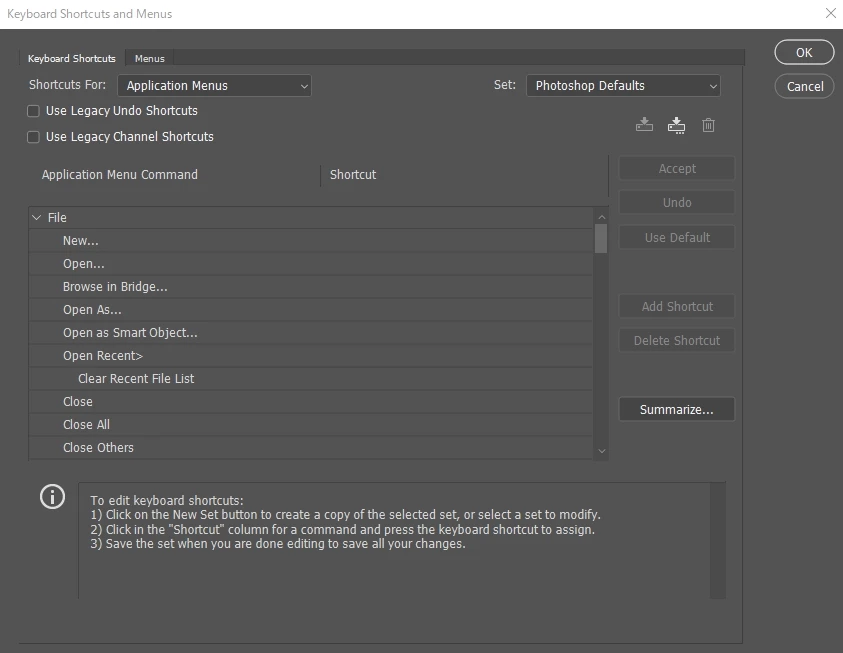
As you can see in the screenshot, the shortcut keys are not shown.
Sorry for my poor English. From Japan.

I am having trouble with Photoshop shortcuts.
I am using a Japanese laptop with the English version.
As you can see in the screenshot, the shortcut keys are not shown.
Sorry for my poor English. From Japan.
On my computer, the file location of the keyboard shortcuts is here:
C:\Program Files\Adobe\Adobe Photoshop 2023\Locales\en_GB\Support Files\Shortcuts\Win
If you have a former version of Photoshop still installed somewhere (or if a friend of yours have) you can try to copy it, and paste in the relevant folder in your actual system... (I have en_GB on mine, because that's the version I have, but you may find that yours is different)
If you manage to make it work, you fill be able to save it as a back-up somewhere, so you can upload it again if it happens (upload, download and save options are visible in the keyboard shortcuts panel)
Enter your E-mail address. We'll send you an e-mail with instructions to reset your password.
 AdChoices