



Magggiemac
Participating Frequently
October 21, 2024
解決済み

Pipette nimmt nicht die vordergrundfarbe auf

  • October 21, 2024
  • 返信数 1.
  • 964 ビュー

Hallo an alle,

ich nehme im Pinselwerkzeug mit der alt-Taste (Pipette) eine Farbe auf und die ist dann immer die Hintergrundfarbe. Seit 2 Stunden versuche ich das umzustellen. Wie konnte das passieren? Ich habe gestern das Update zu 2025 gemacht und seit dem ist das so.

Die Pipette sollte die Farbe im Vordergrund platzieren. Im Werkzeug Pipette macht sie das auch. Aber sobald ich im Pinsel bin und mit Alt zum aufnehmen arbeite bekomme ich die Farbe immer in den Hintergrund. So kann ich nicht arbeiten. Bitte um Hilfe.
このトピックへの返信は締め切られました。
解決に役立った回答 jane-e

@Magggiemac 


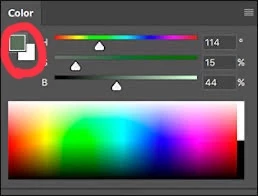
In the Color panel, click once on the foreground swatch to activate it and try again.


Jane


返信数 1

jane-e
Community Expert
jane-eCommunity Expert解決!
Community Expert
October 21, 2024

@Magggiemac 


In the Color panel, click once on the foreground swatch to activate it and try again.


Jane


Magggiemac
Magggiemac作成者
Participating Frequently
October 23, 2024

OMG Jane, I love you. Ich dachte nicht dass da funktionieren wird. Aber es hat geklappt - ich bin so ergriffen und dankbar. 2 Stunden habe ich mich am Montag damit gequält. 🫶💓 Danke DAnke Danke

jane-e
Community Expert
Community Expert
October 23, 2024

Schau mal, bei dir steht R und B. Bei mir gar nichts. Das ist wirklich ein Fehler. Ich kann so gar nicht erkennen welche gerade ausgewählt ist.


@Magggiemac 


I see what you mean. Maggie. In Illustrator, the swatch comes to the front, but not in Photoshop.


Clicking on the foreground or background swatch activates it. In Photoshop, the only way to tell is by where the circle is in the preview window. 


The shortcut to switch between them is X or you can click the switch button in the Tools panel.


Jane