



greless
Inspiring
April 12, 2019
解決済み

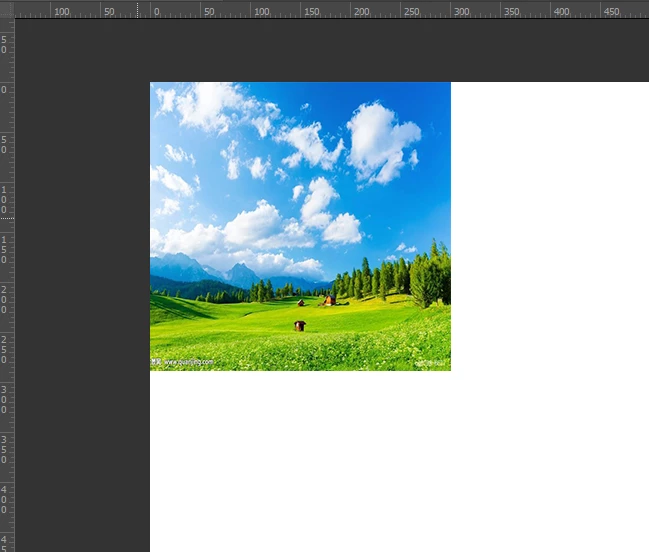
place a pictures and the left=0,top=0

  • April 12, 2019
  • 返信数 3.
  • 2035 ビュー

hi everybody:

     i want to place a pictures and the left=0,top=0,there is a script to using "offset",but offset is Bad calculation,

(function placeEvent_08499145507813()

    {

    try {

        var d = new ActionDescriptor();

        d.putPath(stringIDToTypeID("null"), new File("~/Pictures/timg.jpg"));

        d.putEnumerated(stringIDToTypeID("freeTransformCenterState"), stringIDToTypeID("quadCenterState"), stringIDToTypeID("QCSAverage"));

        var d1 = new ActionDescriptor();

        d1.putUnitDouble(stringIDToTypeID("horizontal"), stringIDToTypeID("pixelsUnit"), -50);

        d1.putUnitDouble(stringIDToTypeID("vertical"), stringIDToTypeID("pixelsUnit"), -29.5);

        d.putObject(stringIDToTypeID("offset"), stringIDToTypeID("offset"), d1);

        d.putUnitDouble(stringIDToTypeID("width"), stringIDToTypeID("percentUnit"), 67.5);

        d.putUnitDouble(stringIDToTypeID("height"), stringIDToTypeID("percentUnit"), 83.5271317829457);

        executeAction(stringIDToTypeID("placeEvent"), d, DialogModes.NO);

        }

    catch (e) { if (e.number!=8007) { alert("Line: "+e.line+"\n\n"+e,"Bug!",true); throw(e); } }

    }

)();
このトピックへの返信は締め切られました。
解決に役立った回答 r-bin

var d = new ActionDescriptor();

var r = new ActionReference();

r.putEnumerated(stringIDToTypeID("layer"), stringIDToTypeID("ordinal"), stringIDToTypeID("targetEnum"));

d.putReference(stringIDToTypeID("null"), r);

var d1 = new ActionDescriptor();

d1.putUnitDouble(stringIDToTypeID("horizontal"), stringIDToTypeID("pixelsUnit"), x);

d1.putUnitDouble(stringIDToTypeID("vertical"),  stringIDToTypeID("pixelsUnit"), y);

d.putObject(stringIDToTypeID("to"), stringIDToTypeID("offset"), d1);

executeAction(stringIDToTypeID("move"), d, DialogModes.NO);

返信数 3

greless
greless作成者
Inspiring
April 13, 2019

hello,

i want to fix the width/height in placement,but replace

  1.   d.putUnitDouble(stringIDToTypeID("width"), stringIDToTypeID("percentUnit"), 67.5);  
  2.   d.putUnitDouble(stringIDToTypeID("height"), stringIDToTypeID("percentUnit"), 83.5271317829457); 

to

  1.   d.putUnitDouble(stringIDToTypeID("width"), stringIDToTypeID("pixelsUnit"), 50);  
  2.   d.putUnitDouble(stringIDToTypeID("height"), stringIDToTypeID("pixelsUnit"), 50);

is unfeasible.could you specify the width height when placing?

Legend
April 13, 2019

This is a long-standing bug (or legalized feature) in Photoshop.
The transform command always perceives width and height as percentages, regardless of the type of units specified.

greless
greless作成者
Inspiring
April 13, 2019

all right,so does it have a formula to convert from pixels to percent?

Stephen Marsh
Community Expert
Community Expert
April 12, 2019

As a scripting beginner, my simple solution would have been to do what I would have done using an action:

#target photoshop

// Select All

  app.activeDocument.selection.selectAll();

// Align - Clean SL

Algn();

function Algn() {

  var c2t = function (s) {

  return app.charIDToTypeID(s);

  };

  var s2t = function (s) {

  return app.stringIDToTypeID(s);

  };

  var descriptor = new ActionDescriptor();

  var descriptor2 = new ActionDescriptor();

  var reference = new ActionReference();

  var reference2 = new ActionReference();

// Align Top

  reference2.putEnumerated( s2t( "layer" ), s2t( "ordinal" ), s2t( "targetEnum" ));

  descriptor2.putReference( c2t( "null" ), reference2 );

  descriptor2.putEnumerated( s2t( "using" ), s2t( "alignDistributeSelector" ), s2t( "ADSTops" ));

  executeAction( c2t( "Algn" ), descriptor2, DialogModes.NO );

// Align Left

  reference.putEnumerated( s2t( "layer" ), s2t( "ordinal" ), s2t( "targetEnum" ));

  descriptor.putReference( c2t( "null" ), reference );

  descriptor.putEnumerated( s2t( "using" ), s2t( "alignDistributeSelector" ), s2t( "ADSLefts" ));

  executeAction( c2t( "Algn" ), descriptor, DialogModes.NO );

}

// Deselect

  app.activeDocument.selection.deselect();

greless
greless作成者
Inspiring
April 12, 2019

This is also a feasible method,Thank you for your reply.it would be very helpful to me,

Legend
April 12, 2019

The place command works differently in different photoshops. And usually very strange.

Do not use offset.

Use the move command to move the layer to the desired position after placeEvent.

greless
greless作成者
Inspiring
April 12, 2019

i'm sorry,but the "move" what be used.

greless
greless作成者
Inspiring
April 12, 2019

var d = new ActionDescriptor();

var r = new ActionReference();

r.putEnumerated(stringIDToTypeID("layer"), stringIDToTypeID("ordinal"), stringIDToTypeID("targetEnum"));

d.putReference(stringIDToTypeID("null"), r);

var d1 = new ActionDescriptor();

d1.putUnitDouble(stringIDToTypeID("horizontal"), stringIDToTypeID("pixelsUnit"), x);

d1.putUnitDouble(stringIDToTypeID("vertical"),  stringIDToTypeID("pixelsUnit"), y);

d.putObject(stringIDToTypeID("to"), stringIDToTypeID("offset"), d1);

executeAction(stringIDToTypeID("move"), d, DialogModes.NO);


thanks,r-bin,My heart is for you

This is the end result

var layer=app.activeDocument.activeLayer;

MoveLayerOrigin(layer.bounds[0],layer.bounds[1]);

function MoveLayerOrigin(top,left)

{

    try{

            var d = new ActionDescriptor();

            var r = new ActionReference();

            r.putEnumerated(stringIDToTypeID("layer"), stringIDToTypeID("ordinal"), stringIDToTypeID("targetEnum"));

            d.putReference(stringIDToTypeID("null"), r);

            var d1 = new ActionDescriptor();

            d1.putUnitDouble(stringIDToTypeID("horizontal"), stringIDToTypeID("pixelsUnit"), -top);

            d1.putUnitDouble(stringIDToTypeID("vertical"),  stringIDToTypeID("pixelsUnit"), -left);

            d.putObject(stringIDToTypeID("to"), stringIDToTypeID("offset"), d1);

            executeAction(stringIDToTypeID("move"), d, DialogModes.NO);

        }

        catch(e){alert(e)}

    }