


Exit
  • Global community
    • Language:
      • Deutsch
      • English
      • Español
      • Français
      • Português
  • 日本語コミュニティ
  • 한국 커뮤니티
0

PSD Files opening with Photoshop CS6 and not Photoshop 2024

Explorer ,
Jan 25, 2024 Jan 25, 2024

Photoshop 2024 is not available in the "Open With" list, only Photoshop CS6. If I don't already have Photoshop 2024 open, my computer will open PSD files using Photoshop CS6, even if I navigate to the Photoshop 2024 file using the "Choose another app" option. If Photoshop 2024 is open, then it will open with that and not CS6. All PSD thumbnails have a CS6 style appearance. I don't want to get rid of Photoshop CS6, I just want PSD files to open using Photoshop 2024.
TOPICS
Windows
2.2K
Translate
Report
Community guidelines
Be kind and respectful, give credit to the original source of content, and search for duplicates before posting. Learn more
community guidelines

correct answers 2 Correct answers

Community Expert , Feb 02, 2024 Feb 02, 2024

Did you install CS6 after installing the 2024 version? If you did, CS6 would take over the file associations and become the default application.

In that case, uninstalling and reinstalling the 2024 version should fix the issue.

Translate
Community Expert , Feb 02, 2024 Feb 02, 2024

As Per says: uninstall 2024 and reinstall it.


The latest installed version will always take over file associations.

Translate
Adobe
Community Expert ,
Jan 25, 2024 Jan 25, 2024
quote

... even if I navigate to the Photoshop 2024 file using the "Choose another app" option.

By @Kayla Danforth


When you select "choose another app" and navigate to PS 2024, there is an option for "all files". I don't remember the exact wording. Are you choosing that? (You didn't say.)


Jane

Translate
Report
Community guidelines
Be kind and respectful, give credit to the original source of content, and search for duplicates before posting. Learn more
community guidelines
Explorer ,
Jan 25, 2024 Jan 25, 2024

I see the All Files option by the File Name bar, but wouldn't that be helpful if I was not able to find the Photoshop 2024 program? I see the Photoshop 2024 program but when I click it, it's like my computer completely disregards that and opens Photoshop CS6.

Translate
Report
Community guidelines
Be kind and respectful, give credit to the original source of content, and search for duplicates before posting. Learn more
community guidelines
Community Expert ,
Jan 25, 2024 Jan 25, 2024

@Kayla Danforth 


I've seen more than a few folks click the Photoshop folder, which doesn't work. Make sure you are clicking the Photoshop app inside the Photoshop folder. 


It might help to have file extensions showing. In File Explorer > View tab > Show/hide group > enable the File name extensions check box.

https://support.microsoft.com/en-us/windows/common-file-name-extensions-in-windows-da4a4430-8e76-89c...


Show a screenshot of the contents of the Photoshop folder if you don't see it.


Jane

Translate
Report
Community guidelines
Be kind and respectful, give credit to the original source of content, and search for duplicates before posting. Learn more
community guidelines
Explorer ,
Feb 02, 2024 Feb 02, 2024

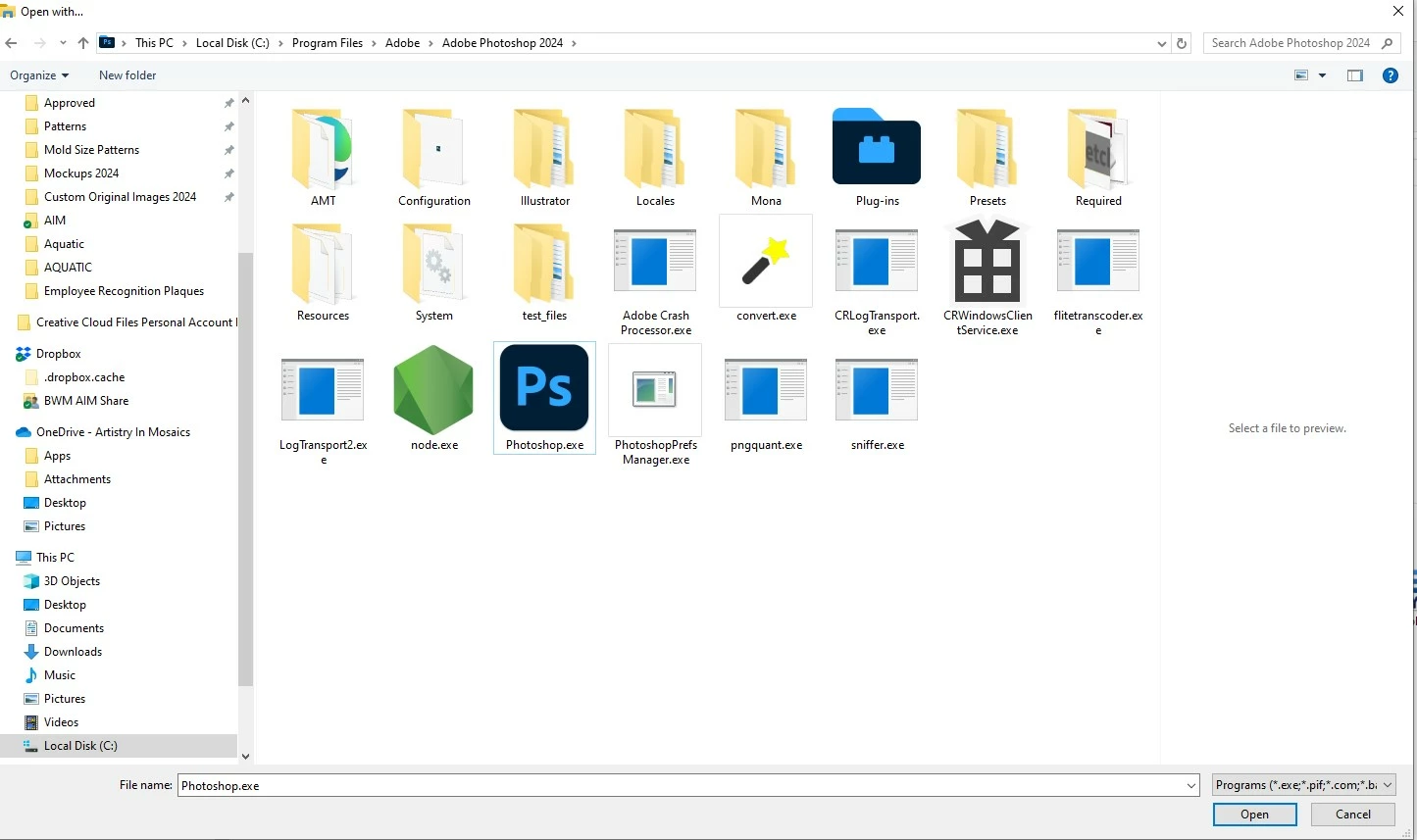
This is what I am seeing. I click Photoshop.exe and it opens PhotoshopCS6. Am I missing something?


janee_0-1706893766623.jpeg


Translate
Report
Community guidelines
Be kind and respectful, give credit to the original source of content, and search for duplicates before posting. Learn more
community guidelines
Community Expert ,
Feb 02, 2024 Feb 02, 2024
quote

This is what I am seeing. I click Photoshop.exe and it opens PhotoshopCS6. Am I missing something?


By @Kayla Danforth


Is it possible that CS6 is already running when you do this? Since Windows won't let you have two versions open at the same time, I guess that trying to open the 2024 version would bring CS6 to the foreground if it's already running.

Translate
Report
Community guidelines
Be kind and respectful, give credit to the original source of content, and search for duplicates before posting. Learn more
community guidelines
Explorer ,
Feb 02, 2024 Feb 02, 2024

I looked in Task Manager and did not see either version of Photoshop running.

Translate
Report
Community guidelines
Be kind and respectful, give credit to the original source of content, and search for duplicates before posting. Learn more
community guidelines
Community Expert ,
Feb 02, 2024 Feb 02, 2024

Did you install CS6 after installing the 2024 version? If you did, CS6 would take over the file associations and become the default application.

In that case, uninstalling and reinstalling the 2024 version should fix the issue.

Translate
Report
Community guidelines
Be kind and respectful, give credit to the original source of content, and search for duplicates before posting. Learn more
community guidelines
Explorer ,
Feb 02, 2024 Feb 02, 2024
LATEST

I did not install CS6 after 2024, but I did uninstall and reinstall 2024 and it worked. Thank you!

Translate
Report
Community guidelines
Be kind and respectful, give credit to the original source of content, and search for duplicates before posting. Learn more
community guidelines
Explorer ,
Feb 02, 2024 Feb 02, 2024

Screenshot 2024-02-02 081159.jpg

Not sure if the screenshot is showing in my other reply...

Translate
Report
Community guidelines
Be kind and respectful, give credit to the original source of content, and search for duplicates before posting. Learn more
community guidelines
Community Expert ,
Feb 02, 2024 Feb 02, 2024

As Per says: uninstall 2024 and reinstall it.


The latest installed version will always take over file associations.

Translate
Report
Community guidelines
Be kind and respectful, give credit to the original source of content, and search for duplicates before posting. Learn more
community guidelines
Explorer ,
Feb 02, 2024 Feb 02, 2024

This worked, and now all my PSD files have the 2024 appearance. Thank you!

Translate
Report
Community guidelines
Be kind and respectful, give credit to the original source of content, and search for duplicates before posting. Learn more
community guidelines