


Beachcolonist
Inspiring
March 2, 2022
解決済み

"Bridge" & "Import" dimmed in File/Automate/Batch

  • March 2, 2022
  • 返信数 1.
  • 269 ビュー

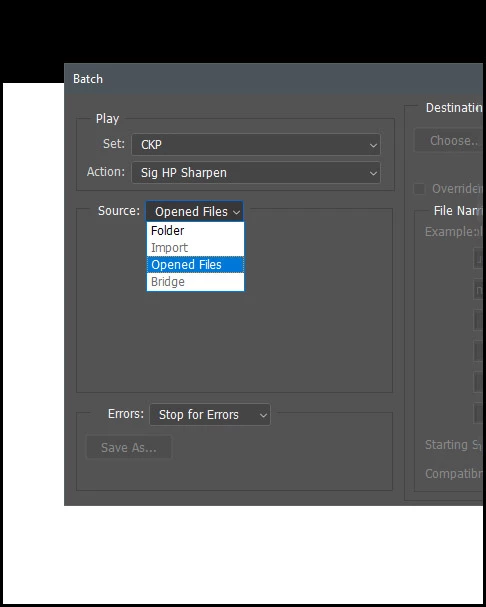
Using File/Automate/Batch the Source: dropdown shows both "Bridge" & "Import" as dimmed. I still can choose either Folder or Opened files as per normal.


Any ideas? No, I am not "resetting my preferences" so save that newbie suggestion for people who have not carefully customized their setup for years. I can work with hints, guesses, etc. Thanks!
 

このトピックへの返信は締め切られました。
解決に役立った回答 D Fosse

"Bridge" becomes active if the script is actually called from Bridge (Tools > Photoshop > Batch).


Don't know about Import, but it must be related to the PS Import menu.

返信数 1

D Fosse
Community Expert
D FosseCommunity Expert解決!
Community Expert
March 2, 2022

"Bridge" becomes active if the script is actually called from Bridge (Tools > Photoshop > Batch).


Don't know about Import, but it must be related to the PS Import menu.

Beachcolonist
Beachcolonist作成者
Inspiring
March 2, 2022

Thanks! I hadn't checked that route to Batch.


Best would be if it worked either way if the user had files selected in Bridge, but this is fine. I was thinking habitually, do everything from Photoshop, or perhaps if it's dimmed there it's out of commission elsewhere too.


Thanks again, Import probably as you say has a like process.