


Participating Frequently
August 31, 2022
解決済み

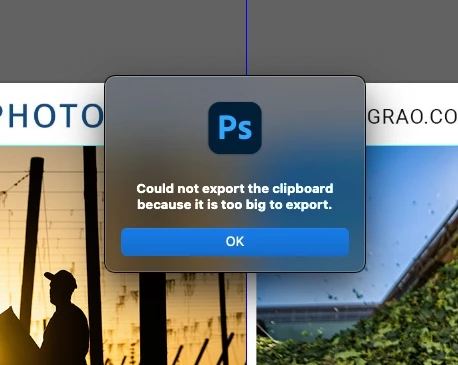
"Could not export the clipboard because it is too big to export." infuriating!
  • August 31, 2022
  • 返信数 5.
  • 7820 ビュー

This is infuriating and I cant make it go away.  I have goggle the issue, to no avail.

How do I stop this insanly annoying message?


Whatever it is telling me I cant do, After I click it to go away, I still do the thing it says I cant do.  


My update is current.


Thank you.
このトピックへの返信は締め切られました。
解決に役立った回答 TheDigitalDog

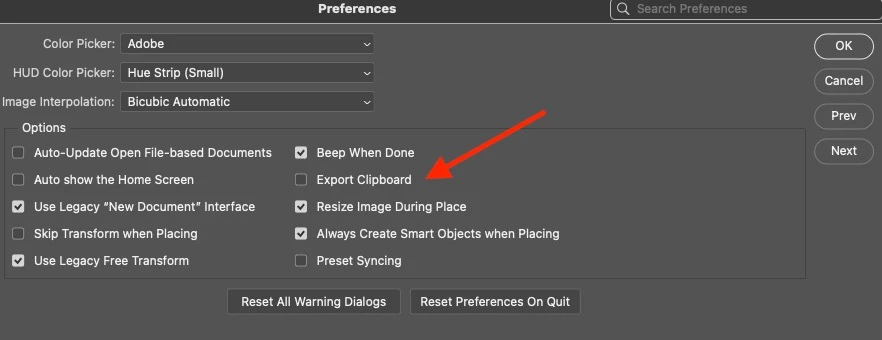
Disable the option in Preferences: Export Clipboard.


返信数 5

photoaaron1作成者
Participating Frequently
August 31, 2022

Sorry, the suggestion posted here worked for me.

I disabled "Export clipboard" in File Handling.

TheDigitalDog
Inspiring
August 31, 2022

OK good; not a bug so moving to discussion.

This preference has been in PS for decades FWIW and isn't Adobe delighting in annoying you. There has always been a clipboard data limit and hence this old preference.

Author “Color Management for Photographers" & "Photoshop CC Color Management/pluralsight"
TheDigitalDog
Inspiring
August 31, 2022

It's still hugely annoying.
And I was obviously being fecicious about Adobe deliting in it.


@photoaaron1 wrote:

It's still hugely annoying.
And I was obviously being fecicious about Adobe deliting in it.


Sorry, I don't understand what that means. But it sounds like you've fixed the 'issue' thanks to our assistance in how the General Preferences work. And in this case, for multiple decades. 

Author “Color Management for Photographers" & "Photoshop CC Color Management/pluralsight"
TheDigitalDog
Inspiring
August 31, 2022

So what fixed it for you?

Author “Color Management for Photographers" & "Photoshop CC Color Management/pluralsight"
photoaaron1作成者
Participating Frequently
August 31, 2022

Thanks. All fixed.

I think Adobe delights in adding little [removed by moderator] like this simply to annoy [removed by moderator] its users.  
Add the save to Adobe cloud popup when you "save as". 

Get a grip, Adobe. Seriously.

gener7
Community Expert
Community Expert
August 31, 2022
quote

Thanks.  All fixed.Add the save to Adobe cloud popup when you "save as". 

Get a grip, Adobe. Seriously.

 On that one, you can choose the default save location under Preferences > File Handling

@mj
Community Expert
Community Expert
August 31, 2022

Hi,

Purge your temp files.

Edit Menu > Purge > All

You can also try this suggestion.

https://thecleverest.com/disabling-the-could-not-export-the-clipboard-because-it-is-too-big-to-export-photoshop-warning/

Let us know how you go


TheDigitalDog
TheDigitalDog解決!
Inspiring
August 31, 2022

Disable the option in Preferences: Export Clipboard.


Author “Color Management for Photographers" & "Photoshop CC Color Management/pluralsight"