


Participant
October 30, 2017
解決済み

"File not found. Check the file name and try again" Error when saving

  • October 30, 2017
  • 返信数 7.
  • 110186 ビュー

When I attempt to save a Photoshop file, I get the error "C:\directoryoffile File not found. Check the file name and try again."

This happens even when I have never saved the file before (new Photoshop document with a single change). I cannot save in any file type to anywhere on the computer BUT the Creative Cloud folder, which is really odd.

I've reinstalled Photoshop and still get this error.

I am running CC 2018 and the latest version of Windows 10.

Any help would be greatly appreciated, as not being able to save is very very inconvenient.
解決に役立った回答 gilc47267946

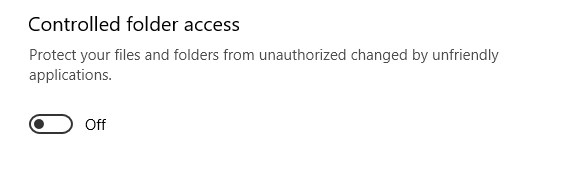
If you are using Windows, disable this...

返信数 7

Participant
November 17, 2019

Thank you for your help! This worked for me

Participant
November 12, 2019

Worked like magic! Thank you

ELECTROHERMIT
Inspiring
January 8, 2019

I also received the "File Not Found - Try Again" window in Photoshop when attempting to save to the desktop.

Adding Photoshop to the Apps list in Windows Defender (see above) worked for me as well. I can now save to the desktop.

BTW - I had to resort to using Windows Defender temporarily because Avira was conflicting with Chrome, cause it to micro-stutter.

mikes10300485
Participant
August 1, 2018

turning off CFA worked

clairep96429592
Participant
May 18, 2018

So we have to turn off Defenders to be able to save? What kind of a program is that? Photoshop shame on you.

gilc47267946解決!
Participant
May 21, 2018

If you are using Windows, disable this...

Participant
July 20, 2018

resolved, Thanks

December 21, 2017

Hello Michaels,

I have this problem the same you. I had solve it by turn off Windown defend controlled.

I can do like it : Windows 10 Forums

Good luck for you

janiced10293214
Participant
April 22, 2018

Thank you, I have been searching for a solution for this problem for a couple of weeks!

Kevin Stohlmeyer
Community Expert
Community Expert
October 30, 2017

Just taking a shot but are you logged in as an admin account? I'm wondering if your HD is locked to changes as a user. It seems like a permissions issue.

Participant
October 30, 2017

It only seems to be Photoshop that comes up with this error, not others such as Word are affected. I'll check if Windows Defender is stopping it as part of ransom-ware prevention.

Edit: Adding Photoshop.exe to the Controlled Folders bypass within Windows Defender Security Centre seems to have solved my problem. Thanks for pointing me in the right direction.

Participant
February 1, 2018

I had the same issue and this method worked for me.