

Mohamed Hameed21513110
Inspiring
September 9, 2023
解決済み

replace textlayer content with prompt search and change specific words colors

  • September 9, 2023
  • 返信数 3.
  • 1083 ビュー

Greetings to everyone
I have this code but it has a problem

var searchWord = prompt("Enter the word to search for:", "", "Search Word");
var textColor = new SolidColor();
textColor.rgb.red = 255;
textColor.rgb.green = 0;
textColor.rgb.blue = 0;

var activeLayer = app.activeDocument.activeLayer;

if (activeLayer.kind === LayerKind.TEXT) {
  var textItem = activeLayer.textItem;
  var textContents = textItem.contents;
var txt = activeDocument.activeLayer.textItem.contents.toLowerCase(); // "blablablabla Sport blablablabla sport blablabla Sports";

var idx = [];
  var newTextContents = textContents.replace(new RegExp(searchWord, 'gi'),+ searchWord );
   //var idx = searchWord;
    for (var i = 0; i < searchWord.length; i++)
    searchWord[i].color = textColor;
  textItem.contents = newTextContents;
  //textItem.color = textColor;
}


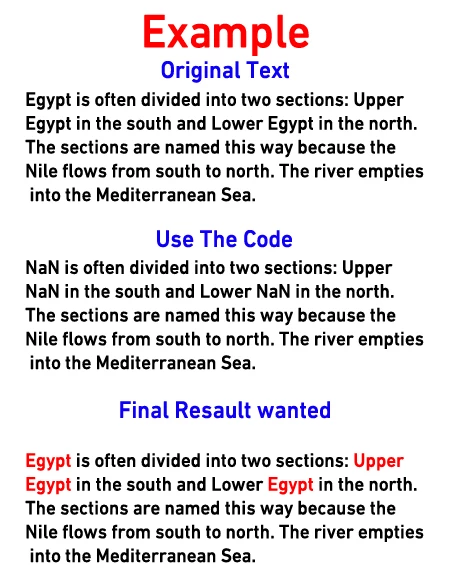
I search for a word within a text layer, but when I use the code, I see results (Nan)
I want to modify the code to show the search results and change the color of the search results words to red
このトピックへの返信は締め切られました。
解決に役立った回答 c.pfaffenbichler
@jazz-y posted code about changing some text color to another text color
and about changing each letter color randomly 
, maybe those can serve as examples. 
 
Edit: I noticed the second example would change other properties so it would probably not be of great help for you. 
 
Edit2: Changing specific words in a Type Layer to a specific color via Script is definitely possible, but my code seems decidedly clunky so far, maybe I will be able to think of a simpler manner. 
// typeLayerChangeColorOfSpefifiedWords.jsx
// apply color to specified words of selected type layer;
// 2023, use it at your own risk;
if (app.documents.length > 0) {
var theNewColor = [255,128,0];
var theRegeExp = /456/gi;
//////////////////
try {
var theRanges = new Array;
var theStyleRanges = new Array;
// get font of active layer;
var ref = new ActionReference();
ref.putEnumerated( charIDToTypeID("Lyr "), charIDToTypeID("Ordn"), charIDToTypeID("Trgt") ); 
var layerDesc = executeActionGet(ref);
var layerSet = typeIDToStringID(layerDesc.getEnumerationValue(stringIDToTypeID("layerSection")));
var isBackground = layerDesc.getBoolean(stringIDToTypeID("background"));
var theName = layerDesc.getString(stringIDToTypeID('name'));
// if not layer group collect values;
if (layerSet != "layerSectionEnd" && layerSet != "layerSectionStart" && isBackground != true) {
var hasText = layerDesc.hasKey(stringIDToTypeID("textKey"));
if (hasText == true) {
var textDesc = layerDesc.getObjectValue(stringIDToTypeID('textKey'));
var theText = textDesc.getString(stringIDToTypeID('textKey'));
// get indices for string;
var indicesCount = 0;
var theIndices = new Array;
var cnt = 0;
while ((result = theRegeExp.exec(theText))!=null) {
    theIndices.push([result.index, result.index+result[0].length, cnt])
};
// get properties;
var paragraphRangeList = textDesc.getList(stringIDToTypeID('paragraphStyleRange'));
var kernRange = textDesc.getList(stringIDToTypeID('kerningRange'));
var rangeList = textDesc.getList(stringIDToTypeID('textStyleRange'));
// process the list to get an array of styles and one array of the indices;
for (var o = 0; o < rangeList.count; o++) {
var thisList = rangeList.getObjectValue(o);
var theFrom = thisList.getInteger(stringIDToTypeID('from'));
var theTo = thisList.getInteger(stringIDToTypeID('to'));
var styleDesc = thisList.getObjectValue(stringIDToTypeID('textStyle'));
//////////////////
// add to array;
if (o == 0) {
    theRanges.push([theFrom, theTo]);
    theStyleRanges.push(styleDesc);
    };
if (o > 0 && theFrom != theRanges[theRanges.length - 1][0] /*&& theTo != theRanges[theRanges.length - 1][1]*/) {
theRanges.push([theFrom, theTo]);
theStyleRanges.push(thisList.getObjectValue(stringIDToTypeID('textStyle')));
};
//////////////////
}
}
};
// change text;
// =======================================================
var idTxtt = charIDToTypeID( "Txtt" );
var idFrom = charIDToTypeID( "From" );
var idT = charIDToTypeID( "T   " );
var idTxtS = charIDToTypeID( "TxtS" );
var idTxLr = charIDToTypeID( "TxLr" );
var idTxt = charIDToTypeID( "Txt " );
    var desc6 = new ActionDescriptor();
        var ref1 = new ActionReference();
        ref1.putEnumerated( idTxLr, charIDToTypeID( "Ordn" ), charIDToTypeID( "Trgt"  ));
    desc6.putReference( idnull = charIDToTypeID( "null" ), ref1 );
        var desc7 = new ActionDescriptor();
        desc7.putString( idTxt, theText );
            var list2 = new ActionList();
//////////////////
// define each letter individually;
var theIndex = 0;
var thisStyleRange = theStyleRanges[theIndex];
var originalColor = theStyleRanges[theIndex].getObjectValue(stringIDToTypeID('color'));
var thisRange = theRanges[theIndex];
var targetStart = theIndices[indicesCount][0];
var targetEnd = theIndices[indicesCount][1];
for (var m = 0; m < theText.length; m++) {
// check for relevant style range;
    if (m == thisRange[1]) {
        theIndex++;
        var thisStyleRange = theStyleRanges[theIndex];
        var originalColor = theStyleRanges[theIndex].getObjectValue(stringIDToTypeID('color'));
        var thisRange = theRanges[theIndex];
        };
// apply style range but change the color;
    var desc14 = new ActionDescriptor();
    desc14.putInteger( idFrom, m );
    desc14.putInteger( idT, m+1 );
        var desc15 = new ActionDescriptor();
        var desc15 = thisStyleRange;
        if (m >= targetStart && m < targetEnd) {
            var a1 = new ActionDescriptor();
            a1.putDouble(stringIDToTypeID('red'), theNewColor[0]);
            a1.putDouble(stringIDToTypeID('grain'), theNewColor[1]);
            a1.putDouble(stringIDToTypeID('blue'), theNewColor[2]);
            desc15.putObject(stringIDToTypeID('color'), stringIDToTypeID('RGBColor'), a1);
        } else {
            desc15.putObject(stringIDToTypeID('color'), stringIDToTypeID('RGBColor'), originalColor)
            if (m == targetEnd && indicesCount < theIndices.length-1) {
                indicesCount++;
                var targetStart = theIndices[indicesCount][0];
                var targetEnd = theIndices[indicesCount][1];
            }
        };
    desc14.putObject( idTxtS, idTxtS, desc15 );
    list2.putObject( idTxtt, desc14 );
    };
//////////////////
var desc7 = new ActionDescriptor();
var list3 = new ActionList();
    for (var n = kernRange.count-1; n >= 0; n--) {
        var thisOne = kernRange.getObjectValue(n);
        var desc15 = new ActionDescriptor();
        desc15.putInteger( idFrom, thisOne.getInteger(charIDToTypeID("From")) );
        desc15.putInteger( idT, thisOne.getInteger(charIDToTypeID( "T   " )) );
        desc15.putInteger( charIDToTypeID( "Krng" ), thisOne.getInteger(stringIDToTypeID("kerning")));
        list3.putObject( stringIDToTypeID( "kerningRange"),  desc15);
        };
        desc7.putList( idTxtt, list2 );
        desc7.putList( stringIDToTypeID( "kerningRange"), list3);
    desc6.putObject( idT, idTxLr, desc7 );
executeAction( charIDToTypeID( "setd" ), desc6, DialogModes.NO );
}
catch (e) {};
};

返信数 3

c.pfaffenbichler
Community Expert
Community Expert
September 10, 2023

@Mohamed Hameed21513110 , I added code to my previous post, have you tested it yet? 

Mohamed Hameed21513110
Inspiring
September 10, 2023

@c.pfaffenbichler 
thank you for helping me

Excuse me sir
I put the code in and tried it, but I didn't understand how it worked

Please explain how the code works by changing the color of the selected words

c.pfaffenbichler
Community Expert
Community Expert
September 11, 2023
var theNewColor = [255,128,0];

defines the new color 

var theRegeExp = /456/gi;

definess the RegExp to be replaced. 


I checked with a Type Layer combining different fonts, sizes etc. and those seem to be maintained. 

c.pfaffenbichler
Community Expert
Community Expert
September 9, 2023

If I remember correctly DOM code did not use to be able to color individual words in a Type Layer so AM code needed to be used. 


Mohamed Hameed21513110
Inspiring
September 9, 2023

@c.pfaffenbichler 

quote

 so AM code needed to be used. 


If possible explain how this is done?

c.pfaffenbichler
Community Expert
Community Expert
September 9, 2023

Record changing the color of a word in a Type Layer with ScriptingListener.plugin and then clean up the resulting code and wrap in in a function that takes meaningful arguments. 

Legend
September 9, 2023

Why is the + sign needed here?


var newTextContents = textContents.replace(new RegExp(searchWord, 'gi'),+ searchWord );