


Inspiring
June 9, 2015
解決済み

Shape dynamics no longer works - where is my tapered brush?

  • June 9, 2015
  • 返信数 5.
  • 34825 ビュー

Not sure why but when I select Pen Pressure in Shape Dynamics/Brush Panel i Used to get a really useful tapered effect on my brush - perfect for my illustration style. Now that doesn't happen anymore and none of my presets from previous versions work that way either. I assume it must be an upgrade issue. I am using an Intuous 3 with Windows 8 (yes that was a struggle turning all the weirdness down) and the latest and greatest version of PS CC 2014 - Full Version. I'm sure there is a button somewhere that will fix this but I cannot find it and deadlines are getting closer!

I get a ! warning next to Pen Pressure when selected, and that can't be good.
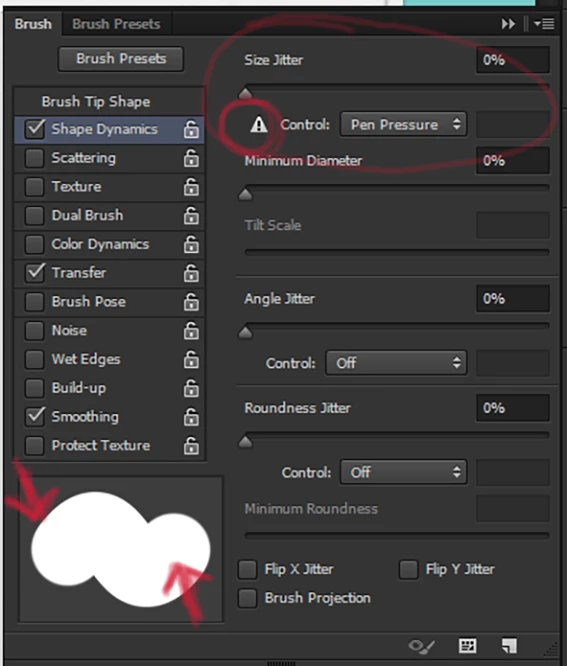
Please Adobe Community - only you can help me!

Cheers

JoBeeOne

    解決に役立った回答 JoBeeOne

    Okay - right now I have it working. I have uninstalled and re-installed drivers - messed around with all the Windows settings and turned a variety of settings on and off.

    This worked: Removing the preference file from Wacom Tablet Preference File Utility and then adding Photoshop to the Application area. (Intuos 3 and Windows 8, PS CC 2014)

    So the brush worked for a few moments but then I tried unchecking Use Ink in the mapping area and I lost sensitivity again.

    So now I will see if there is a set of things that will consistently work to reinstate the pressure sensitivity.

    I also found another thread on these forums discussing this same problem. I also have the problem with my cintiqu and Windoes vista with Photoshop CS6.New Wacom driver installed.

    I also use a Mac, Bamboo and PS CC 2014 at my other work and no issue at all.

    Not really sure why this happened now - was never an issue for the Cintiq before.

    Will continue to pull-my hair out until I have a solid fix.

    返信数 5

    Participating Frequently
    December 2, 2022

    I'm experiencing same issue. 
    I'm using Huion Kamvas 13, windows 11 and Photoshop 2023.

    For comparisons, shape dynamics brush setttings appears normal in Clip Studio Paint software. 


    Participant
    February 23, 2024

    I'm also having this issue using a Huion Kamvas 22 Plus. It's worked fine with Photoshop in the past but I just recently ran into this issue and I can't figure out what's causing it. Works fine in Clip Studio and other applications so it's definitely an Adobe glitch.


    So far I've tried re-installing Photoshop and the Huion driver, used 3 different versions of Photoshop (2022, 2023 and 2024), and even tried the "PSUserConfig" fix but I'm still not getting any change in pressure.


    It's been almost nine years since this thread posted, how are people still having this issue in 2024??

    Participant
    March 29, 2024

    I have the same problem with Huion Inspiroy H640P. I can't draw anymore in Photoshop


    lenton
    Participant
    December 16, 2017

    See this Photoshop Tutorial: Using Tapered Brushes, Stroking Paths and Creating Patterns - YouTube

    No pen tablet required. The above is how the Fade function is supposed to work.

    Is pen tablet in the way? If it is, Adobe has not implemented the Fade brush function correctly.

    I have an Intuos pen tablet. The settings for this are next to non-existent.

    I am using Windows 7 64 bit.

    This function used to work in Photoshop CS. It has never worked in Photoshop CC. It's been close to three years now. 

    How do I call Adobe over here to see this post? @Adobe  Support - nonworking feature.

    Answered? I think not.

    Benjamin Root
    Legend
    December 16, 2017

    Feedback.photoshop.com is where bugs can be reported. Do a search first. If there is already a report on the topic “me too” it.

    Participant
    September 29, 2020

    So, it turns out to be NOT a tablet problem at all.


    There are TWO brush menus in Photoshop. If you just use the one and select "Shape Dynamics", you have only done half the jobe. You ALSO have to go to BRUSH PRESETS and select a brush that tapers.


    This works EVERY time.

    enriquec57939868
    Participant
    June 16, 2015

    VERY ANGRY with Adobe again. I did not use CC 2014 due to the Wacom shape dinamics problems and stayed with CC. Now today I chose to give CC2015 a chance to see if these issues would be resolved only to find that:

    1) My CC version was deleted without asking.

    2) The Wacom issues are still there!

    This is unbelievable, seriously. I don't know why I have to lose hours of my work only to find that there's no easy solution for the Wacom problem and I have to re-install Photoshop CC again to be able to work again as usual.

    I'm an professional illustrator and I have a company to run. I cannot lose hours of work and frustration  looking for some hack to make my Wacom tablets work again as they did 2 years ago.

    Who's going to refund my 2 hours of work lost this moring, uh? Nobody, I guess.

    After 17 years of working with Adobe Photoshop I have seriously thought of using another program for my work.

    -An angry customer.

    Adobe Employee
    June 16, 2015

    Sorry to hhave caused you any frustration. Does any of the info on this page assist you with you Wacom + PS problems?

    Tablet support FAQ for Photoshop

    JoBeeOne作成者解決!
    Inspiring
    June 15, 2015

    Okay - right now I have it working. I have uninstalled and re-installed drivers - messed around with all the Windows settings and turned a variety of settings on and off.

    This worked: Removing the preference file from Wacom Tablet Preference File Utility and then adding Photoshop to the Application area. (Intuos 3 and Windows 8, PS CC 2014)

    So the brush worked for a few moments but then I tried unchecking Use Ink in the mapping area and I lost sensitivity again.

    So now I will see if there is a set of things that will consistently work to reinstate the pressure sensitivity.

    I also found another thread on these forums discussing this same problem. I also have the problem with my cintiqu and Windoes vista with Photoshop CS6.New Wacom driver installed.

    I also use a Mac, Bamboo and PS CC 2014 at my other work and no issue at all.

    Not really sure why this happened now - was never an issue for the Cintiq before.

    Will continue to pull-my hair out until I have a solid fix.

    JoBeeOne作成者
    Inspiring
    June 15, 2015

    Okay - it seems that I need to delete Wacom Prefernces quite a bit - reinstate my changes and keeping the Wacom properties window seems to help too

    Benjamin Root
    Legend
    June 16, 2015

    Alright, thanks for checking back with your findings!

    JoBeeOne作成者
    Inspiring
    June 9, 2015

    Hello - well desperate times! I seem to have fixed the problem. Windows comes with a bunch of options to "plug and play" various tablet devices - it seems that although the Wacom driver is installed and working you still need to jiggle around with some of the other controls before you get what you need performance wise. Anyway, I went into my Contol Panel and opened Devices and entered the Wacom Properties via there and added Photoshop to the list of programs the tablet is used for. This has worked - I no longer have the warning and my taper is back. Happy now - busy drawing! I hope if anyone else has this problem this solution helps.

    Benjamin Root
    Legend
    June 9, 2015

    Thanks for checking back with your solution. You might consider marking your answer correct. This marks the issue solved and will serve to help other users find solutions to similar problems. Note: you must be signed into the forum.

    Benjamin

    JoBeeOne作成者
    Inspiring
    June 9, 2015

    Thanks Benjamin, it appears I was a bit premature with the solution. It seems that there are many variable now. Whenever I go to use a modifier key from the keyboard it seems to lose the connectivity with my tablet and the problem reoccurs.

    Still looking for a concrete set of procedures that fix the problem and stop it from reoccurring!