Inspiring
December 20, 2012
解決済み

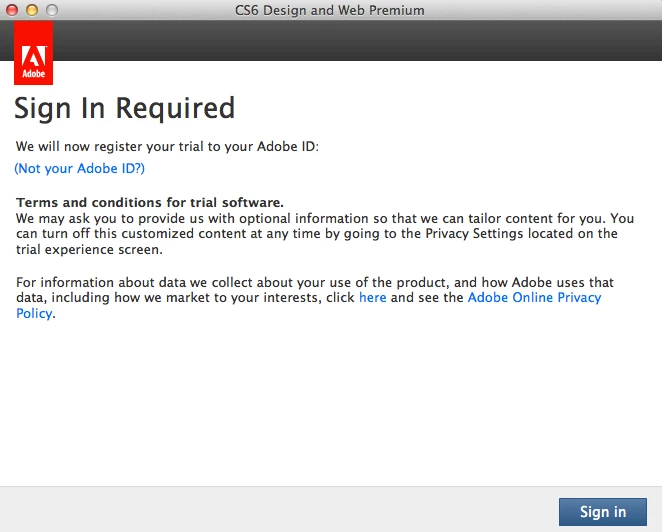
Sign in Required CS6 Adobe Photoshop

  • December 20, 2012
  • 返信数 5.
  • 91733 ビュー

This has been installed and working since just after CS6 released, now Photoshop won't launch it gives me this "sign in required" screen

the only change to my OSX 10.7.5 system is I ran the recent Adobe updates

i bought CS6 directly from Adobe... i guess i could just click on some suspect mystery SignIn screen... strange

    このトピックへの返信は締め切られました。
    解決に役立った回答 amxyz

    We are sorry to hear that so many of you are hitting issues. It appears that one of the licensing files was corrupted during the recent update. We are working on a fix right now but in the meantime, you can workaround the issue by relicensing the software:

    1. On receiving Trial/Trial Expired screen
    2. Make sure that you are online
    3. Click on license this software
    4. Creative Cloud members: Log in with Adobe ID which has subscription
      Perpetual product owners: Log in with adobe ID and enter product serial number
    5. Product should be licensed successfully

    Note that this isn't a permanent solution, and you might need to repeat the above mentioned steps again should the licensing screen reappear. Again, we apologize for any inconveniences we've caused and we should be able to provide a real fix soon.


    返信数 5

    Participant
    February 14, 2022

    Why the frig am I being forced to sign in to Adobe, when I've owned my own copy of CS6 for years? How the hell do I get around this stupid control feature?  

    Participant
    April 2, 2015

    it is not working please someone help me its coming like this i have an internet connection but it shows there is no internet connection please help

    liriodendrontulipifera
    Participant
    October 16, 2015

    It's amazing to me that this thread is 3 years old, and even with the latest versions, I'm still having the same problem.  This is seriously annoying.

    amxyz
    amxyz解決!
    Inspiring
    December 21, 2012

    We are sorry to hear that so many of you are hitting issues. It appears that one of the licensing files was corrupted during the recent update. We are working on a fix right now but in the meantime, you can workaround the issue by relicensing the software:

    1. On receiving Trial/Trial Expired screen
    2. Make sure that you are online
    3. Click on license this software
    4. Creative Cloud members: Log in with Adobe ID which has subscription
      Perpetual product owners: Log in with adobe ID and enter product serial number
    5. Product should be licensed successfully

    Note that this isn't a permanent solution, and you might need to repeat the above mentioned steps again should the licensing screen reappear. Again, we apologize for any inconveniences we've caused and we should be able to provide a real fix soon.

    gator soup作成者
    Inspiring
    December 22, 2012

    Click on license this software

    not sure who marked this thread solved, but if one clicked on "Trial" wouldn't that give them 30 days without this error and entering their serial over and over

    that should be more than enough days to fix it...

    Participating Frequently
    January 1, 2013

    Hi Noel, I guess I have read - and written some of it! Read my last 2 posts to the effect that

    1- the foolish notice started popping up WITHOUT the 13.02, 13.03 updates!!

    So,

    2- I thought it no longer made any difference and perhaps might solve the vexing HDR merge problem I am having if I updated anyway, seeing's how adobe was going to pop up the #$% thing no matter what I did.

    I have done so many reinstalls for this and that problem It is amazing my CD is not worn out. I do not mean to sound so dramatic but- after over 10 (since version 5 or 6) years using this app I have had no where near as much trouble as I am having since they introduced CS6 and the cloud.  I am keeping my updates and will reneter my serial # over and over and agree to let them look over my shoulder and if they still have not figured it out by the time 30 days are up how to recognize a full license holder from a trial version holder and they still think I have a trial I will deal with whatever nonsence they, then, think they need to add to the list. Pissed off I am. And, now, well vented of speen. aloha, U

    Noel Carboni wrote:

    I guess you haven't been reading all the threads on the problem very carefully...  It's a problem with all the newest updates.  Adobe has acknowledged it and will work on it as soon as they get back from their holiday time off.

    No workarounds have been found.

    There's nothing you can do about it save for uninstalling everything then installing only the 13.0.1 update, avoiding all higher updates. 

    Other than the uninstall/reinstall choice, you could just leave Photoshop running as much as you can and ignore the dialog as best you can for now. 

    Maybe Adobe will release another update in early 2013, though I sincerely hope they take whatever time is necessary to get it right this time.

    -Noel


    POSSIBLE key to a SOLUTION and an EFFECTIVE WORKAROUND. Hi all and sorry for the snarky tone of my last post. I can get like a pit bull and not let go. I am working on that. I have installed the updates, inspite of the pop ups, in hopes they would solve other performance issues that linger on. They did not - but the app seems to respond faster to some of my more common action sequences. So I have been just "dealing with it (the pop ups and tracking etc.)". I came up with a VIABLE and SWIFT workaround, though, whereby we can have our updates and avoid pop ups too; open bridge (NOT mini bridge from within PS6!!) as a stand alone BEFORE opening PS6. Don't open PS6 but instead from within bridge open a doc via 2Xclick or rtclick>open in adobe PS or camera raw. PS6 will launch and the doc will load without all the falderah and fiddldeedee of pop ups popping up.!! "O frabjous day! Callooh! Callay!" Please tell the developers about this as it may be a key to some code varient that they can explore that night point them to a swift solution! In the meantime doing it this way has improved the quality of my PS6 experience muchly!  I want to add how much I LOVE this app over these many years and want so very much for it to contiue to be the great and powerful Oz that I have come to see it as. I don't know who is behind the curtain but you have enriched my life. These problems, though frustrating and maddening, when I step back a pace, I see how they are a few tears in the curtain and through it I see we are all human. aloha, U

    gator soup作成者
    Inspiring
    December 20, 2012

    okay, i see the ongoing thread

    http://forums.adobe.com/thread/1114727

    it was a bit off from my previous searches why i didn't hit it

    i should add my copy is an actual retail updater disk i purchased directly from adobe -- not a download or monthly lease

    and to be clear, it has already been properly Licensed and functioning for months (since it was initially released)

    it is suspicious that it is asking me to click on a bogus popup is my point (but it looks like my only option and i hope i don't get caught up in the other thread headache of wasted time)...

    Noel Carboni
    Legend
    December 20, 2012

    I'd say enter your info once - the dialogs you're showing look legit.

    If it prompts again, that's when it can definitely be said that it didn't fix the problem.

    Adobe has had some serious problems with activation.  It may be that the activation mechanism itself has had to be updated, thus the re-prompting.

    -Noel

    Participating Frequently
    December 21, 2012

    Hi noel, this problem is because of update 13.03. NOT installing it fixed the problem for me. Otherwise I was constantly having to enter the info and watch the count down day after day! And I own, outrigh my license. I had to reinstall the app and run updater from within the app and choose NOT to install that one update. I no longer have the pop up.. I suspect they added it on to what ever fixes they were introducing. I do wish I could get whatever was in the update without that nusance advert popping up. I suspect (hope) that update 13.03 would fix the HDR horor show. but I will have to wait and see a more stable vesion of the update. 

    Noel Carboni wrote:

    I'd say enter your info once - the dialogs you're showing look legit.

    If it prompts again, that's when it can definitely be said that it didn't fix the problem.

    Adobe has had some serious problems with activation.  It may be that the activation mechanism itself has had to be updated, thus the re-prompting.

    -Noel

    gator soup作成者
    Inspiring
    December 20, 2012

    thanks, it must be a real 'joy' for those who administrate numerous users/workstations...

    installing 13.0.3 didn't fix the problem

    turning off Internet access at least gives me an option to open Photoshop to get my work done in trial mode until i investigate the problem

    YOU CAN TRY THIS PRODUCT FOR 30 DAYS

    i have to add, this looks like as much a hacker spoof virus attempt as the Adobe Flash updater that pops up and runs without an ADMIN password... how are regular people supposed to know authentic real notices with this sort of behavior

    are we supposed to just click on every Adobe popup and enter our info

    Noel Carboni
    Legend
    December 20, 2012

    gator soup wrote:


    installing 13.0.3 didn't fix the problem

    How so?  Did you enter your Adobe ID and serial number, have it activate and tell you all was well, then prompt you to sign in again?

    I could imagine you needing to do that one more time after installing 13.0.3.

    -Noel