



davescm
Community Expert
Community Expert
September 12, 2025
質問

Something for the Weekend - Part 249 - Poison Pen!

  • September 12, 2025
  • 返信数 37.
  • 4604 ビュー

Thanks to all who took part in our previous 'What goes up' challenge. 

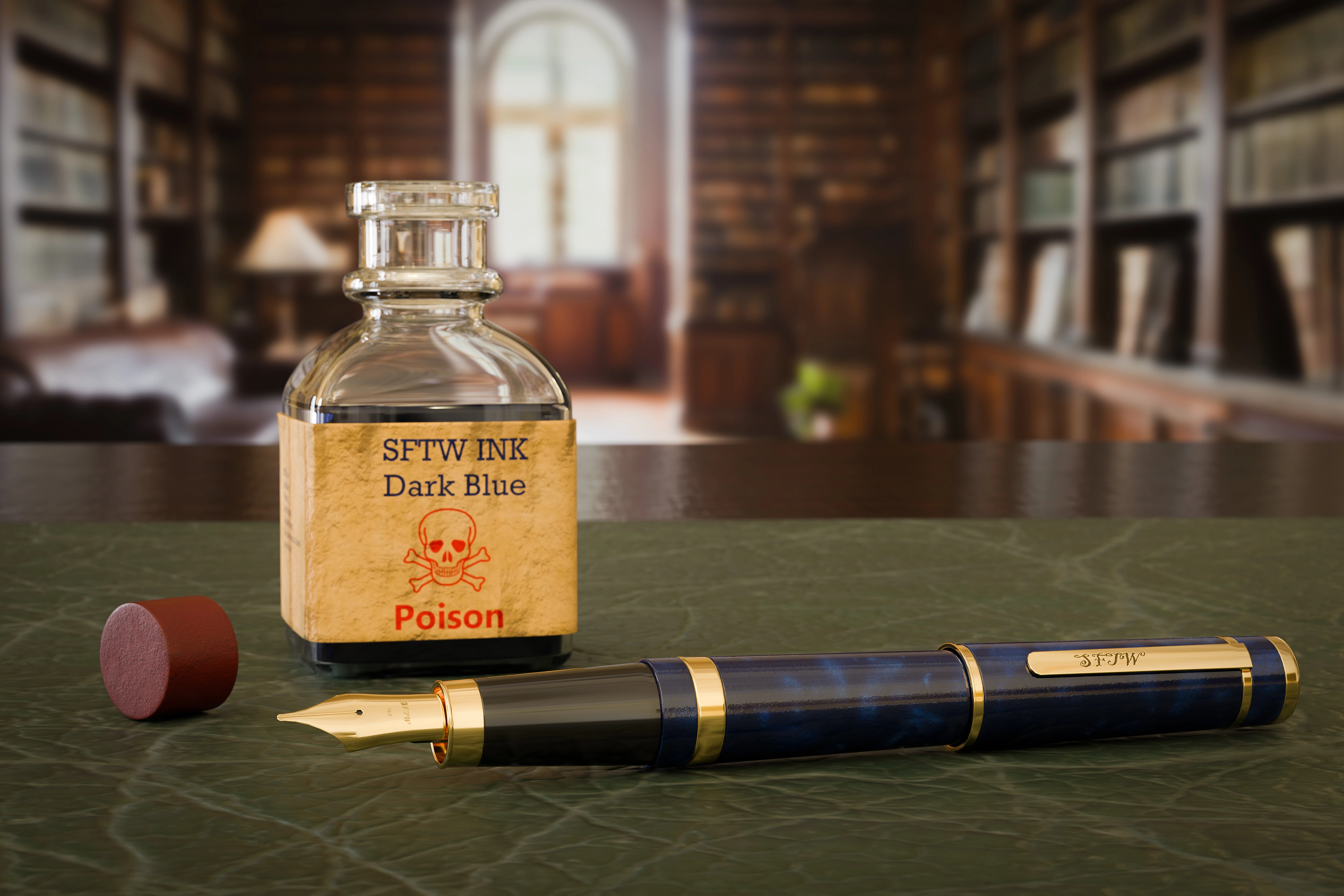
This week something a bit different. I heard the phrase 'Poison Pen' in a TV drama recently and my thoughts arrived at the image below. Made in 3D, the objects on the 'desk' are from Substance 3D assets, which I textured, along with the desk, in Substance Painter.  The background was AI generated in Photoshop, using Firefly, and blurred to match the image before taking into Blender prior to rendering. Finishing was in Photoshop.
 
So we have our starter image, what will you do with it? You could use any or all of the objects, or make something using the entire scene. 

When you post your response can you add just a few words on how you went about it. It may help others see the potential of different approaches, software, and tools to such a challenge.

The “rules”:

  • Use the starter image as at least part of your own image entry.
  • Anything goes, as long as it meets the forum rules on decency, copyright, etc.
  • Anyone, and everyone, is welcome to have a go, whether you are a complete beginner or a Photoshop expert. This is not just for our forum “regulars”.
  • The challenge is not limited to Photoshop. Any Adobe software can be used. 
  • There are no prizes apart from the chance to practice, show off your skills, or bring a bit of humor and fun. Don't be shy, join in and have a go!
  • The starter image is made available for you to use in this forum challenge only.


To download the starter image, hover over the image and click on the circle with the arrows at the top right. Then, when the image opens in its own window, right click and choose “Save Image As/Save Target As” (or similar depending on your browser).


When posting back your image — please use the blue reply button in this first post and use the 'Insert Photos' icon at the top of the reply box. If posting a comment on someone else’s entry, then please use the grey reply button next to their image post.


Have fun!


Dave

返信数 37

AlanGilbertson
Community Expert
Community Expert
September 21, 2025

I had some composites left over from the detective story challenge, and since this is in same general ballpark, I put them to use! The first is a multiple composite with GenFill and GenExpand from the original figure generated by Imagen 4. I've added a couple of bits to the original: the book title and the deceased person.

This detective (or psychopath, depending on what  you think is going on here) was from Firefly 4. Victim added with Gemini 2.5 Flash using Rob de Winter's awesome script, then blurred to match. Book title, like the previous one, is a smart object.

Trevor.Dennis
Community Expert
Community Expert
September 21, 2025

Nicely done Alan. I am going believe that the man with his head on the table is just sleeping. 🙂


A wee tip for getting the perspective right in this sort of situation.

Make the text a smart object and open in a new window.

Expand the canvas (I just use Crop and drag)

Create a temporary layer and add a stroke that aproximates the book cover, and trim the window.

Save and go back to the image, and Ctrl drag your corners to match the outline.

Go back to the edit window and turn off the temporary layer.

I also used a temporary curves layer so we could better see the book outline.


AlanGilbertson
Community Expert
Community Expert
September 22, 2025

I have plenty of ways to handle perspective; what I don't have is a lot of time. In the first composite, the idea was to avoid making the cover and title stand out. The text is in Linear Dodge blend mode at 40% opacity. I enjoy dropping in a few Easter eggs.

Jacob Bugge
Community Expert
Community Expert
September 20, 2025


Click to get closer, Click again to get closer still

Trevor.Dennis
Community Expert
Community Expert
September 20, 2025

Woah there Jacob.  Mixing fonts is like crossing the streams with a ghost catcher, or allowing antimatter chop sticks to touch.  You just don't do it!


Jacob Bugge
Community Expert
Community Expert
September 20, 2025

I am still trying to grasp the hidden meaning of Mixing fonts here, Trevor.


lambiloon
Community Expert
Community Expert
September 20, 2025

Ali Sajjad / Graphic Design Trainer / Freelancer / Adobe Certified Professional
Trevor.Dennis
Community Expert
Community Expert
September 20, 2025

I love the red ink. Not that Adobe would have a use for red ink.  I'm thinking there should be a pair of Adobe cuff links (never mind that no one wears them nowadays) and a belt buckle to go with the Adobe pen. 

Trevor.Dennis
Community Expert
Community Expert
September 20, 2025

I couldn't get this under the forums 10Gb max file size limit, so I had to upload as a video. 

The only Ai was Generative Expand to stretch the background to 16:9.  The parachutes and background (with the water pump but not the tree, are Adobe (free) stock. There's a surprising amount of decent free stuff.  I came across a Adobe free stock tab in Photoshop when doing this, but of course I can't find it now. 😞    I use SketchFab a lot as you can ointate the models to match your perspective and screengrab them.  It helps to have a 4K screem to get the pixels.


[EDIT] Video replaced after wondering why it was only 720P and finding that I had Photoshop set to render out to SD (duh!)

War Unicorn
Community Expert
Community Expert
September 21, 2025

There's a "Free" tab under the Creative Cloud Desktop app; contains a variety of free assets but I'm not sure if the same assets are available in Photoshop. (There are also free templates under the New Document dialog.)


EDITED TO ADD: The "Free" tab is under the "Stock & Marketplace" module, bottom left.

Trevor.Dennis
Community Expert
Community Expert
September 21, 2025

Really useful James.  Thanks.  It's interesting comparing the free assets with those that say 'Available with trial'. As in 'not free'.  The free assets are at the top of the page and invite you to Download if you hover the cursor over them.  


@davescm  how do we use the 3D assets?  There are plenty of free 3D assets, but you can't orientate them on the webpage.  I'm guessing we have to use one of the Substance apps?

J E L
Community Expert
Community Expert
September 19, 2025

davescm
Community Expert
davescmCommunity Expert作成者
Community Expert
September 20, 2025

Very clever JEL. The bottle fits in well in that scene. Straight back to the 60s.

Dave

J E L
Community Expert
Community Expert
September 22, 2025

Thanks, Dave. I recently had a lively discussion on who has been the best Bond. For me, it's Roger Moore. Thoughts?

daniellei4510
Community Expert
Community Expert
September 18, 2025

Oops.


Adobe Community Expert | If you can't fix it, hide it; if you can't hide it, delete it.
Community Expert
September 18, 2025

The effects of the water are magnificent. I love the work on the reflections.

EuanWilliamson
Community Expert
Community Expert
September 18, 2025

Best regards, Euan.
davescm
Community Expert
davescmCommunity Expert作成者
Community Expert
September 18, 2025

A clever interpretation, Alan. It looks like Alice already did...

Dave

Kevin Stohlmeyer
Community Expert
Community Expert
September 18, 2025

davescm
Community Expert
davescmCommunity Expert作成者
Community Expert
September 18, 2025

It looks more sinister now - nicely done. 🙂

Dave

Community Expert
September 18, 2025

Not a perfume creator but a poison creator!


davescm
Community Expert
davescmCommunity Expert作成者
Community Expert
September 18, 2025

I believe, Dior make such a perfume. This one though is real!

Dave

Community Expert
September 18, 2025

Thank you Dave, hehe, yes, that's the point!

Trevor.Dennis
Community Expert
Community Expert
September 16, 2025

davescm
Community Expert
davescmCommunity Expert作成者
Community Expert
September 16, 2025

Haha, I love the hook pushing the bottle at the end 🙂
Dave