


New Participant
August 9, 2020
Question

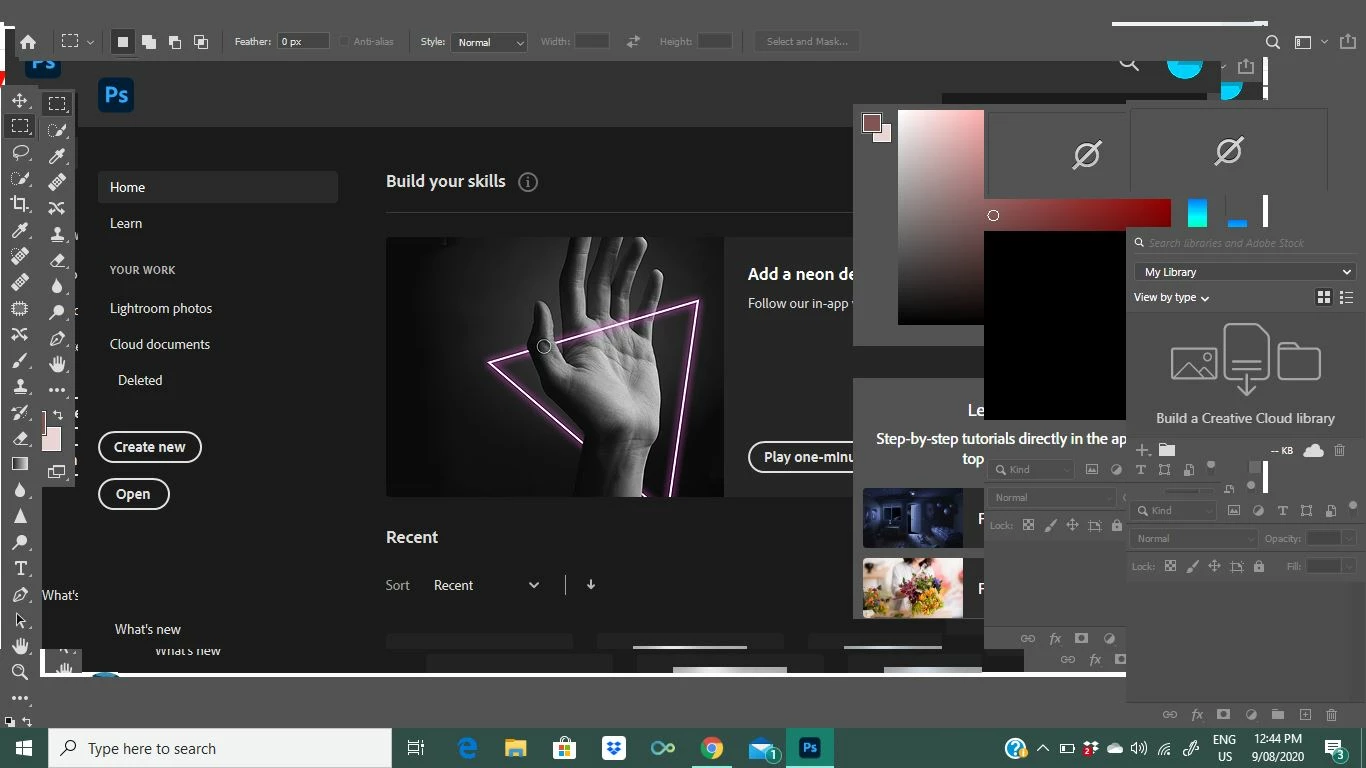
Tool bars and drop down menus missing

  • August 9, 2020
  • 2 replies
  • 2792 views

I updated photoshop and now my screen looks like this! No drop down menus at the top and I cant click between images.. I have tried Widnows > workspace > essentials > resest essentials and it didnt work! There is also no exit, minize buttons in top right corner either.. and everything looks like its piled on top of each other?? 
This topic has been closed for replies.

2 replies

JJMack
Braniac
August 9, 2020

Try resetting your workspace. It look like your tool bar and tool Option bar are undocked.  The tool option bar is covering Photoshop menu top bar The home screen is being displayed. There are floating Palette windows.  Clean up your workspace!!!


JJMack
New Participant
August 9, 2020

thankyou for your reply. I tried resetting the workspace and it did nothing unforutanately. 

Michael Bullo
Participating Frequently
August 9, 2020

Try resetting the Photoshop Preferences.


Press and hold Alt+Control+Shift (Windows) or Option+Command+Shift (Mac OS) as you start Photoshop. You are prompted to delete the current settings. The new preferences files are created the next time you start Photoshop.


https://helpx.adobe.com/au/photoshop/using/preferences.html

New Participant
August 9, 2020

Thankyou. I jsut tried your suggestion but it didn't work. I can faintly see the exit and minimize in the top right corner now but nothing else has changed. 


Any other suggestions? 

Michael Bullo
Participating Frequently
August 9, 2020

Have you tried uninstalling and then reinstalling Photoshop from the Creative Cloud app?