

Participant
April 18, 2019
解決済み

Unable to use Stamp Visible [2019]

  • April 18, 2019
  • 返信数 3.
  • 3040 ビュー

I've "upgraded" to Photoshop 2019 and can no longer use "Command Option Shift E" to copy all layers in to one. I also noticed there is no "Stamp Visible" in the menu anywhere. Any ideas?

このトピックへの返信は締め切られました。
解決に役立った回答 davidn57180314

JJMack  wrote

That is not stamp visible layers thay is merge visible layers.

If you hold the ALT/Option key, click on Layer > Merge Visible while still holding the ALT/Option key it will stamp visible layers
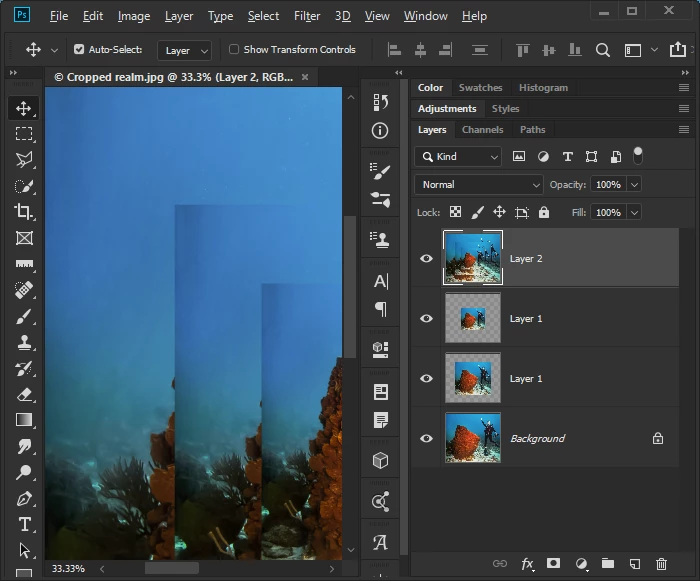

Thank you for all the responses!

Apparently my teenage son used my computer for gaming and changed some of my key commands. Grrr ...

All is well!

返信数 3

JJMack
Community Expert
Community Expert
April 18, 2019

If the current targeted layer visibility is off the stamp visible shortcut will do nothing.  Try using two shortcut like I do in action.

Ctrl+Alt+Shift+N+E Actually its two shortcuts

Ctrl+Alt+Shift+N Add new visible empty layer and be the target without a layer name prompt.

Ctrl+Alt+Shift+E Stamp visible layers into the new empty layer.

Those two were required in the past then Adobe  changed the operation made the add new layer optional.  However for some reason if the current target layer is not visible the shortcut does not function.  Ctrl+Alt+Shift+N insures the current layer is visible and empty and will be stamped into.

In this case Photoshop is compatible with its past operation. The two step still works a second empty layer is not created automatically and stamped into.

JJMack
c.pfaffenbichler
Community Expert
Community Expert
April 18, 2019

Could you please post a screenshot with the pertinent Panels (Layers, Channels, Options Bar, …) and the menu visible?

April 18, 2019

Hi

It's working fine for me on Windows, have you checked Layer > Merge Visible you can use that while holding the option key

also resetting Photoshop preferences

JJMack
Community Expert
Community Expert
April 18, 2019

That is not stamp visible layers thay is merge visible layers.

JJMack
April 18, 2019

JJMack  wrote

That is not stamp visible layers thay is merge visible layers.

If you hold the ALT/Option key, click on Layer > Merge Visible while still holding the ALT/Option key it will stamp visible layers